EasyManua.ls Logo

Samsung BD-C5900 - Playing Audio CD or MP3

Samsung BD-C5900
85 pages
Print Icon
To Next Page IconTo Next Page
To Previous Page IconTo Previous Page
Loading...
0
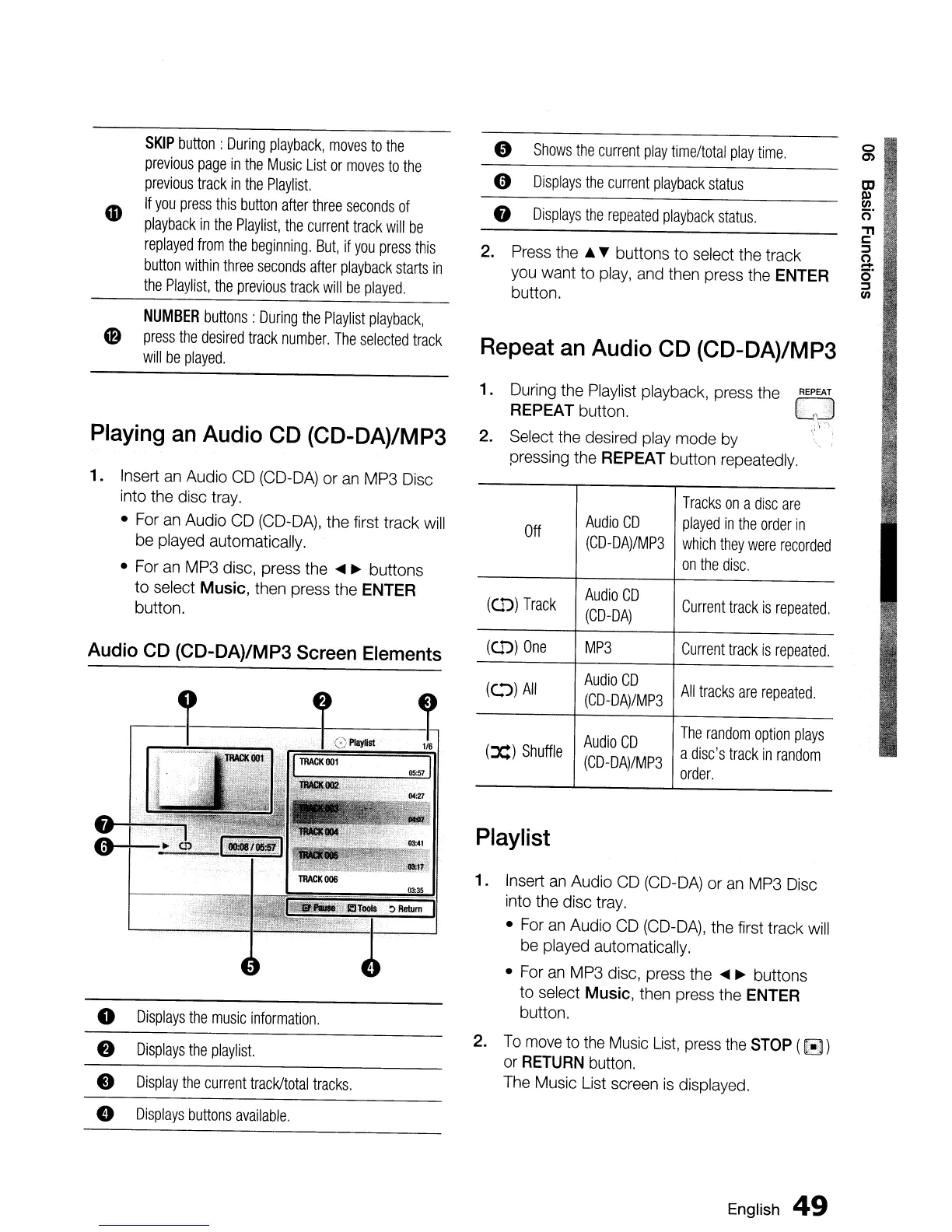
Displays
the
music
information.
f)
2.
Displays
the
playlist.
e
Display
the
current
track/total
tracks.
e
Displays
buttons
available.
SKIP
button
:
During
playback,
moves
to
the
previous
page
in
the
Music
List
or
moves
to
the
previous
track
in
the
Playlist.
If
you
press
this
button
after
three
seconds
of
playback
in
the
Playlist,
the
current
track
will
be
replayed
from
the
beginning.
But,
if
you
press
this
button
within
three
seconds
after
playback
starts
in
the
Playlist,
the
previous
track
will
be
played.
NUMBER
buttons:
During
the
Playlist
playback,
Cf)
press
the
desired
track
number.
The
selected
track
will
be
played.
Playing
an
Audio CD (CD-DA)/MP3
1.
Insert
an
Audio
CD
(CD-DA)
or
an
MP3
Disc
into
the
disc
tray.
•
For
an
Audio
CD
(CD-DA),
the first track
will
be
played
automatically.
•
For
an
MP3
disc, press
the
....
~
buttons
to select Music,
then
press the
ENTER
button.
Audio
CD
(CD-DA)/MP3 Screen Elements
.------I------~L-
03:35
~
Return
9
Shows
the
current
play
time/total
play
time.
0
0)
0
Displays
the
current
playback
status
OJ
Q)
VI
8
Displays
the
repeated
playback
status.
o'
"
c
2.
Press
the
...
~
buttons to select
the
track
::s
"
-
you
want to
play,
and
then
press
the
ENTER
o'
::s
button.
VI
Repeat an Audio CD (CD-DA)/MP3
1.
During
the
Playlist
playback,
press
the
eJ
REPEAT
button.
;'
f\
~.
,;
v
~1
2. Select
the
desired
play
mode
by"
:
pressing
the
REPEAT
button
repeatedly.
T
racks
on
a
disc
are
Off
Audio
CD
played
in
the
order
in
(CD-DA)/MP3
which
they
were
recorded
on
the
disc.
(
Col"»)
Track
Audio
CD
Current
track
is
repeated.
(CD-DA)
(Col"»)
One
MP3
Current
track
is
repeated.
(c.."»)
All
Audio
CD
All
tracks
are
repeated.
(CD-DA)/MP3
Audio
CD
The
random
option
plays
(:x:)
Shuffle
(CD-DA)/MP3
a
disc's
track
in
random
order.
Playlist
1.
Insert
an
Audio
CD
(CD-DA)
or
an
MP3
Disc
into
the
disc
tray.
•
For
an
Audio
CD
(CD-DA),
the
first track
will
be
played
automatically.
•
For
an
MP3
disc,
press
the
....
~
buttons
to select
Music,
then
press
the
ENTER
button.
To
move
to
the
Music
List,
press
the
STOP
(8)
or
RETURN
button.
The
Music
List
screen
is
displayed.
English
49

Table of Contents