Setup
Digital
Output
Selection
Setup
PCM
Dolby
Digital
Dolby
Digital
Plus
Up
to
7.1
ch
PCM
2ch
DTS
re-encoded
PCM PCM
2ch
Up
to
5,1
ch
PCM
2ch
DTS
re-encoded
Dolby
Digital
Dolby
Digital
Dolby
Digital
Dolby
Digital
Plus
Definition
for
Blu-ray
Disc
Any
Decodes
main
feature
audio
and
BONUSVIEW
audio
stream
together
into
PCM
audio
and
add
Navigation
Sound
Effects,
Decodes
main
feature
audio
and
BONUSVIEW
audio
stream
together
into
PCM
audio
and
add
Navigation
Sound
Effects,
then
re-encodes
the
PCM
audio
into
DTS
bitstream.
Outputs
only
main
feature
audio
stream
so
that
your
AV
receiver
can
decode
the
audio
bitstream.
You
will
not
hear
BONUSVIEW
audio
and
Navigation
Sound
Effects,
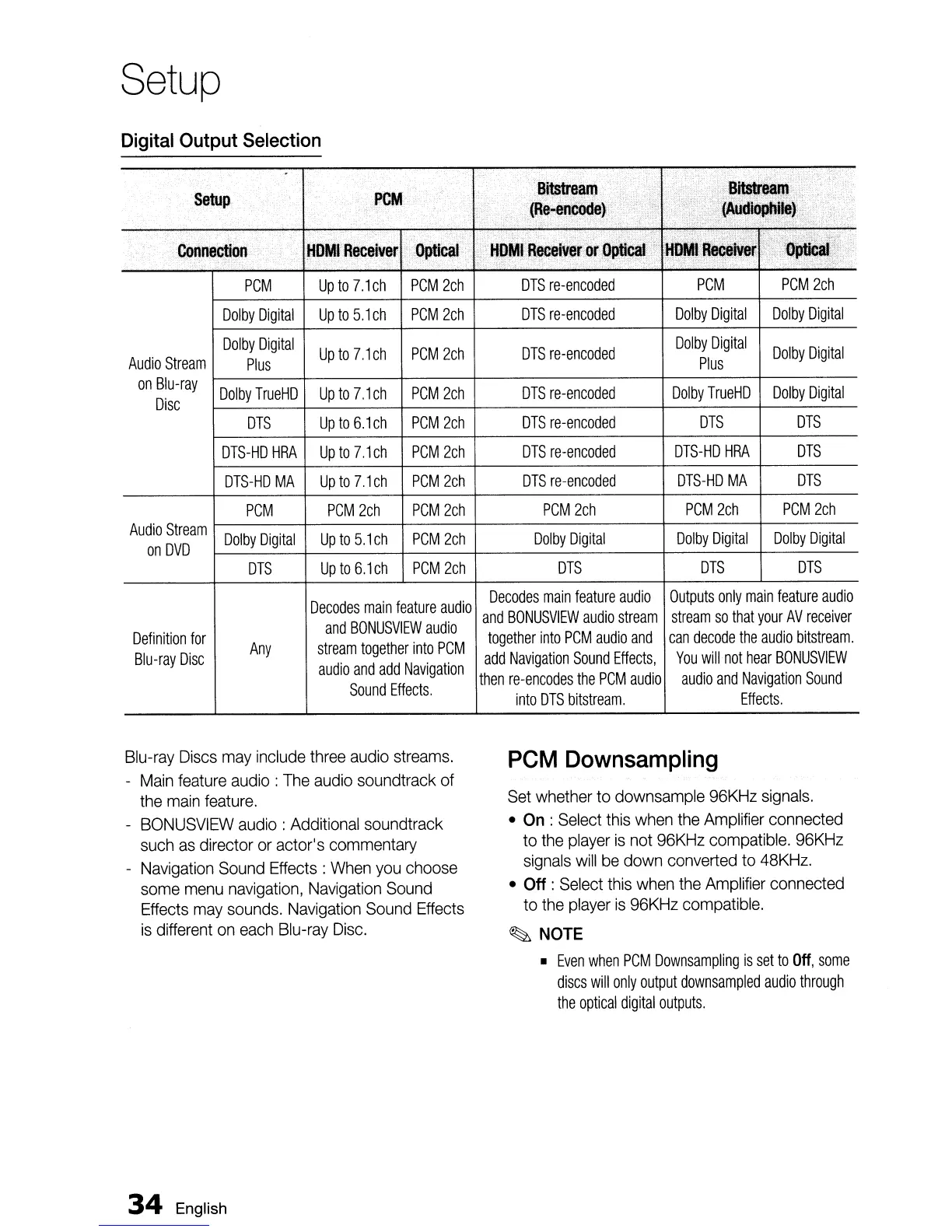
Blu-ray Discs
may
include three audio streams.
-
Main
feature audio:
The
audio soundtrack of
the
main
feature.
-
BONUSVIEW
audio: Additional soundtrack
such
as
director
or
actor's commentary
- Navigation Sound Effects:
When
you
choose
some
menu
navigation, Navigation Sound
Effects
may
sounds. Navigation Sound Effects
is
different
on
each
Blu-ray
Disc.
34
English
PCM
Downsampling
Set
whether to downsample 96KHz
signals.
•
On
: Select this when the Amplifier connected
to the player
is
not 96KHz compatible. 96KHz
signals
will
be
down converted to 48KHz.
•
Off
: Select this when the Amplifier connected
to the player
is
96KHz compatible.
~
NOTE
•
Even
when
PCM
Downsampling
is
set
to
Off,
some
discs
will
only
output
downsampled
audio
through
the
optical
digital
outputs.


 To Next Page