EasyManua.ls Logo

Samsung BD-E5700 - Playing Discs and Starting Smart Hub; How to Play a Video Disc; First-Time Smart Hub Setup and Launch

Samsung BD-E5700
89 pages
Print Icon
To Next Page IconTo Next Page
To Previous Page IconTo Previous Page
Loading...
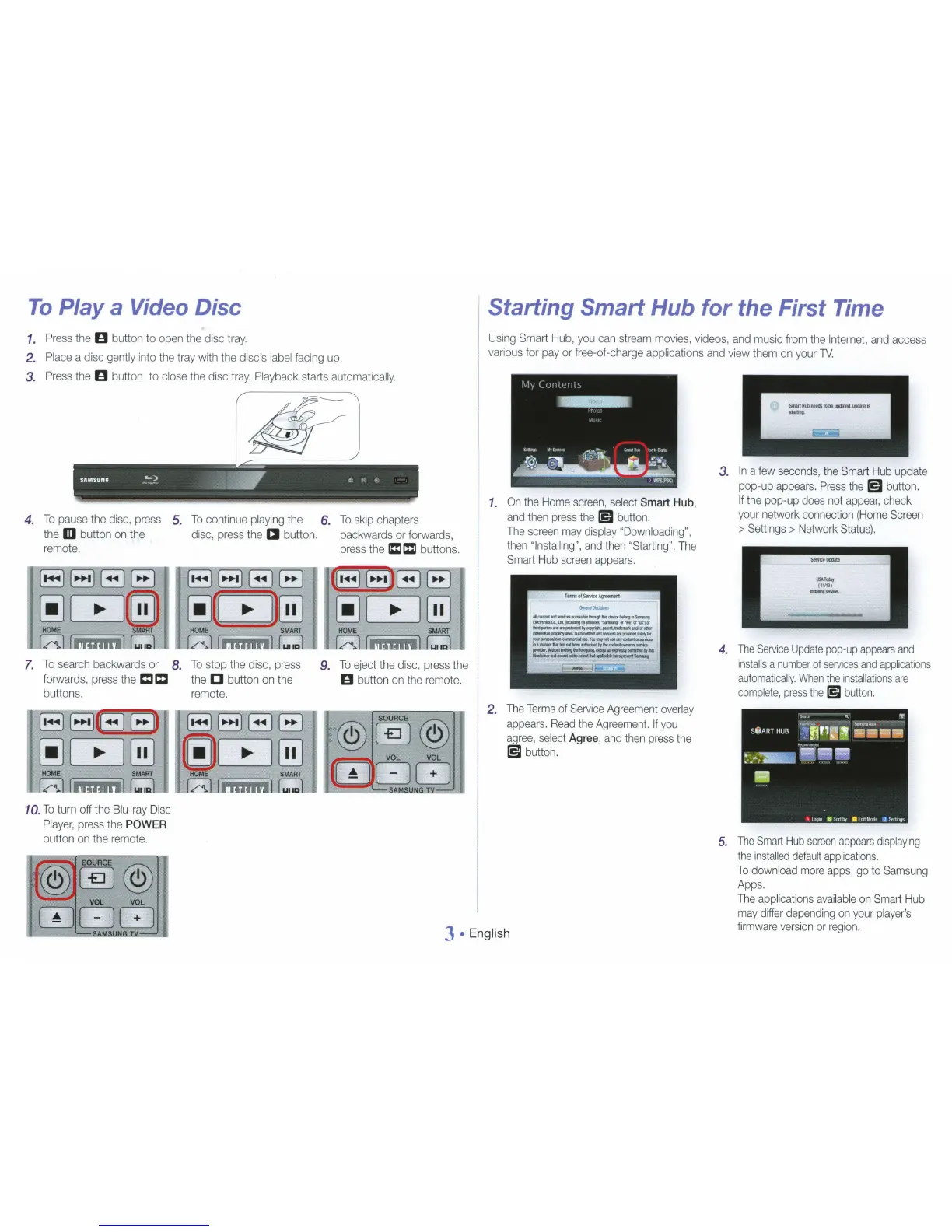
To
Play
a
Video Disc
1.
Press
the
0
button
to
open
the disc tray.
2.
Place
a disc
gently
into
the
tray
with
the
disc's
label
facing
up.
3.
Press
the
0
button to
close
the
disc
tray.
Playback
starts
automatically.
4.
To
pause
the
disc,
press
the
m
button
on
the
remote
.
7.
To
search
backwards or
forwards,
press
the
Cl C
buttons.
10.
To
turn off
the
Blu-ray
Disc
Player,
press
the
POWER
button
on
the
remote.
5.
8.
To
continue
playing
the
disc,
press
the
a
button.
1
•~
11
...
11
~
11
'*
1
~
[
~
~
@]
HOME
SMART
To
stop
the
disc,
press
the
[]
button
on
the
remote
.
6.
To
skip
chapters
backwards or
forwards,
press
the
ICI
c:l
buttons.
9.
To
eject
the disc,
press
the
0
button
on
the
remote.
@
@J@)
VOL VOL
(f
~
DGJ
~
"AM.SUH.f'
TV
.
I
Starting
Smart
Hub
for
the
First Time
Using
Smart
Hub,
you
can
stream
movies,
videos,
and
music
from
the
Internet
,
and
access
,
various
for
pay
or free-of-charge applications
and
view
them
on
your
TV.
1.
On
the
Home
screen,
select
Smart
Hub
,
and
then
press
the
[5I
button.
The
screen
may
display
"Downloading",
then
"Installing",
and
then
"Starting".
The
Smart
Hub
screen
appears
.
2.
The
Terms
of
Serv
i
ce
Agreement
overlay
appears.
Read
the
Agreement.
If
you
agree
,
select
Agree
,
and
then
press
the
(5I
button.
3.
In
a
few
seconds,
the
Smart
Hub
update
pop-up
appears.
Press
the
[5I
button.
If
the
pop-up
does
not
appear,
check
your
network
connection
(Home
Screen
>
Settings
>
Network
Status).
USA!
...
(11113)
---
4.
The
Service
Update
pop-up
appears
and
installs
a
number
of
services
and
applications
automatically.
When
the
installations
are
complete,
press
the
(5I
button
.
,....
s_...~
Sfi!ART
HUB
·~
f1 F1
11
•eaa
~
'"'cr,._.,..·
~
·
....
~!'1!!!!1
A
L
~
IIS.rt
by
.
Ed
rtf.l
od!!
0
Se
H
1111J5
5.
The
Smart
Hub
screen
appears
displaying
the
installed
default
app
l
ications.
To
down
l
oad
mo
re
apps,
go
to
Sams
u
ng
Apps.
3
English
The
applications
avai
l
able
on
Smart
Hub
may
differ
depending
on
your
player's
firmware
version
or
region.

Other manuals for Samsung BD-E5700

Related product manuals