32
SETTING
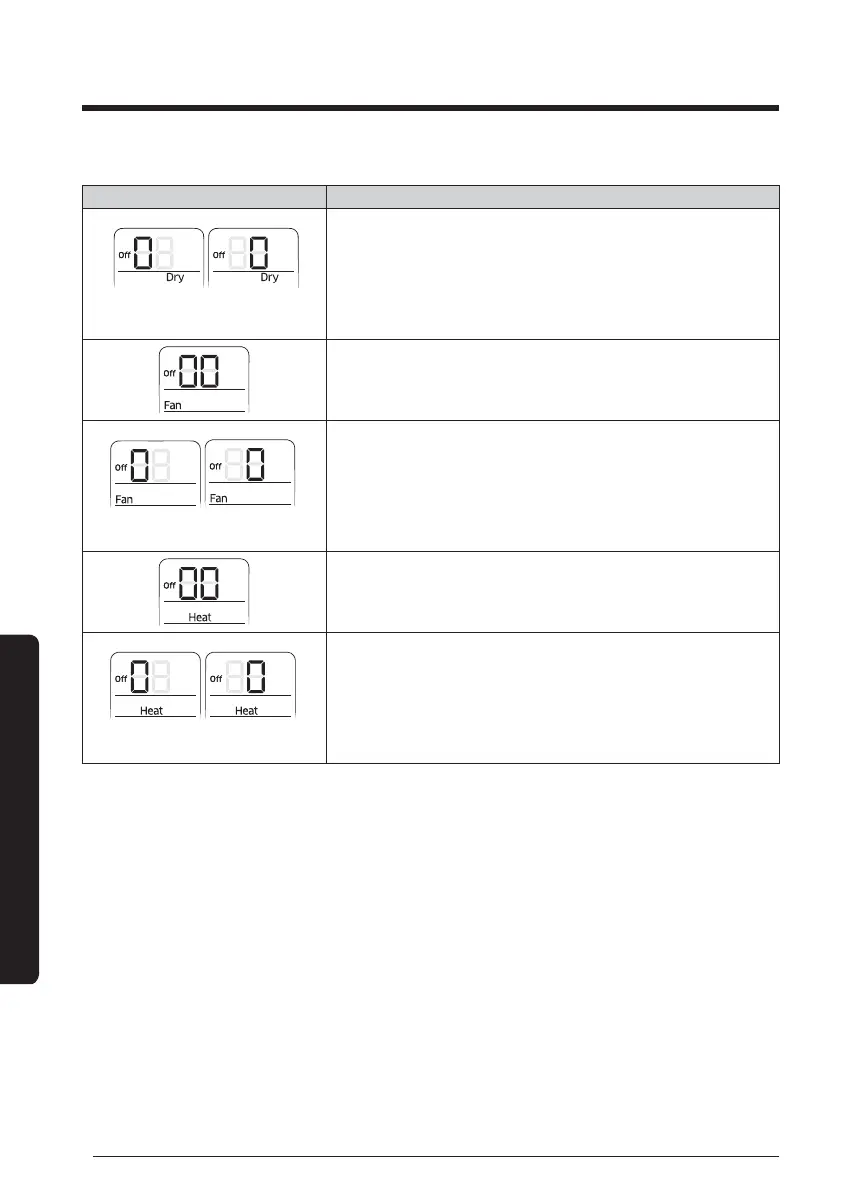
Status Setting an option
SEG18 SEG20
15 Setting SEG18, SEG20 option
Press [Fan
∨
] button to enter SEG18 value.
Press [Fan
∧
] button to enter SEG20 value.
Each time you press the button, [SEG image] will be
selected in rotation.
16 Setting Fan mode
Press [Mode] button to change to Fan mode in the Off
status.
SEG21 SEG22
17 Setting SEG21, SEG22 option
Press [Fan
∨
] button to enter SEG21 value.
Press [Fan
∧
] button to enter SEG22 value.
Each time you press the button, [SEG image] will be
selected in rotation.
18 Setting Heat mode
Press [Mode] button to change to Heat mode in the Off
status.
SEG23 SEG24
19 Setting SEG23, SEG24 option
Press [Fan
∨
] button to enter SEG23 value.
Press [Fan
∧
] button to enter SEG24 value.
Each time you press the button, [SEG image] will be
selected in rotation.
Setting address of FCU KIT and installation option





 To Next Page