English-18
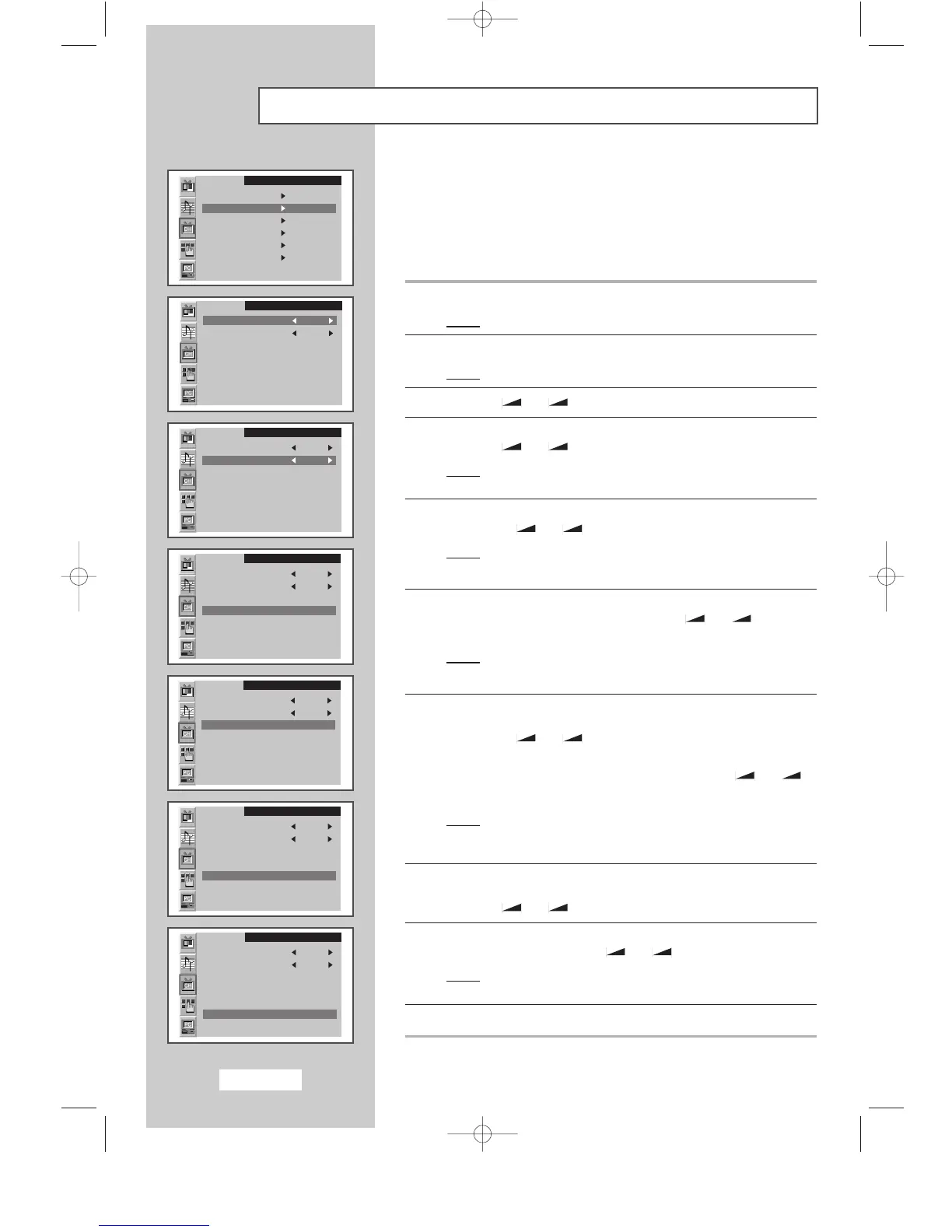
Storing Channels Manually
You can store up to 100 channels, including those received via cable
networks. When storing channels manually, you can choose:
◆
Whether or not to store each of the channels found
◆
The programme number of each stored channel which
you wish to identify
1 Press the MENU button.
Result
:
The main menu is displayed.
2 Press the P▼ or P▲ button to select the Channel.
Result
:
The options available in the
Channel
group are displayed.
3 Press the
-
or + button
.
4 Press the P▼ or P▲ button
to
select the Manual store
.
Press the
-
or + button.
Result
:
The options available in the
Manual store
group are
displayed with the
Colour system
is selected.
5 If necessary, indicate the broadcasting standard required by
pressing the
-
or + button repeatedly.
Result
: The color standards are displayed in the following order:
AUTO
-
PAL
-
SECAM
-
NT4.43
6 Press the P▼ or P▲ button to select the Sound system. Indicate
the sound standard required by pressing the
-
or + button
repeatedly.
Result
: The sound standards are displayed in the following order:
BG
-
DK
-
I
-
L
7 If you know the channel number to be stored, press the P▼ or P▲
button to select the Channel. Indicate the required number by
pressing the
-
or + button.
If you do not know the channel numbers, press the
P▼ or P▲ button
to select the
Search. Start the search by pressing the
-
or +
button.
Result
: The tuner scans the frequency range until the first
channel or the channel that you selected is received on
your screen.
8 To assign a programme number to a channel, select the Program
by pressing the P▼ or P▲ button.
Press the
-
or + button to find the correct number.
9 Press the P▼ or P▲ button to select the Store
.
Select the OK by pressing the
-
or + button
.
Result: The channel and associated programme number are
stored.
10 Repeat Steps 7 to 9 for each channel to be stored.
SLEEP DUAL I/II LIST/FLOF CANCEL
P.SIZE PIP
ON
TTX/MIX AUTO
PRE-CH
EXITMUTE
TV/VIDEO PC DISPLAY STILL
P.STD S.STD
Power
LOCATE
-/--
SIZE
SUBPAGE
SLEEP DUAL I/II LIST/FLOF CANCEL
P.SIZE PIP
ON
TTX/MIX AUTO
PRE-CH
EXITMUTE
TV/VIDEO PC DISPLAY STILL
P.STD S.STD
Power
LOCATE
-/--
SIZE
SUBPAGE
SLEEP DUAL I/II LIST/FLOF CANCEL
P.SIZE PIP
ON
TTX/MIX AUTO
PRE-CH
EXITMUTE
TV/VIDEO PC DISPLAY STILL
P.STD S.STD
Power
LOCATE
-/--
SIZE
SUBPAGE
SLEEP DUAL I/II LIST/FLOF CANCEL
P.SIZE PIP
ON
TTX/MIX AUTO
PRE-CH
EXITMUTE
TV/VIDEO PC DISPLAY STILL
P.STD S.STD
Power
LOCATE
-/--
SIZE
SUBPAGE
SLEEP DUAL I/II LIST/FLOF CANCEL
P.SIZE PIP
ON
TTX/MIX AUTO
PRE-CH
EXITMUTE
TV/VIDEO PC DISPLAY STILL
P.STD S.STD
Power
LOCATE
-/--
SIZE
SUBPAGE
SLEEP DUAL I/II LIST/FLOF CANCEL
P.SIZE PIP
ON
TTX/MIX AUTO
PRE-CH
EXITMUTE
TV/VIDEO PC DISPLAY STILL
P.STD S.STD
Power
LOCATE
-/--
SIZE
SUBPAGE
SLEEP DUAL I/II LIST/FLOF CANCEL
P.SIZE PIP
ON
TTX/MIX AUTO
PRE-CH
EXITMUTE
TV/VIDEO PC DISPLAY STILL
P.STD S.STD
Power
LOCATE
-/--
SIZE
SUBPAGE
SLEEP DUAL I/II LIST/FLOF CANCEL
P.SIZE PIP
ON
TTX/MIX AUTO
PRE-CH
EXITMUTE
TV/VIDEO PC DISPLAY STILL
P.STD S.STD
Power
LOCATE
-/--
SIZE
SUBPAGE
SLEEP DUAL I/II LIST/FLOF CANCEL
P.SIZE PIP
ON
TTX/MIX AUTO
PRE-CH
EXITMUTE
TV/VIDEO PC DISPLAY STILL
P.STD S.STD
Power
LOCATE
-/--
SIZE
SUBPAGE
SLEEP DUAL I/II LIST/FLOF CANCEL
P.SIZE PIP
ON
TTX/MIX AUTO
PRE-CH
EXITMUTE
TV/VIDEO PC DISPLAY STILL
P.STD S.STD
Power
LOCATE
-/--
SIZE
SUBPAGE
SLEEP DUAL I/II LIST/FLOF CANCEL
P.SIZE PIP
ON
TTX/MIX AUTO
PRE-CH
EXITMUTE
TV/VIDEO PC DISPLAY STILL
P.STD S.STD
Power
LOCATE
-/--
SIZE
SUBPAGE
SLEEP DUAL I/II LIST/FLOF CANCEL
P.SIZE PIP
ON
TTX/MIX AUTO
PRE-CH
EXITMUTE
TV/VIDEO PC DISPLAY STILL
P.STD S.STD
Power
LOCATE
-/--
SIZE
SUBPAGE
SLEEP DUAL I/II LIST/FLOF CANCEL
P.SIZE PIP
ON
TTX/MIX AUTO
PRE-CH
EXITMUTE
TV/VIDEO PC DISPLAY STILL
P.STD S.STD
Power
LOCATE
-/--
SIZE
SUBPAGE
SLEEP DUAL I/II LIST/FLOF CANCEL
P.SIZE PIP
ON
TTX/MIX AUTO
PRE-CH
EXITMUTE
TV/VIDEO PC DISPLAY STILL
P.STD S.STD
Power
LOCATE
-/--
SIZE
SUBPAGE
SLEEP DUAL I/II LIST/FLOF CANCEL
P.SIZE PIP
ON
TTX/MIX AUTO
PRE-CH
EXITMUTE
TV/VIDEO PC DISPLAY STILL
P.STD S.STD
Power
LOCATE
-/--
SIZE
SUBPAGE
SLEEP DUAL I/II LIST/FLOF CANCEL
P.SIZE PIP
ON
TTX/MIX AUTO
PRE-CH
EXITMUTE
TV/VIDEO PC DISPLAY STILL
P.STD S.STD
Power
LOCATE
-/--
SIZE
SUBPAGE
Channel
Auto store
Manual store
Name
Add/Erase
Fine tune
Channel sort
Channel
Colour system AUTO
Sound system BG
Search 471MHz
Channel C4
Program P1
Store ?
Channel
Colour system AUTO
Sound system BG
Search 471MHz
Channel C4
Program P1
Store ?
Channel
Colour system AUTO
Sound system BG
Search 471MHz
Channel C4
Program P1
Store ?
Channel
Colour system AUTO
Sound system BG
Search 471MHz
Channel C4
Program P1
Store ?
Channel
Colour system AUTO
Sound system BG
Search 471MHz
Channel C4
Program P1
Store ?
Channel
Colour system AUTO
Sound system BG
Search 471MHz
Channel C4
Program P1
Store OK
BN68-00438D-02_en 6/11/03 7:11 PM Page 18



 To Next Page