English-22
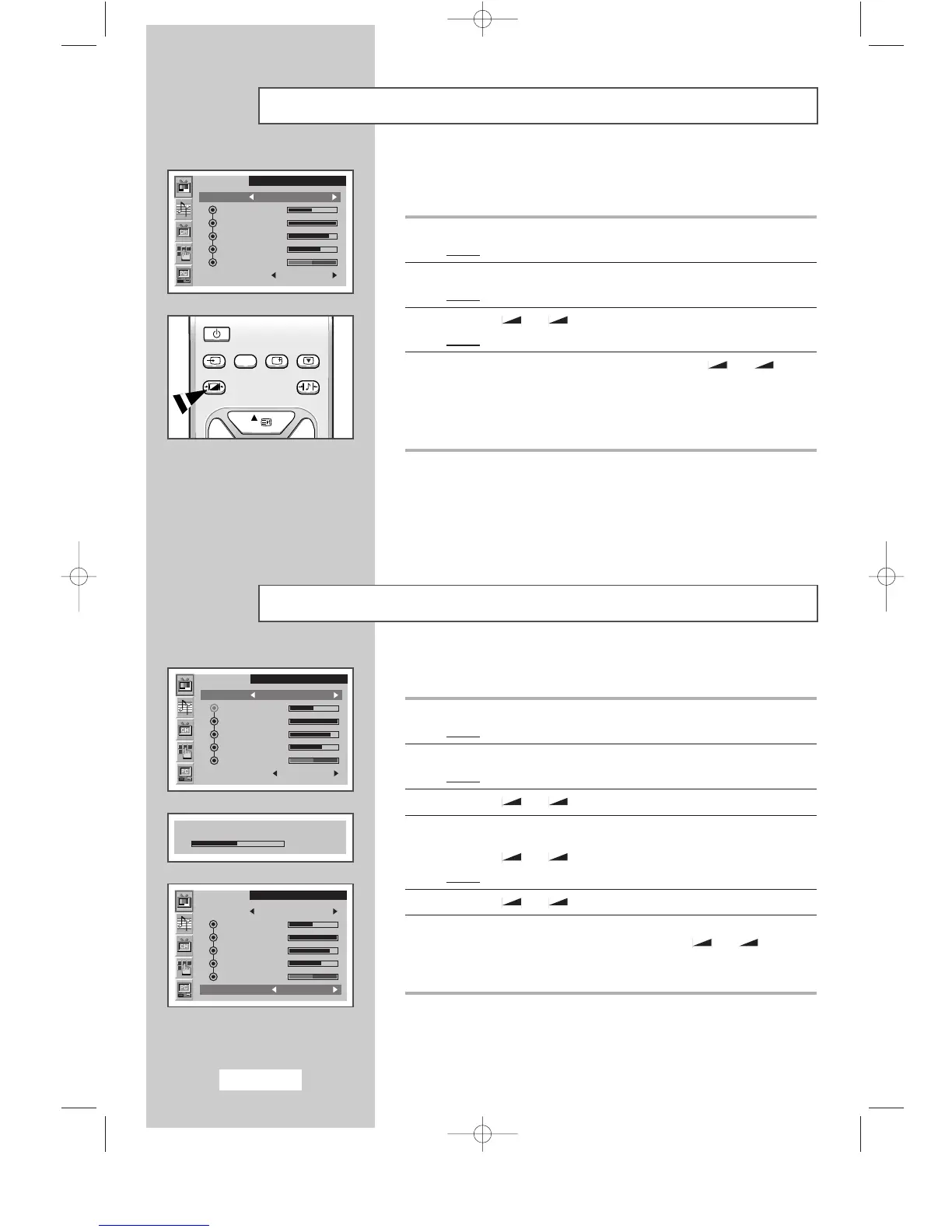
Changing the Picture Standard
You can select the type of picture which best corresponds to your
viewing requirements.
1 Press the MENU button.
Result
:
The main menu is displayed.
2 Press the P▼ or P▲ button to select the Picture.
Result
:
The options available in the
Picture
group are displayed.
3 Press the
-
or + button.
Result
:
The
Mode
is selected.
4 Select the required picture effect by pressing the
-
or +
button repeatedly. The following picture effects are available:
Dynamic
-
Standard
-
Movie
-
Custom.
➣
You can also set these options simply by pressing the
P.STD (Picture Standard) button.
➣
On the Picture menu, if you change the Brightness,
Contrast, Sharpness, Colour or Tint (NTSC only) settings,
the
Custom is selected automatically
.
SLEEP DUAL I/II LIST/FLOF CANCEL
P.SIZE PIP
ON
TTX/MIX AUTO
PRE-CH
EXITMUTE
TV/VIDEO PC DISPLAY STILL
P.STD S.STD
Power
LOCATE
-/--
SIZE
SUBPAGE
SLEEP DUAL I/II LIST/FLOF CANCEL
P.SIZE PIP
ON
TTX/MIX AUTO
PRE-CH
EXITMUTE
TV/VIDEO PC DISPLAY STILL
P.STD S.STD
Power
LOCATE
-/--
SIZE
SUBPAGE
SLEEP DUAL I/II LIST/FLOF CANCEL
P.SIZE PIP
ON
TTX/MIX AUTO
PRE-CH
EXITMUTE
TV/VIDEO PC DISPLAY STILL
P.STD S.STD
Power
LOCATE
-/--
SIZE
SUBPAGE
SLEEP DUAL I/II LIST/FLOF CANCEL
P.SIZE PIP
ON
TTX/MIX AUTO
PRE-CH
EXITMUTE
TV/VIDEO PC DISPLAY STILL
P.STD S.STD
Power
LOCATE
-/--
SIZE
SUBPAGE
Adjusting the Picture Settings
Your set has several settings which allow you to control picture quality.
1 Press the MENU button.
Result
:
The main menu is displayed.
2 Press the P▼ or P▲ button to select the Picture.
Result
:
The options available in the
Picture
group are displayed.
3 Press the
-
or + button.
4 Select the option (Brightness
,
Contrast
,
Sharpness
,
Colour or
Tint) to be adjusted by pressing the P▼ or P▲ button.
Press the
-
or + button.
Result
:
The horizontal bar is displayed.
5 Press the
-
or + button to reach the required setting.
6 Press the P▼ or P▲ button to select the Colour tone.
Select the required option by pressing the the
-
or + button
repeatedly. The following options are available:
Cool 2
-
Cool 1
-
Normal
-
Warm 1
-
Warm 2
➣
If you make any changes to these settings,
the picture standard is automatically switched to
Custom.
SLEEP DUAL I/II LIST/FLOF CANCEL
P.SIZE PIP
ON
TTX/MIX AUTO
PRE-CH
EXITMUTE
TV/VIDEO PC DISPLAY STILL
P.STD S.STD
Power
LOCATE
-/--
SIZE
SUBPAGE
SLEEP DUAL I/II LIST/FLOF CANCEL
P.SIZE PIP
ON
TTX/MIX AUTO
PRE-CH
EXITMUTE
TV/VIDEO PC DISPLAY STILL
P.STD S.STD
Power
LOCATE
-/--
SIZE
SUBPAGE
SLEEP DUAL I/II LIST/FLOF CANCEL
P.SIZE PIP
ON
TTX/MIX AUTO
PRE-CH
EXITMUTE
TV/VIDEO PC DISPLAY STILL
P.STD S.STD
Power
LOCATE
-/--
SIZE
SUBPAGE
SLEEP DUAL I/II LIST/FLOF CANCEL
P.SIZE PIP
ON
TTX/MIX AUTO
PRE-CH
EXITMUTE
TV/VIDEO PC DISPLAY STILL
P.STD S.STD
Power
LOCATE
-/--
SIZE
SUBPAGE
SLEEP DUAL I/II LIST/FLOF CANCEL
P.SIZE PIP
ON
TTX/MIX AUTO
PRE-CH
EXITMUTE
TV/VIDEO PC DISPLAY STILL
P.STD S.STD
Power
LOCATE
-/--
SIZE
SUBPAGE
SLEEP DUAL I/II LIST/FLOF CANCEL
P.SIZE PIP
ON
TTX/MIX AUTO
PRE-CH
EXITMUTE
TV/VIDEO PC DISPLAY STILL
P.STD S.STD
Power
LOCATE
-/--
SIZE
SUBPAGE
SLEEP DUAL I/II LIST/FLOF CANCEL
P.SIZE PIP
ON
TTX/MIX AUTO
PRE-CH
EXITMUTE
TV/VIDEO PC DISPLAY STILL
P.STD S.STD
Power
LOCATE
-/--
SIZE
SUBPAGE
SLEEP DUAL I/II LIST/FLOF CANCEL
P.SIZE PIP
ON
TTX/MIX AUTO
PRE-CH
EXITMUTE
TV/VIDEO PC DISPLAY STILL
P.STD S.STD
Power
LOCATE
-/--
SIZE
SUBPAGE
Picture
Mode Custom
Brightness
Contrast
Sharpness
Colour
Tint
Colour tone Standard
SLEEP DUAL I/II LIST/FLOF CANCEL
P.SIZE PIP
ON
TTX/MIX AUTO
PRE-CH
EXITMUTE
TV/VIDEO PC DISPLAY STILL
P.STD S.STD
Power
Picture
Mode Custom
Brightness
Contrast
Sharpness
Colour
Tint
Colour tone Standard
Brightness
50
Picture
Mode Custom
Brightness
Contrast
Sharpness
Colour
Tint
Colour tone Standard
BN68-00438D-02_en 6/11/03 7:11 PM Page 22



 To Next Page