English-26
Viewing the Picture In Picture (PIP)
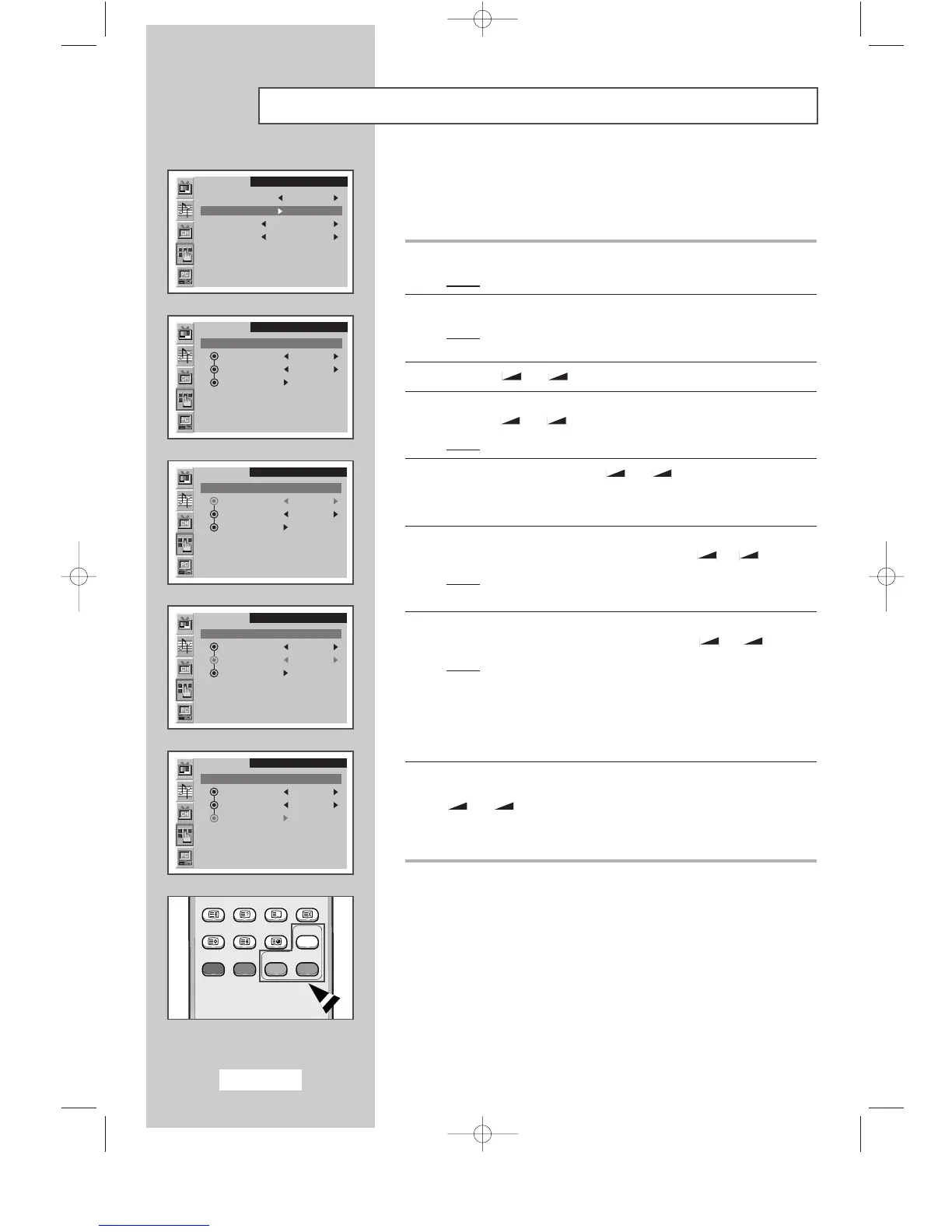
You can display a sub picture within the main picture of PC MODE.
In this way you can watch TV program or external A/V device such as
VCR or DVD (to video_1, video_2, S-video), while watching PC Mode.
1 Press the MENU button.
Result
:
The main menu is displayed.
2 Press the P▼ or P▲ button to select the Function.
Result:
The options available in the
Function
group are
displayed.
3 Press the
-
or + button
.
4 Press the P▼ or P▲ button
to
select the PIP
.
Press the
-
or + button.
Result
:
The options available in the
PIP
group are displayed.
5 Select the On by pressing the
-
or + button
.
➣
You can also activate the PIP simply by pressing the PIP ON
button.
6 Press the P▼ or P▲ button to select the TV/Video.
Select a source of the sub picture by pressing the
- or + button.
Result
: The sources are displayed in the following order:
TV
-
VIDEO1
-
VIDEO2
-
S-VIDEO
7 Press the P▼ or P▲ button to select the Size.
Select a size of the sub picture by pressing the
- or + button.
Result
: The sizes are displayed in the following order:
Small
-
Medium
-
Large
➣
◆ You can also select these options simply by pressing
the
SIZE button.
◆ Not Available in PC mode.
8 Press the P▼ or P▲ button to select the Locate.
Move the sub picture counterclockwise by pressing the
-
or + button.
➣
You can also move the sub picture simply by pressing the
LOCATE button.
SLEEP DUAL I/II LIST/FLOF CANCEL
P.SIZE PIP
ON
TTX/MIX AUTO
PRE-CH
EXITMUTE
TV/VIDEO PC DISPLAY STILL
P.STD S.STD
Power
LOCATE
-/--
SIZE
SUBPAGE
SLEEP DUAL I/II LIST/FLOF CANCEL
P.SIZE PIP
ON
TTX/MIX AUTO
PRE-CH
EXITMUTE
TV/VIDEO PC DISPLAY STILL
P.STD S.STD
Power
LOCATE
-/--
SIZE
SUBPAGE
SLEEP DUAL I/II LIST/FLOF CANCEL
P.SIZE PIP
ON
TTX/MIX AUTO
PRE-CH
EXITMUTE
TV/VIDEO PC DISPLAY STILL
P.STD S.STD
Power
LOCATE
-/--
SIZE
SUBPAGE
SLEEP DUAL I/II LIST/FLOF CANCEL
P.SIZE PIP
ON
TTX/MIX AUTO
PRE-CH
EXITMUTE
TV/VIDEO PC DISPLAY STILL
P.STD S.STD
Power
LOCATE
-/--
SIZE
SUBPAGE
SLEEP DUAL I/II LIST/FLOF CANCEL
P.SIZE PIP
ON
TTX/MIX AUTO
PRE-CH
EXITMUTE
TV/VIDEO PC DISPLAY STILL
P.STD S.STD
Power
LOCATE
-/--
SIZE
SUBPAGE
SLEEP DUAL I/II LIST/FLOF CANCEL
P.SIZE PIP
ON
TTX/MIX AUTO
PRE-CH
EXITMUTE
TV/VIDEO PC DISPLAY STILL
P.STD S.STD
Power
LOCATE
-/--
SIZE
SUBPAGE
SLEEP DUAL I/II LIST/FLOF CANCEL
P.SIZE PIP
ON
TTX/MIX AUTO
PRE-CH
EXITMUTE
TV/VIDEO PC DISPLAY STILL
P.STD S.STD
Power
LOCATE
-/--
SIZE
SUBPAGE
SLEEP DUAL I/II LIST/FLOF CANCEL
P.SIZE PIP
ON
TTX/MIX AUTO
PRE-CH
EXITMUTE
TV/VIDEO PC DISPLAY STILL
P.STD S.STD
Power
LOCATE
-/--
SIZE
SUBPAGE
SLEEP DUAL I/II LIST/FLOF CANCEL
P.SIZE PIP
ON
TTX/MIX AUTO
PRE-CH
EXITMUTE
TV/VIDEO PC DISPLAY STILL
P.STD S.STD
Power
LOCATE
-/--
SIZE
SUBPAGE
SLEEP DUAL I/II LIST/FLOF CANCEL
P.SIZE PIP
ON
TTX/MIX AUTO
PRE-CH
EXITMUTE
TV/VIDEO PC DISPLAY STILL
P.STD S.STD
Power
LOCATE
-/--
SIZE
SUBPAGE
SLEEP DUAL I/II LIST/FLOF CANCEL
P.SIZE PIP
ON
TTX/MIX AUTO
PRE-CH
EXITMUTE
TV/VIDEO PC DISPLAY STILL
P.STD S.STD
Power
LOCATE
-/--
SIZE
SUBPAGE
SLEEP DUAL I/II LIST/FLOF CANCEL
P.SIZE PIP
ON
TTX/MIX AUTO
PRE-CH
EXITMUTE
TV/VIDEO PC DISPLAY STILL
P.STD S.STD
Power
LOCATE
-/--
SIZE
SUBPAGE
Function
Sleep timer Off
PIP
Size Normal
Language English
Function
PIP : On
TV/Video TV
Size Small
Locate
Function
PIP : On
TV/Video TV
Size Small
Locate
Function
PIP : On
TV/Video TV
Size Small
Locate
Function
PIP : On
TV/Video TV
Size Small
Locate
SLEEP DUAL I/II LIST/FLOF CANCEL
P.SIZE PIP
ON
TTX/MIX AUTO
PRE-CH
EXITMUTE
TV/VIDEO PC DISPLAY STILL
P.STD S.STD
Power
BN68-00438D-03eng 8/18/03 2:47 PM Page 26



 To Next Page