28
playback
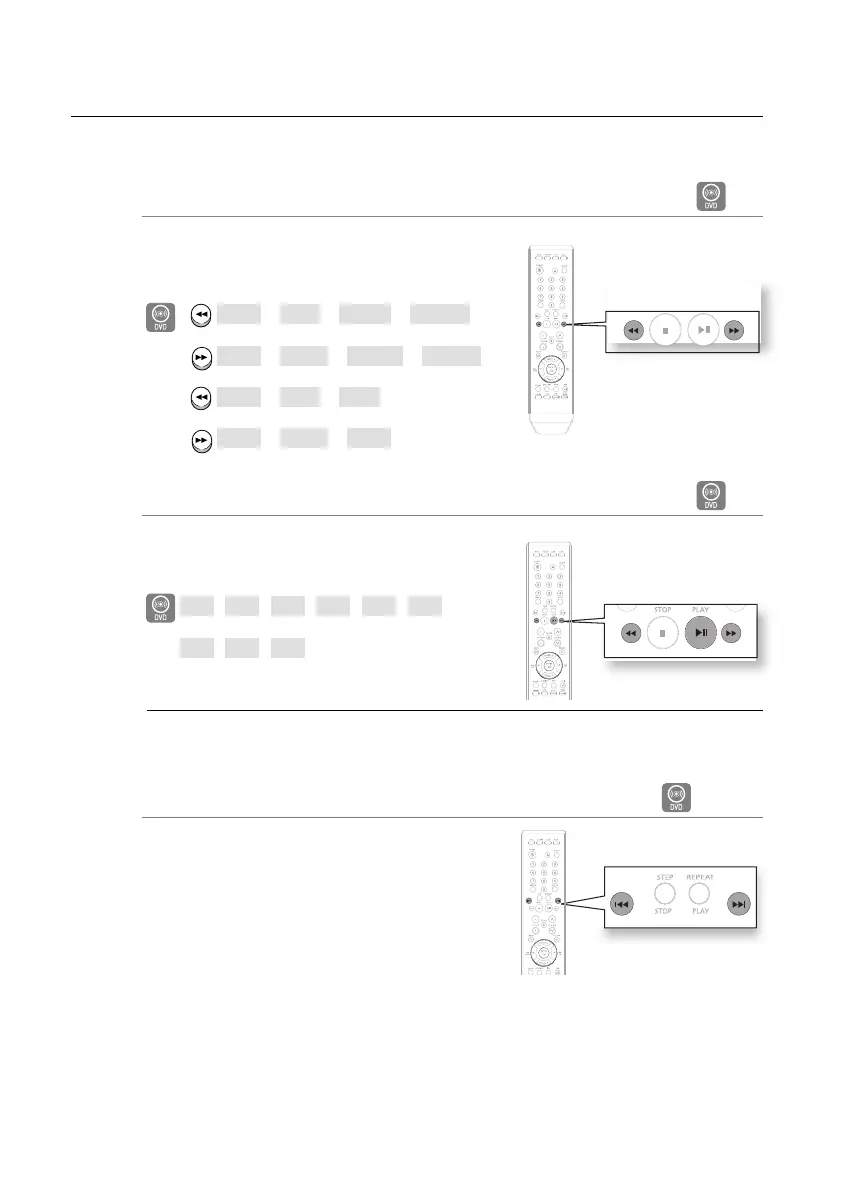
Fast Playback
D
Press the (
√√ or ®®
) button.
Each time the button is pressed during playback, the
playback speed changes as follows:
X2 ➞ X4 ➞ X64 ➞ X128
X2 ➞ X4 ➞ X64 ➞ X128
X2 ➞ X4 ➞ X8
X2 ➞ X4 ➞ X8
Slow Playback
D
In Pause mode, Press the (
√√ or ®®
) button.
Each time the button is pressed during playback, the
playback speed changes as follows:
1/2
➞1/4➞1/8➞1/2➞1/4➞1/8
1/2
➞1/4➞1/8
No sound is heard during slow playback.
Reverse slow playback does not work with DivX.
Skipping Scenes/Songs
DA
Press the [
l√√ or ®®l
] button.
Each time the button is pressed during playback, the
previous or next chapter, track or directory (fi le) will be
played.
•
•
M
•
D
D
02107H-RTSE10-XME.indd 2802107H-RTSE10-XME.indd 28 6/20/08 11:05:04 AM6/20/08 11:05:04 AM






 To Next Page