ENGLISH
2323
✤ Clock setup works in <Camera>/<Player>/<M.Cam>/<M.Player>
modes. ➥page 19
✤ The Date/Time is automatically recorded onto a tape. Before
recording, please set the <Date/Time>. ➥page 30
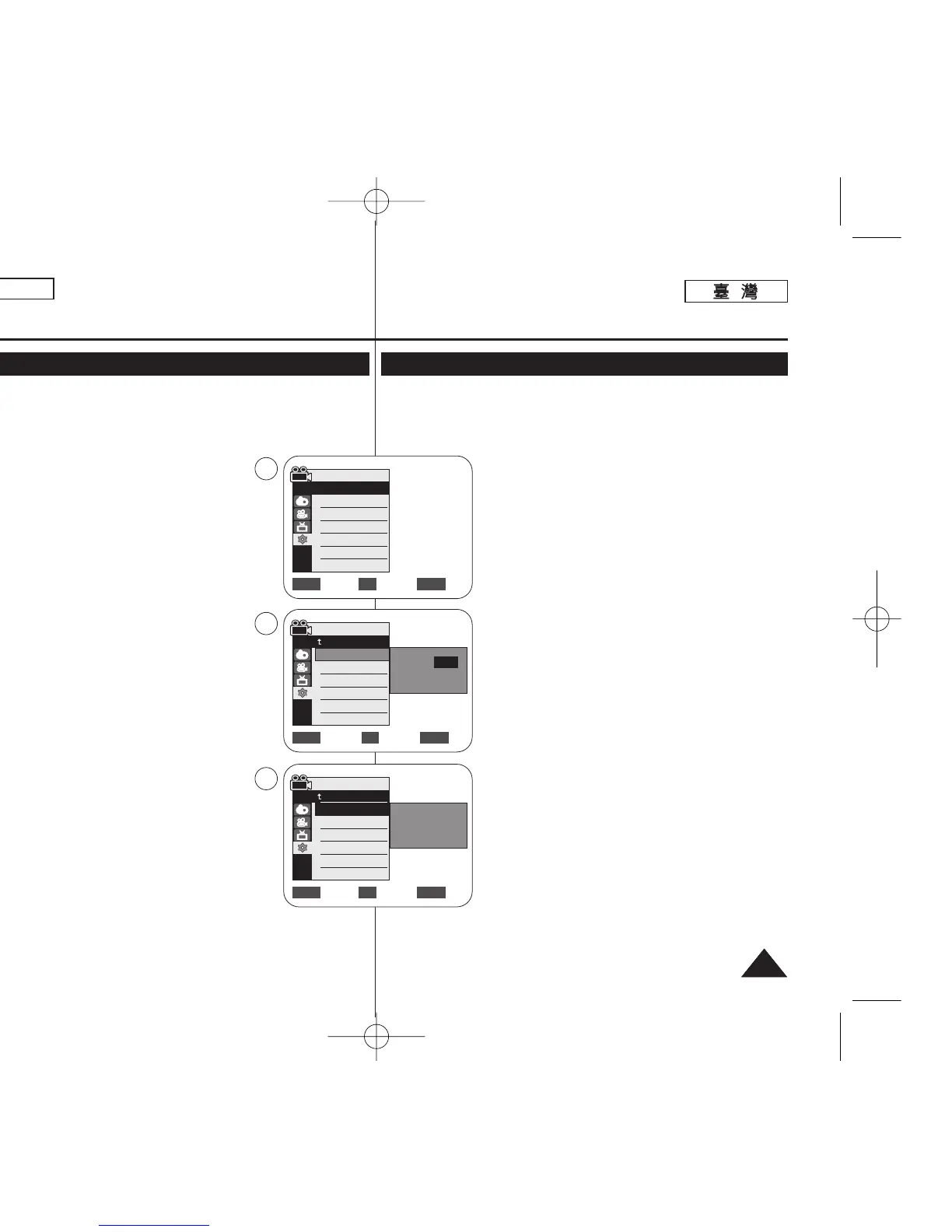
1. Set the [Power] switch to [CAMERA] or
[PLAYER].
2. Set the [Mode] switch to [TAPE] or [MEMORY]. (SC-
D363/D364/D365/D366 only)
3. Press the [MENU] button.
■
The menu list will appear.
4. Move the [Zoom] lever up or down to select
<System>, then press the [OK] button.
5. Move the [Zoom] lever up or down to select
<Clock Set>, then press the [OK] button.
■
The year will be highlighted first.
6. Move the [Zoom] lever up or down to set current
<Year>, then press the [OK] button.
■
The month will be highlighted.
7. You can set the month, day, hour and minute
following the same procedure after setting the year.
8. Press the [OK] button after setting the minutes.
■
A message <Complete !> is displayed.
■
To adjust the clock, select the Year, Month,
Day, Hour or Min by pressing the [OK] button,
then move the [Zoom] lever to the up or down
to set respective values.
9. To exit, press the [MENU] button.
[ Notes ]
■
After the Lithium Battery loses its charge (after
about 6 months), the date/time appears on the
screen as <12:00 AM JAN.1,2006>.
■
You can set the year up to 2037.
■
If the Lithium Battery is not installed, any inputted data will not be
backed up.
Initial Setting : System Menu Setting
Setting the Clock (Clock Set)
✤ 時鐘設定功能可在 <Camera>/<Player>/<M.Cam>/<M.Player>模式
下操作0 ➥第 19 頁
✤ 日期/時間將自動記錄到錄影帶中0 錄影之前,請設定 <Date/Time>0
➥第 30 頁
1. 將 [Power]
((電電源源))
開關設定爲 [CAMERA] 或
[PLAYER]
((播播放放機機))
0
2. 將 [Mode]
((模模式式))
開關設定爲 [TAPE]
((錄錄影影帶帶))
或
[MEMORY]
((記記憶憶賓賓))
0
(僅限 SC-D363/D364/ D365/D366)
3. 按下 [MENU] 按瞿0
■
選單淸單將會顯示0
4. 向上或向下移動 [Zoom]
((縮縮放放))
桿以選擇
<System>,然後按下 [OK]
((確確定定))
按瞿0
5. 向上或向下移動 [Zoom]
((縮縮放放))
桿以選擇
<Clock Set>,然後按下 [OK]
((確確定定))
按瞿0
■
將會先反白顯示年略0
6. 向上或向下移動 [Zoom]
(( 縮縮放放 ))
桿以設定目前
<Year>,然後按下 [OK]
((確確定定))
按瞿0
■
將會反白顯示月略0
7. 舅可以依照設定年略的相同程序來設定月/ 日/ 小時
和分鐘0
8. 設定分鐘後,請按下 [OK]
((確確定定))
按瞿0
■
一則 <Complete !> 訊息將會顯示0
■
若要調整時鐘,請按下 [OK]
((確確定定))
按瞿以選擇
年/ 月/ 日/ 小時或分鐘,然後向上或向下移動
[Zoom]
((縮縮放放))
桿以設定個別的數値0
9. 按 [MENU]
((選選單單))
按瞿以結束0
[
附附註註
]
■
裏電池耗電(大約 6 個月)後,螢幕上的日期/時間顯
示爲 <12:00 AM JAN.1,2006>0
■
舅最多可以將年略設定爲 20370
■
若沒有安裝裏電池,任何輸入資料都將無法備略0
起起始始設設定定:: 系系統統選選單單設設定定
設設定定時時鐘鐘((時時鐘鐘設設定定))
Adjust Select Exit
MENUOKZOOM
Camera Mode
Back
Clock Set
Remote
Beep Sound
Language
Demonstration
JAN 1 2006
12 : 00 AM
…
†
Move Select Exit
MENUOKZOOM
Camera Mode
Back
Clock Set
Remote
Beep Sound
Language
Demonstration
JAN 1 2006
12 : 00 AM
Complete !
Camera Mode
√System
Clock Set
Remote
Beep Sound
Language
Demonstration
√On
√On
√English
√On
Move Select Exit
MENUOKZOOM
4
5
8
00970F SCD363 TAI~043 1/13/06 2:08 PM 페이지23 001 QMS 1660E














 To Next Page