ENGLISH
8282
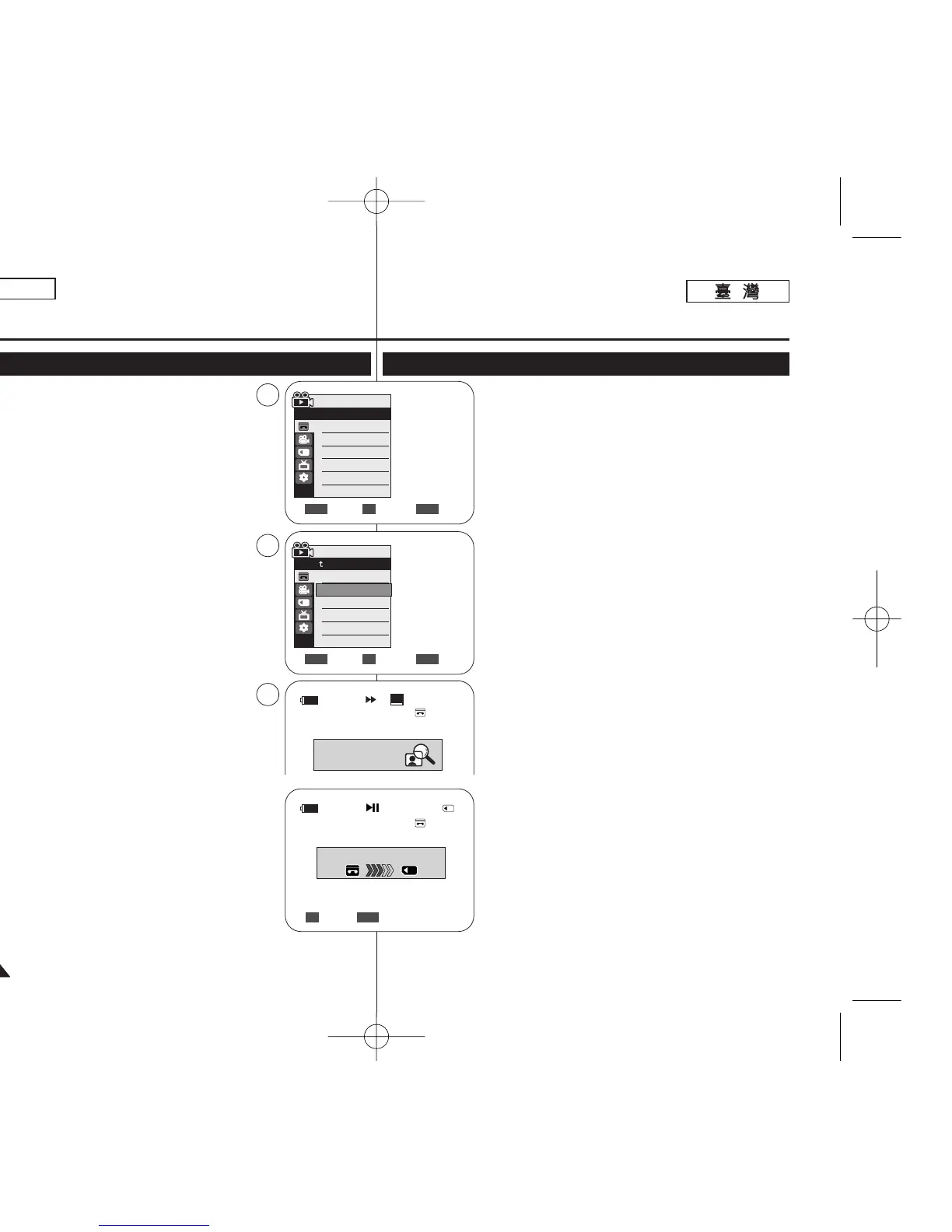
✤ The Photo Copy function works only in
<Player> mode. ➥page 19
✤ You can copy all Still images recorded with the
Photo function from the cassette to a Memory Card.
✤ Rewind the tape to the desired point.
1. Set the [Power] switch to [PLAYER].
2. Set the [Mode] switch to [TAPE].
3. Press the [MENU] button.
■
The menu list will appear.
4. Move the [Zoom] lever up or down to select
<Tape>, then press the [OK] button.
5. Move the [Zoom] lever up or down to select <Photo
Copy>, then press the [OK] button.
■
All still images that recorded on a cassette
tape will be copied into a Memory Card.
6. The Camcorder automatically performs the still
image search to find still images and copy starts.
7. Press the [■ (STOP)] button to stop copying.
■
Copy stops when the cassette is finished or
Memory Card is full.
[ Note ]
Still images copied from the cassette to the Memory
Card are saved in 640x480 format.
Digital Still Camera Mode
(SC-D363/D364/D365/D366 only)
Copying Still Images from a Cassette to a Memory Card (Photo Copy)
Move Select Exit
MENUOKZOOM
Player Mode
Back
Photo Search
Photo Copy
Audio Select
Audio Effect
SP
25min
Photo searching...
0:44:38:03
√Sound[1]
√Off
Move Select Exit
MENUOKZOOM
Player Mode
√Tape
Photo Search
Photo Copy
Audio Select
Audio Effect
4
5
6
Photo Copy
25min
Now copying...
Photo Copy
Back Exit
MENUOK
2/46
✤ 相片複製
功能僅可在 <Player> 模式下操作0
➥第 19 頁
✤ 舅可以將以相片功能錄製的所有靜止影像,從錄影
帶複製到記憶賓中0
✤ 將錄影帶回轉到所要的點0
1. 將 [Power]
((電電源源))
開關設定爲 [PLAYER]
((播播放放機機))
0
2. 將 [Mode]
((模模式式))
開關設定爲 [TAPE]
((錄錄影影帶帶))
0
3. 按下 [MENU] 按瞿0
■
選單淸單將會顯示0
4. 向上或向下移動 [Zoom]
((縮縮放放))
桿以選擇 <Tape>,
然後按下 [OK]
((確確定定))
按瞿0
5. 向上或向下移動 [Zoom]
((縮縮放放))
桿以選擇
<Photo Copy>,然後按下 [OK]
((確確定定))
按瞿0
■
所有錄製在錄影帶上的靜止影像將會複製到記憶
賓0
6. 攝錄放影機將自動執行靜止影像搜尋,以尋胥靜止
影像橙開始複製0
7. 按下 [■ (STOP)]
((停停止止))
按瞿以停止播放0
■
當錄影帶用完或記憶賓已滿時複製將停止0
[
附附註註
]
從錄影帶複製到記憶賓上的靜止影像,將會以
640x480 格式儲存0
數數位位靜靜止止相相機機模模式式
((僅僅限限
SC-D363/D364/ D365/D366
))
將將靜靜止止影影像像從從錄錄影影帶帶複複製製到到記記憶憶賓賓((相相片片複複製製))
00970F SCD363 TAI~094 1/12/06 3:44 PM 페이지82 001 QMS 1660E














 To Next Page