ENGLISH
7676
Digital Still Camera Mode
(SC-D363/D364/D365/D366 only)
Deleting Photo Images and Moving Images
✤ The Delete function works only in <M.Player> mode. ➥page 19
✤ You can erase the photo images and moving images recorded on the
Memory Card.
✤ If you want to delete protected images, you must first deactivate the
image protection.
✤ An image which has been deleted cannot be recovered.
1. Set the [Power] switch to [PLAYER].
2. Set the [Mode] switch to [MEMORY].
■
The last recorded image appears.
■
If there are no recorded images on the Memory
Card, <No image!> is displayed.
3. Using the [
œœœœ
/
√√√√
(REV/FWD)] buttons, search for
the photo image that you want to delete.
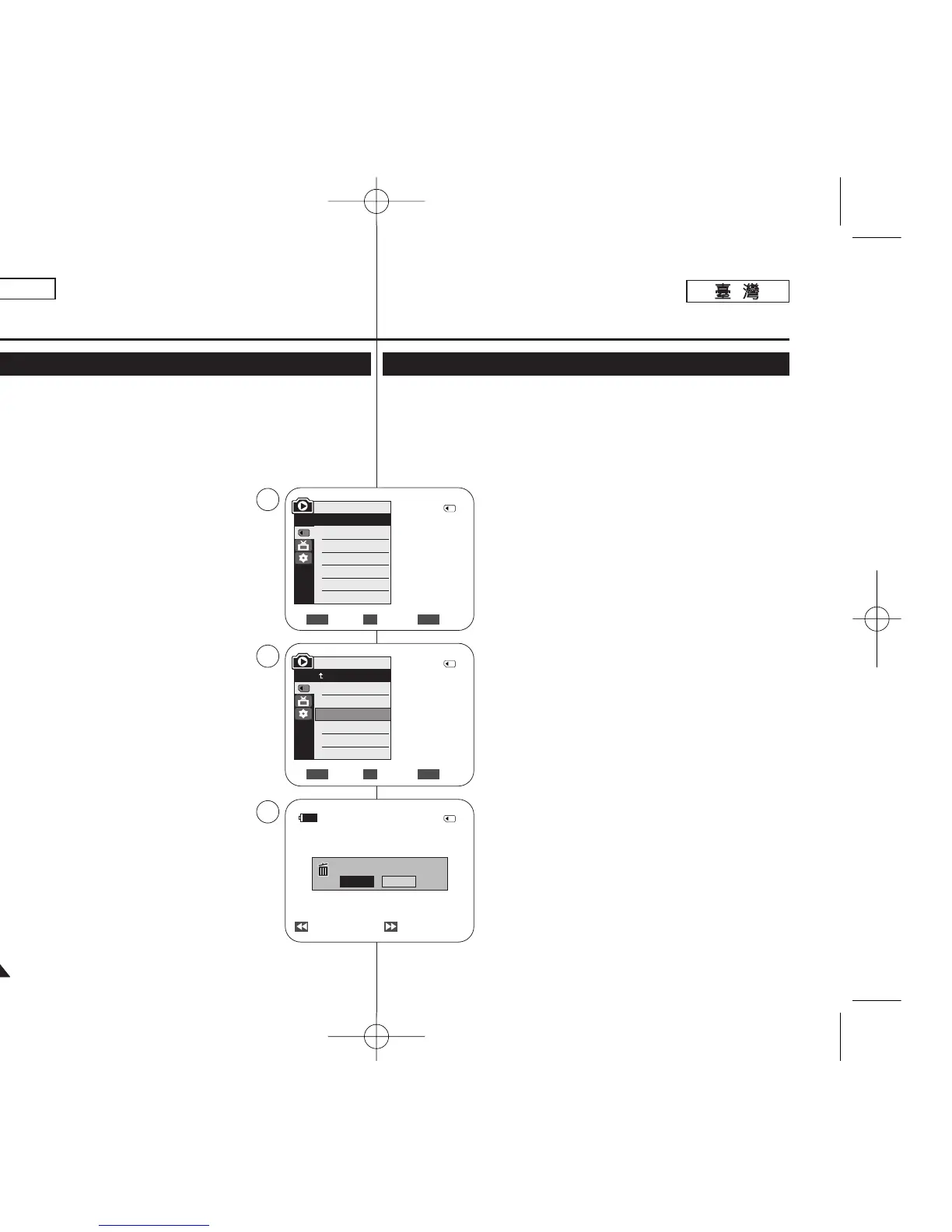
4. Press the [MENU] button.
■
The menu list will appear.
5. Move the [Zoom] lever up or down to select
<Memory>, then press the [OK] button.
6. Move the [Zoom] lever up or down to select
<Delete>, then press the [OK] button.
■
A message <Do you want to delete?> is
displayed.
7. Move the [Zoom] lever up or down to select <Yes> or
<No>, then press the [OK] button.
8. To exit, press the [MENU] button.
Move Select Exit
MENUOKZOOM
M.Player Mode
Back
Memory Type
M.Play Select
Delete
Delete All
Protect
Print Mark
Previous Next
800x600
Do you want to delete?
2/46
2/46
2/46
Yes
No
√Memory Card
√Photo
√Off
Move Select Exit
MENUOKZOOM
M.Player Mode
√Memory
Memory Type
M.Play Select
Delete
Delete All
Protect
Print Mark
5
6
7
†
†
100-0002
數數位位靜靜止止相相機機模模式式
((僅僅限限
SC-D363/D364/ D365/D366
))
刪刪除除相相片片影影像像和和動動態態影影像像
✤ 刪除功能僅可在 <M.Player> 模式下操作0 ➥第 19 頁
✤ 舅可以刪除錄製在記憶賓內的相片影像和動態影像0
✤ 若舅要刪除受保護的影像,必須先關閉影像保護功能0
✤ 所刪除的影像將無法恢復0
1. 將 [Power]
((電電源源))
開關設定爲 [PLAYER]
((播播放放機機))
0
2. 將 [Mode]
((模模式式))
開關設定爲 [MEMORY]
((記記憶憶賓賓))
0
■
最後錄製的影像將會顯示0
■
如果記憶賓內沒有已錄製的影像,<No image!>
將會顯示0
3. 使用 [
œœœœ
/
√√√√
(REV/FWD)]
((倒倒退退
/
前前進進))
按瞿,搜尋
舅要刪除的相片影像0
4. 按下 [MENU] 按瞿0
■
選單淸單將會顯示0
5. 向上或向下移動 [Zoom]
((縮縮放放))
桿以選擇
<Memory>,然後按下 [OK](確定)按瞿0
6. 向上或向下移動 [Zoom]
((縮縮放放))
桿以選擇
<Delete>,然後按下 [OK](確定)按瞿0
■
一則 <Do you want to delete?> 訊息將會顯示0
7. 向上或向下移動 [Zoom]
((縮縮放放))
桿以選擇 <Yes> 或
<No>,然後按下 [OK]
((確確定定))
按瞿0
8. 按 [MENU]
((選選單單))
按瞿以結束0
00970F SCD363 TAI~094 1/12/06 3:44 PM 페이지76 001 QMS 1660E




 To Next Page