ENGLISH
8080
Digital Still Camera Mode
(SC-D363/D364/D365/D366 only)
Playing the Moving Images (MPEG) on the Memory Card (M.Play Select)
✤ The Moving Images Playback function works only in <M. Player> mode. ➥page 19
✤ You can play the moving images on the Memory Card. Stereo audio is played
back at the same time.
✤ The playback picture will be of higher quality if it is viewed on
a PC than on a TV.
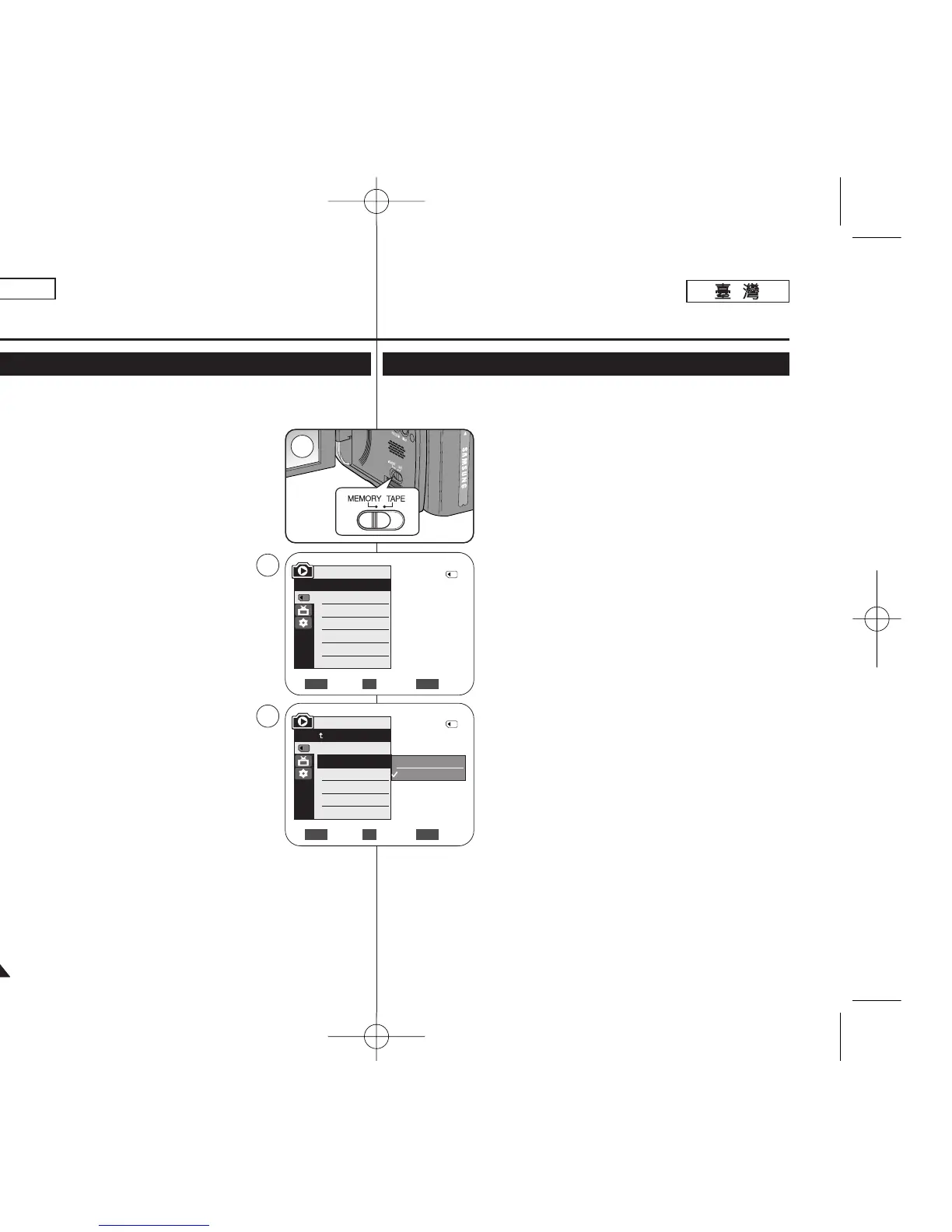
1. Set the [Power] switch to [PLAYER].
2. Set the [Mode] switch to [MEMORY].
3. Press the [MENU] button.
■
The menu list will appear.
4. Move the [Zoom] lever up or down to select <Memory>, then
press the [OK] button.
5. Move the [Zoom] lever up or down to select
<M.Play Select>, then press the [OK] button.
6. Move the [Zoom] lever up or down to select <Movie>,
then press the [OK] button.
7. To exit the menu, press the [MENU] button.
8. Using the [
œœœœ
/
√√√√
(REV/FWD)] buttons, search for the
moving image that you want to playback.
9. Press the [
√√
/❙❙ (PLAY/STILL)] button.
■
The moving images recorded on the Memory Card will
playback.
■
You can control playback using the [
√√
/❙❙ (PLAY/STILL)],
[
œœœœ
/
√√√√
(REV/FWD)], and [■ (STOP)] buttons.
[ Notes ]
■
You can directly access the M.Play Select function using the
[QUICK MENU] button. ➥page 20
■
[MENU] button and [OK] button are not available
during moving image playback.
To use [MENU] button and [OK] button, stop playback.
Moving image playback is not available when a menu or
Quick menu is displayed on the screen. To start playback,
press the [MENU] button to make it disappear.
■
There may be broken or mosaic pictures while playing the
moving images, but it is not a malfunction.
■
The moving images that you recorded on the Memory Card
may not play on other manufacturer’s equipment.
■
The moving images recorded by another Camcorder may not
play on this Camcorder.
■
To playback moving images on a PC, the Video Codec (in the CD provided with
the camcorder) should be installed.
- You need Microsoft Windows Media Player Version 9 or higher in order to
play moving images on the Memory Card on your PC.
- You can download the Microsoft Windows Media Player with your desired
language from the Microsoft Website,
“http://www.microsoft.com/windows/windowsmedia/download/default.asp”.
Move Select Exit
MENUOKZOOM
Photo
Movie
2
√Memory Card
√Photo
√Off
Move Select Exit
MENUOKZOOM
M.Player Mode
√Memory
Memory Type
M.Play Select
Delete
Delete All
Protect
Print Mark
4
6
†
†
M.Player Mode
Back
Memory Type
M.Play Select
Delete
Delete All
Protect
Print Mark
2/46
2/46
數數位位靜靜止止相相機機模模式式
((僅僅限限
SC-D363/D364/ D365/D366
))
播播放放記記憶憶賓賓上上的的動動態態影影像像
(MPEG)
((
M.Play
選選擇擇))
✤ 動態影像播放功能僅可在 <M. Player> 模式下操作0 ➥第 19 頁
✤ 舅可以播放記憶賓內的動態影像,立體聲音響也將會同時播放0
✤ 若在電腦上檢視,播放怜面的品質會比在電視上來得高0
1. 將 [Power]
((電電源源))
開關設定爲 [PLAYER]
((播播放放機機))
0
2. 將 [Mode]
((模模式式))
開關設定爲 [MEMORY]
((記記憶憶賓賓))
0
3. 按下 [MENU] 按瞿0
■
選單淸單將會顯示0
4. 向上或向下移動 [Zoom]
((縮縮放放))
桿以選擇 <Memory>,然後
按下 [OK]
((確確定定))
按瞿0
5. 向上或向下移動 [Zoom]
((縮縮放放))
桿以選擇 <M.Play
Select>,然後按下 [OK]
((確確定定))
按瞿0
6. 向上或向下移動 [Zoom](縮放)桿以選擇 <Movie>,然後按
下 [OK]
((確確定定))
按瞿0
7. 按 [MENU](選單)按瞿以結束選單0
8. 使用 [
œœœœ
/
√√√√
(REV/FWD)]
((倒倒退退
/
前前進進))
按瞿,搜尋舅要播放
的動態影像0
9. 按[
√√
/❙❙ (PLAY/STILL)]
((播播放放
/
靜靜止止))
按瞿0
■
將播放錄製在記憶賓上的動態影像0
■
舅可以使用 [
√√
/❙❙ (PLAY/STILL)]
((播播放放
/
靜靜止止))
按瞿/
[
œœœœ
/
√√√√
(REV/FWD)]
((倒倒退退
/
前前進進))
及 [■ (STOP)]
((停停止止))
按瞿0
[
附附註註
]
■
舅可以使用 [QUICK MENU]
((快快速速選選單單))
按瞿直接存取
M.Play 選擇功能0 ➥第 20 頁
■
[MENU]
((選選單單))按按瞿瞿和和
[OK]
((確確定定))按按瞿瞿在在動動態態影影像像播播放放期期間間
不不可可用用00 若若要要使使用用
[MENU]
((選選單單))按按瞿瞿和和
[OK]
((確確定定))按按瞿瞿,,
請請停停止止播播放放00 動動態態影影像像播播放放功功能能在在
MENU
((選選單單))或或
QUICK
MENU
((快快速速選選單單))顯顯示示在在螢螢幕幕上上時時不不可可
用用00 若若要要開開始始播播放放,,
按按
[MENU]
((選選單單))按按瞿瞿以以使使央央消消失失00
■
播放動態影像時會出現破損或馬賽克相片,這橙非故障0
■
舅錄製在記憶賓上的動態影像也許無法在其他製造商的裝置
上播放0
■
採用其他攝錄放影機所錄製的動態影像可能無法在本攝錄放
影機上播放0
■
若要在電腦上播放動態影像,必須安裝視訊轉碼器(位於攝錄放影機隨附的光勒
上)0
- 舅必須擁有 Microsoft Windows Media Player 版本 9 或以上版本,才可在電
腦上播放記憶賓內的動態影像0
- 舅可以從 Microsoft 網站:
「http://www.microsoft.com/windows/windowsmedia/download/default.asp」,
下載舅所要的語言版本之 Microsoft Windows Media Player0
00970F SCD363 TAI~094 1/12/06 3:44 PM 페이지80 001 QMS 1660E




 To Next Page