ENGLISH
3434
Basic Recording
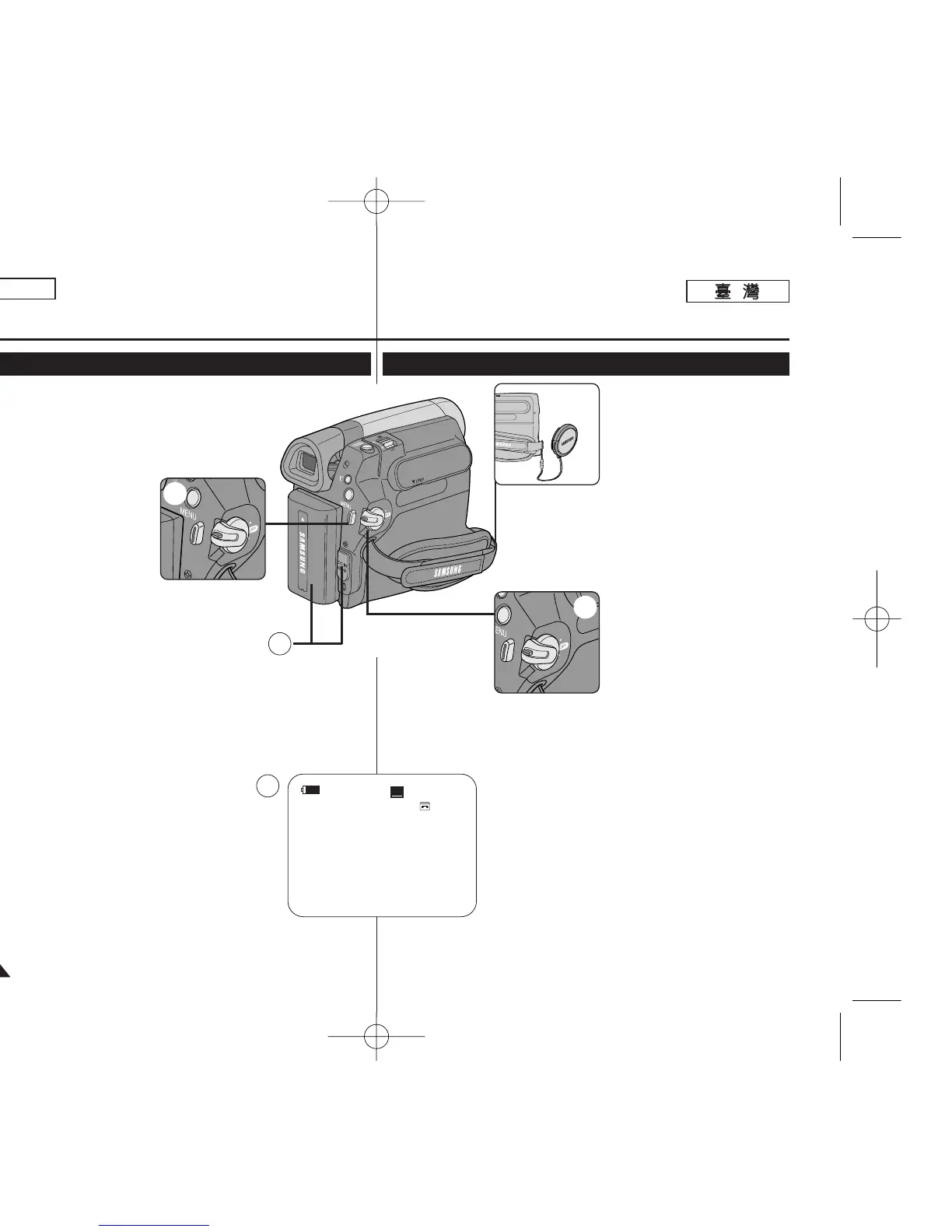
Making your First Recording
1. Connect a power source to the
Camcorder. ➥page 19
(A Battery pack or a AC Power
adapter)
Insert a cassette. ➥page 32
2. Remove the Lens Cover.
3. Set the [Power] switch to
[CAMERA].
■
Open the LCD Screen.
■
Set the [Mode] switch to
[TAPE]. (SC-D363/D364/
D365/D366 only)
Make sure that <STBY> is
displayed.
■
If the write protection tab of
the cassette is open (set to
save), <STOP> and
<Protection!> will be
displayed. Release the write protection tab to record.
■
Make sure the image you want to record appears on the LCD
Screen or Viewfinder.
■
Make sure the Battery Level indicates that there is enough
remaining power for your expected recording time.
■
You can select the Record Mode of your choice.
➥pages 44, 45, 46
4. To start recording, press the [Start/Stop] button.
■
<REC●> is displayed on the LCD Screen.
To stop recording, press the [Start/Stop] button again.
■
<STBY> is displayed on the LCD Screen.
[ Note ]
Detach the Battery Pack when you are finished recording
to prevent unnecessary battery power consumption.
4
3
2
√
√
60min
0:00:10
SP
REC
●
√
4
1
基基本本錄錄製製
1. 將電源連接到攝錄放影機0
➥第 19 頁
(電池組或交流電源適配器)
放入錄影帶0 ➥第 32 頁
2. 取下透鏡蓋0
3. 將 [Power]
((電電源源))
開關設定爲
[CAMERA]
((相相機機))
0
■
打開 LCD 螢幕0
■
將 [Mode]
((模模式式))
開關設
定爲 [TAPE]
((錄錄影影帶帶))
0
(僅限 SC
-D363/D364/
D365/D366)確保顯示
<STBY>0
■
如果錄影帶的寫入保護標
籤打開(設定以保存),
<STOP>及<Protection!>
將顯示0 解除寫入保護標
籤以進行錄製0
■
確保舅要錄製的影像出現在 LCD 螢幕或觀景
鎖上0
■
確保電池電量表示尙有足觀的剩餘電量可供舅
的預計錄製時間使用0
■
舅可以選擇所要的錄製模式0
➥第 44/ 45/ 46 頁
4. 若要開始錄製,請按 [Start/Stop]
((開開始始
/
停停止止))
按
瞿0
■
<REC ● >出現在 LCD 螢幕上0
若要停止錄製,請再次按 [Start/Stop]
((開開始始
/
停停止止))
按瞿0
■
<STBY>出現在 LCD 螢幕上0
[
附附註註
]
在舅完成錄製時取出電池組,以避免不必要的電池耗電0
進進行行舅舅的的第第一一次次錄錄製製
00970F SCD363 TAI~043 1/12/06 3:25 PM 페이지34 001 QMS 1660E




 To Next Page