ENGLISH
6464
Playback
Tape Playback
✤ The Playback function works only in <Player> mode. ➥page 19
Playing back on a TV Monitor
✤ To play back a tape, the television must be
NTSC compatible. ➥page 97
✤ We recommend that you use the AC
Power adapter as the power source for the
Camcorder.
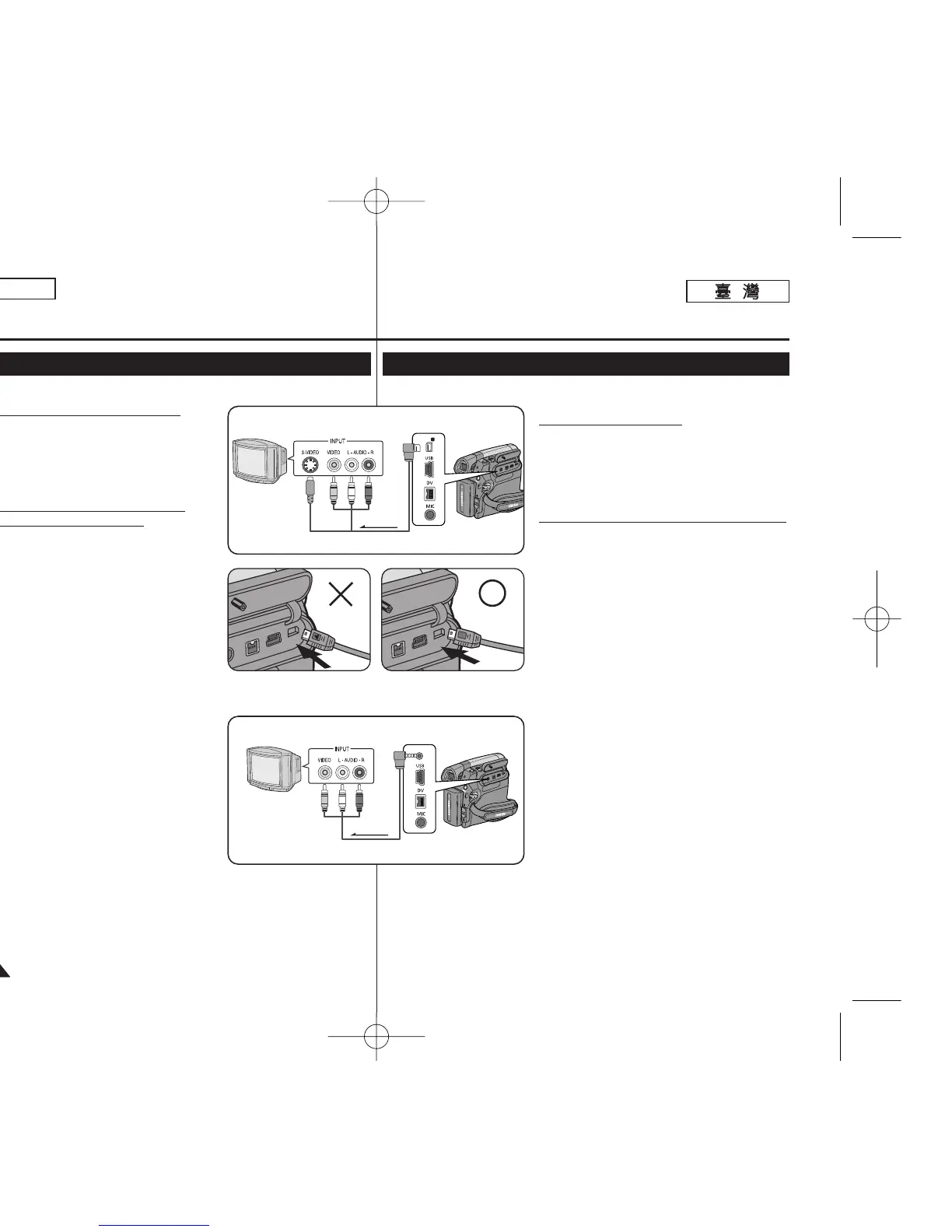
Connecting to a TV which has
Audio/Video Input Jacks
1. Connect the Camcorder to your TV with
Audio/Video Cable or Multi Cable.
■
The yellow jack: Video
■
The white jack: Audio(L)-mono, The red
jack: Audio(R)
■
If you connect to a monaural TV,
connect the yellow jack (Video) to the
video input of the TV and the white jack
(Audio L) to the audio input of the TV.
2. Set the [Power] switch to [PLAYER].
3. Set the [Mode] switch to [TAPE].
(SC-D363/D364/D365/D366 only)
4. Turn on the TV and set the TV/VIDEO
selector on the TV to Video.
■
Refer to the TV user’s manual.
5. Play the tape. ➥page 63
[ Notes ]
■
You may use an S-Video connector on the
cable to obtain better quality pictures if you
have a S-Video connector on your TV.
(SC-D362/D364/D365/D366 only)
■
Even if you use an S-Video connector, you
need to connect an audio cable.
(SC-D362/D364/D365/D366 only)
■
If you connect the cable to the Audio/Video jack or AV/S jack, you will
not hear sound from the Camcorder's speaker.
■
If only a mono audio input is available on the TV set, use the audio
cable with the white jack (Audio L).
播播放放
錄錄影影帶帶播播放放
✤ 播放功能僅可在 <Player> 模式下操作0 ➥第 19 頁
在在電電視視機機顯顯示示器器上上播播放放
✤ 要播放錄影帶,該電視機必須爲 NTSC 相容
型0
➥第 97 頁
✤ 我們建議舅使用交流電源適配器作爲攝錄放
影機的電源0
連連接接到到具具有有聲聲訊訊
/
視視訊訊輸輸入入揷揷孔孔的的電電視視機機
1. 使用聲訊/視訊纜線或 Multi 纜線將攝錄放影
機連接到電視機0
■
黃色揷孔: 視訊
■
白色揷孔: Audio(L)(聲訊(左))- 單聲
道,紅色揷孔:Audio(R)(聲訊(右))
■
若舅連接了單聲道電視機,請將黃色揷孔
(視訊)連接到電視機的視訊輸入橙將白色
揷孔(聲訊左)連接到電視機的聲訊輸入0
2. 將 [Power]
((電電源源))
開關設定爲 [PLAYER]
((播播放放機機))
0
3. 將 [Mode]
((模模式式))
開關設定爲 [TAPE]
((錄錄影影
帶帶))
0(僅限 SC-D363/D364/ D365/D366)
4. 打開電視機,然後將電視機上的 TV/VIDEO
(電視機/視訊)選擇器設定爲 Video(視訊)0
■
請參閱電視機的使用者手冊0
5. 播放錄影帶0
➥第 63 頁
[
附附註註
]
■
若舅的電視機上有 S-Video 連接器,舅可以
使用纜線上的 S-Video 連接器以取得品質更
佳的怜面0
(僅限 SC-D362/D364/ D365/D366)
■
卽使舅使用 S-Video 連接器,舅仍然需要連
接聲訊纜線0
(僅限 SC-D362/D364/ D365/D366)
■
若舅將纜線連接到聲訊/視訊揷孔或 AV/S 揷孔,舅將不會聽到攝錄放影
機的喇叭所發出的音效0
■
若電視機上只有一個單聲道聲訊輸入可以使用,請將聲訊纜線用於白色揷
孔(Audio L(聲訊左))0














 To Next Page