ENGLISH
5050
Advanced Recording
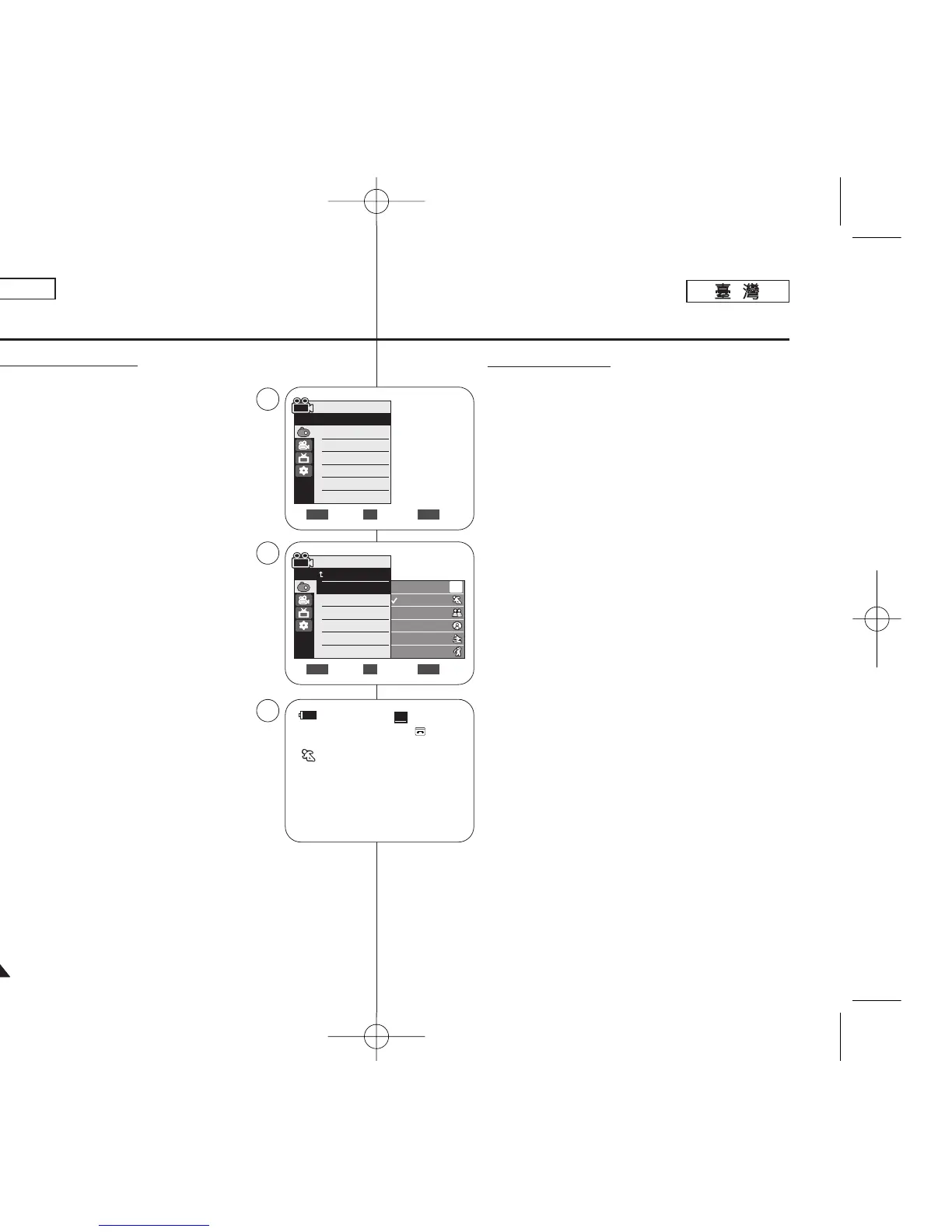
Setting the Program AE
1. Set the [Power] switch to [CAMERA].
2. Set the [Mode] switch to [TAPE].
(SC-D363/D364/D365/D366 only)
3. Press the [MENU] button.
■
The menu list will appear.
4. Move the [Zoom] lever up or down to select
<Camera>, then press the [OK] button.
5. Move the [Zoom] lever up or down to select
<Program AE>, then press the [OK] button.
■
The available options are listed.
6. Move the [Zoom] lever up or down to select desired
program AE option, then press the [OK] button.
7. To exit, press the [MENU] button.
■
The icon of the selected mode is displayed.
■
When the <Auto> mode is selected, no icon
is displayed.
[ Notes ]
■
Direct accessing the Program AE function is available
simply using the [QUICK MENU] button. ➥page 20
■
The Program AE function will not operate in EASY.Q
mode.
60min
0:00:10
SP
STBY
œ
√Auto
√Auto
√Off
√Off
√Off
√Off
Move Select Exit
MENUOKZOOM
Camera Mode
√Camera
Program AE
White Balance
Visual Effect
16:9 Wide
DIS
Digital Zoom
Move Select Exit
MENUOKZOOM
Auto
Sports
Portrait
Spotlight
Sand/Snow
High Speed
A
4
6
7
Camera Mode
Back
Program AE
White Balance
Visual Effect
16:9 Wide
DIS
Digital Zoom
進進階階錄錄製製
設設定定程程序序自自動動曝曝光光
1. 將 [Power]
((電電源源))
開關設定爲 [CAMERA]0
2. 將 [Mode]
((模模式式))
開關設定爲 [TAPE]
((錄錄影影帶帶))
0
(僅限 SC-D363/D364/ D365/D366)
3. 按下 [MENU] 按瞿0
■
選單淸單將會顯示0
4. 向上或向下移動 [Zoom]
((縮縮放放
)桿以選擇
<Camera>,然後按下 [OK]
((確確定定))
按瞿0
5. 向上或向下移動 [Zoom]
((縮縮放放))
桿以選擇
<Program AE>,然後按下 [OK]
((確確定定))
按瞿0
■
可用的選項將會列出0
6. 向上或向下移動 [Zoom]
((縮縮放放))
桿以選擇所要的程
序自動曝光選項,然後按下 [OK]
((確確定定))
按瞿0
7. 按 [MENU]
((選選單單))
按瞿以結束0
■
選定模式的圖示將會顯示0
■
當選擇了<Auto> 模式時,將不會顯示任何圖示0
[
附附註註
]
■
只需使用 [QUICK MENU]
((快快速速選選單單))
按瞿就可直接
存取程序自動曝光功能0 ➥第 20 頁
■
程序自動曝光功能不可在簡易拍攝模式下操作0
00970F SCD363 TAI~067 1/12/06 3:36 PM 페이지50 001 QMS 1660E














 To Next Page