11
Basic Functions
This section describes the ways to initialize the information registered in the lock, to register the
password and card data, and to open or close the door.
Initialization (Password, Card, Key Tag)
All registered data (password, card, key tag) are deleted. After initialization, the password is set to
‘1234’, and the registered card, key tag data are erased.
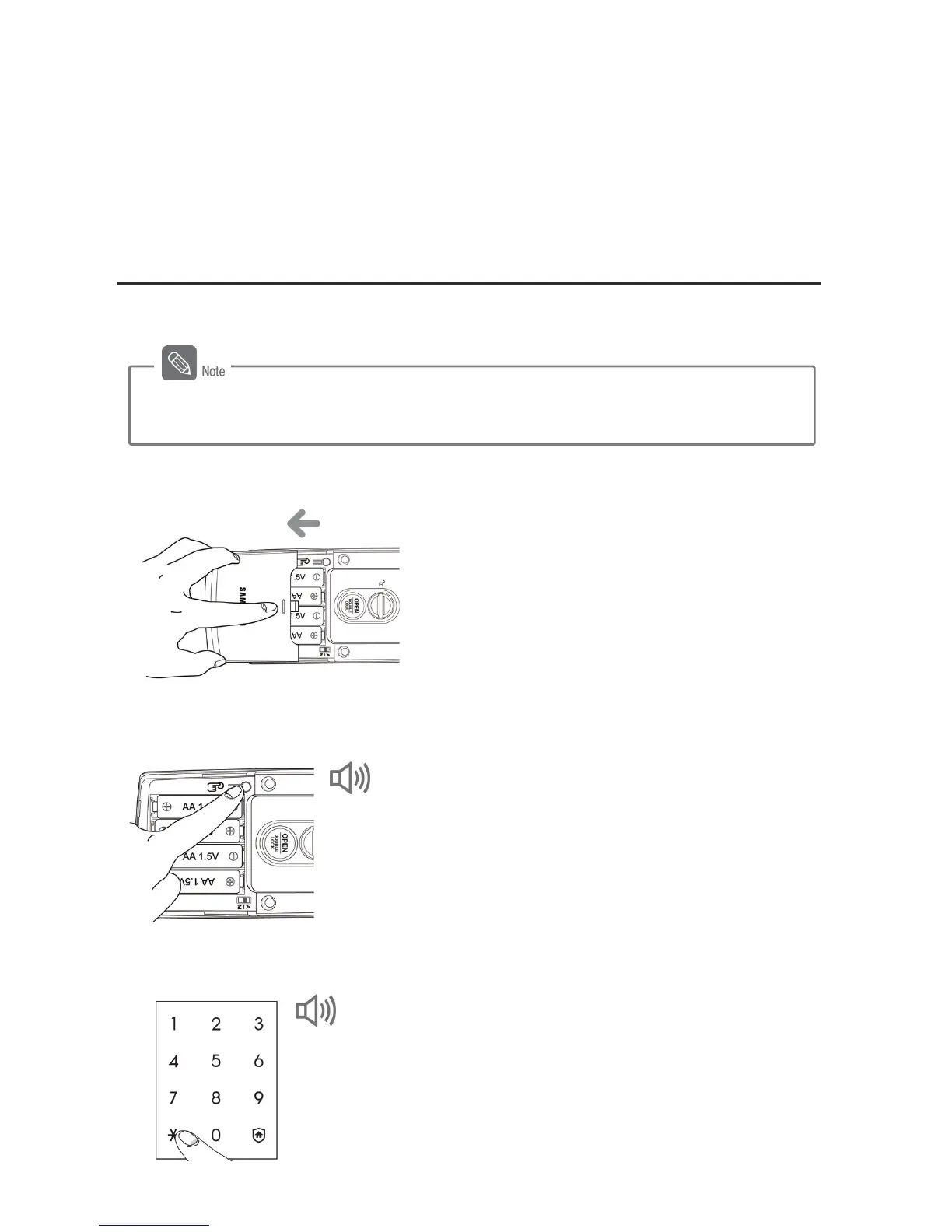
1. Opening the Battery Cover (from the inside)
Lightly press the battery cover and pull it down, as
shown in the picture.
2. Pressing the [Register] Button (from the inside)
Press and hold the [Register] button for 10 seconds.
- Success: “DINGDONGÆDING DINGÆDING DING
DING DING” sounds are generated.
3. Entering the Password for Initialization (from the outside)
Press the registered password, or '4560852580', and
then press the [º] button.
- Success: “DING DONG DENG” sound is generated.
- Fail: “DING DONG DING DONG” sound is generated.
- After initializing the registered data, reregister the card and password.
- Initialization is available while the door is open.



 To Next Page