21
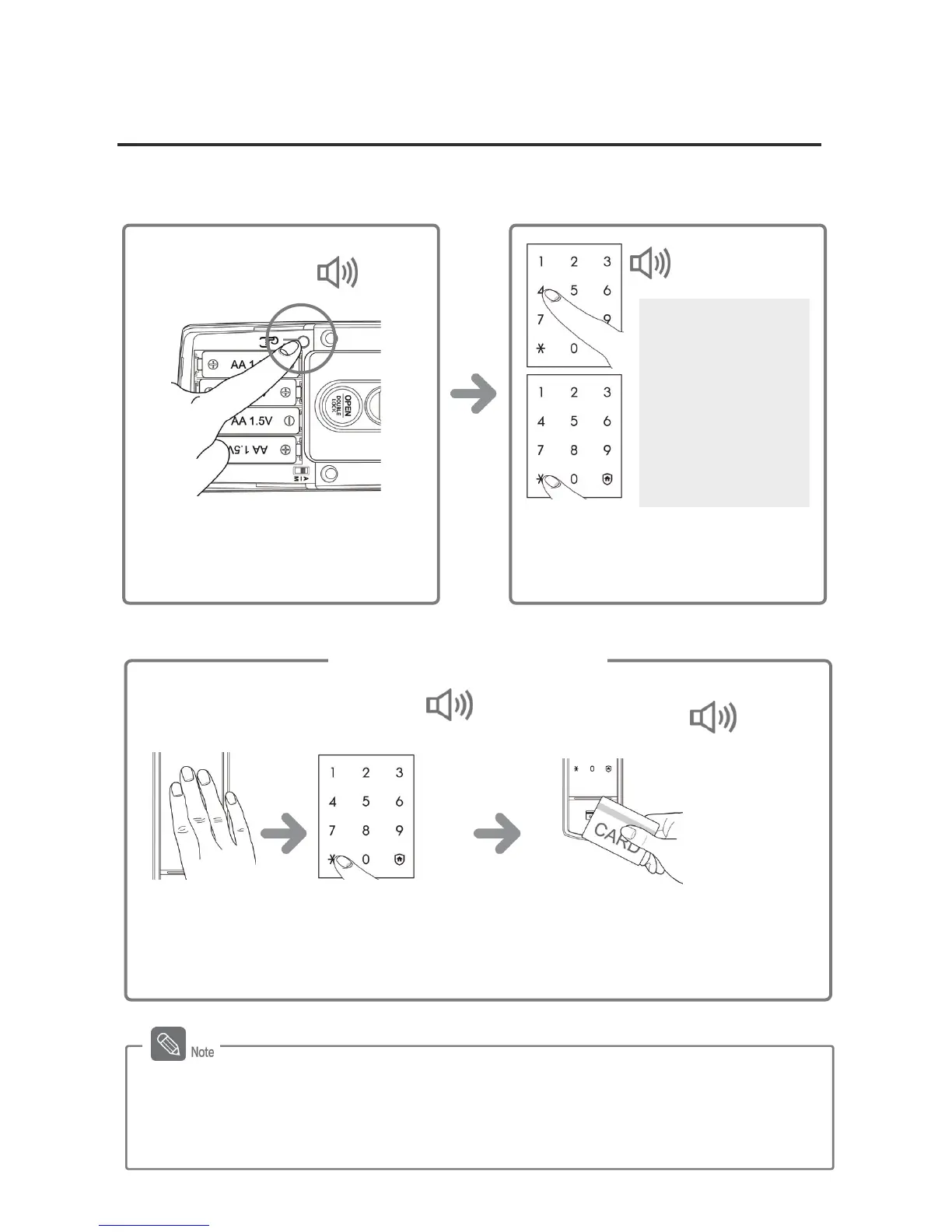
Double Authorization Mode Setting
Double authorization mode requires both card and password to open the door, ensuring more
security. You can either set up or cancel the function for your convenience.
When the light comes on,
on the number pad, enter
the password and press
[¿] button.
- The setup of double authorization mode only works when the door is open.
- When purchased, the product is not set to double authorization mode initially.
- To setup the double authorization mode, more than 1 card must be registered.
- Double authorization mode will automatically be turned off when all cards are deleted.
Press the [¿] button after pressing the
[4] or [6] button, and the authorization
mode will be set.
Mode Setting
[4] Button :
Double
authorization mode
on
[6] Button :
Double
authorization mode
off
DING DONG DENG
Briefly press the [Register] button on
the inner body.
DING
DONG
Place the card or key tag on the card
reader. When the authorization is
success, the door will open.
Touch [Number
Pad].
Success: “DING
DONG DENG”
Fail: “DING DONG
DIN



 To Next Page