22
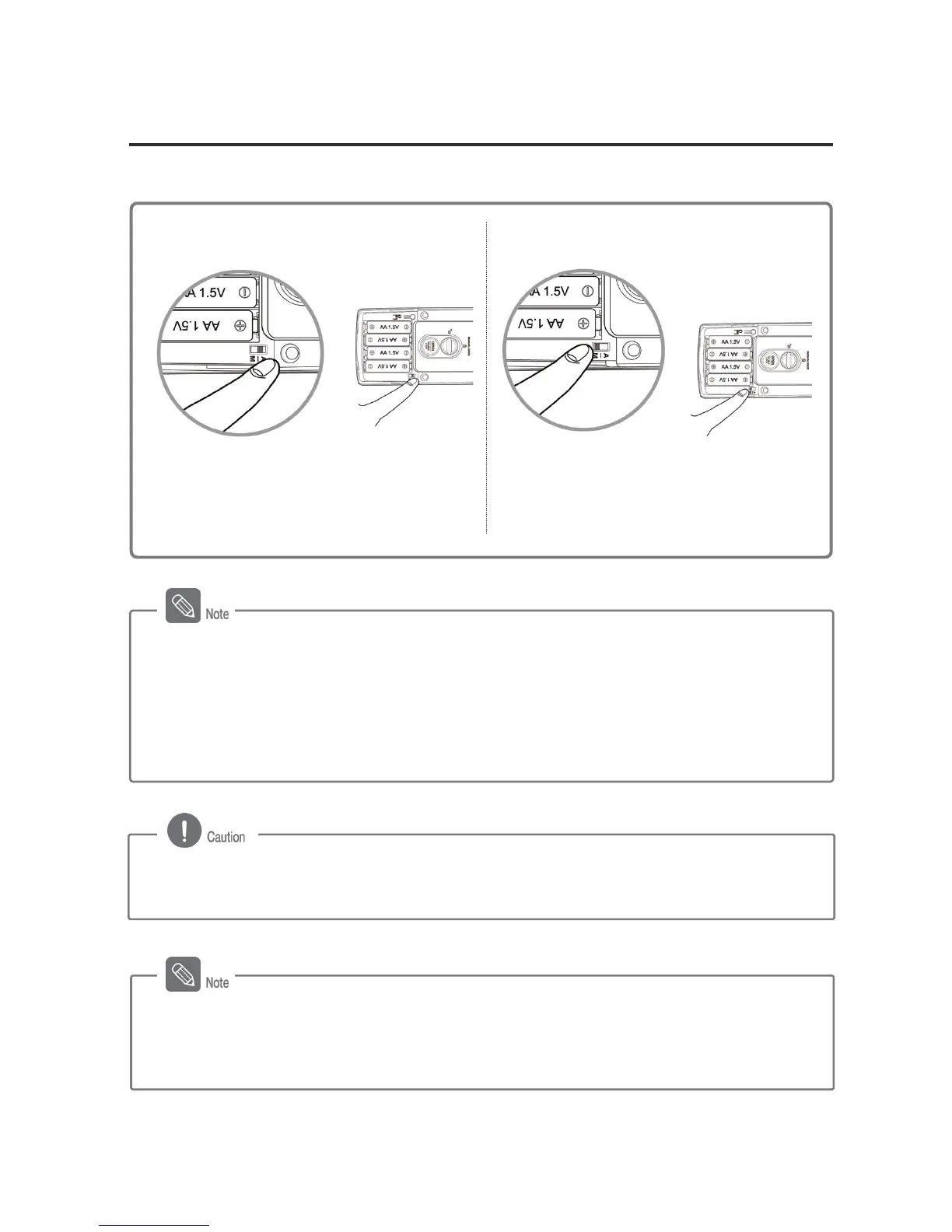
Automatic/Manual Locking Setting
The Automatic Locking mode allows for automatic locking of the door when it is closed.
Automatic Locking Setting
Manual Locking Setting
Set the [Automatic/Manual Locking]
toggle switch of the Inner Body to the ‘A’
position.
Set the [Automatic/Manual Locking]
toggle switch of the Inner Body to the ‘M’
position.
Difference between Automatic and Manual Modes
- Automatic Mode: The door is automatically locked 2 seconds after being closed. This
mode is not activated when the batteries are completely discharged.
- Manual Mode: The door does not lock automatically, and [OPEN] button must be
pressed from the inside, touch [Number Pad] to close the door.
- If the deadbolt comes out automatically when the door is open and the door openning
sensor is pressed, then the auto-lock function is on.
- If the door is not open within 7 seconds from being unlocked, it will be re-locked.
Ensure that the door is locked after locking the door in the Manual Locking mode, since
it is not automatically locked after being closed.



 To Next Page