23
Sound Setting and Releasing
The sound that is generated when the number buttons are pressed, when the door is locked or
when the locked door is unlocked, can be set according to the user’s preference.
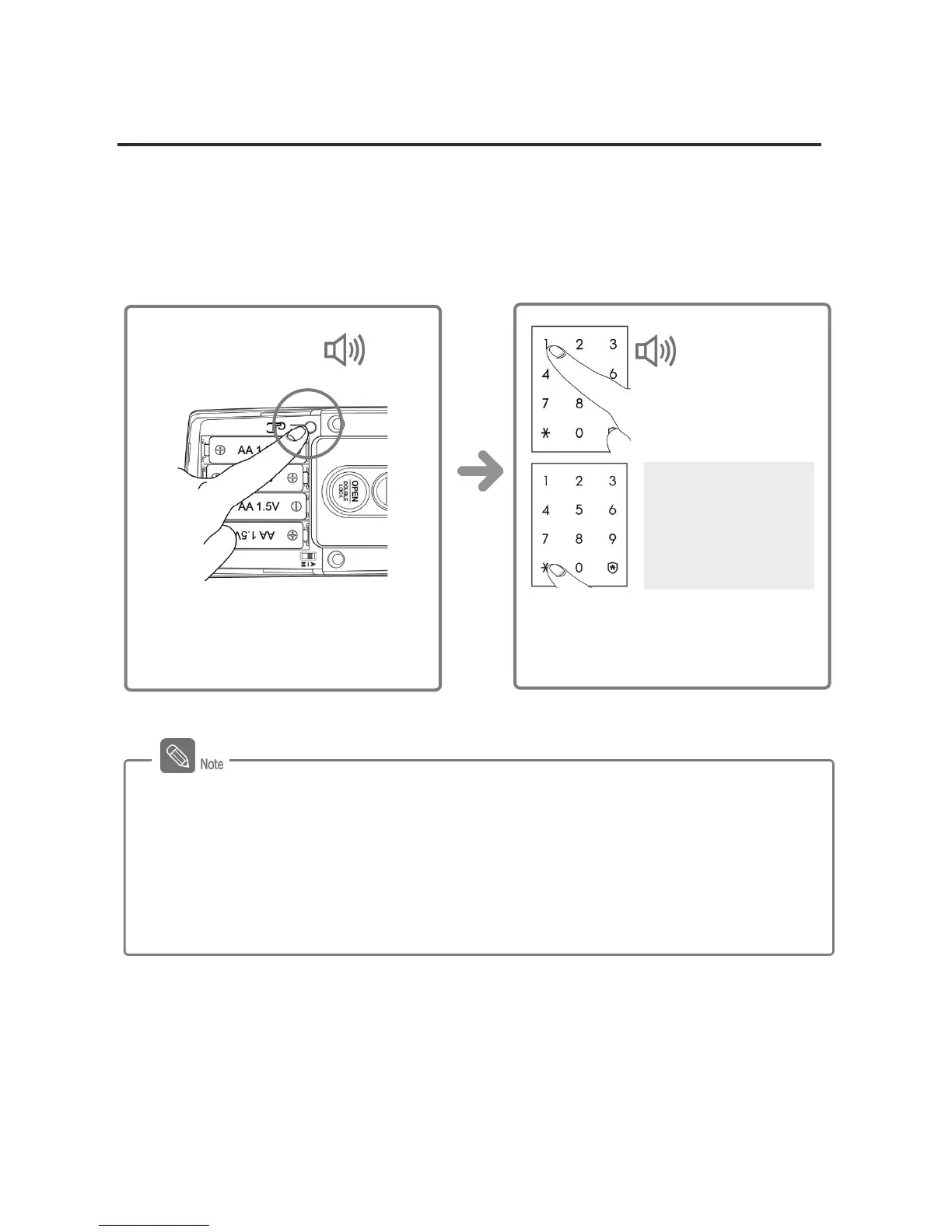
Sound Function Setting
The product is set to generate all sounds at the factory. (Set in 2 steps)
The sound function is set when the [¹]
button is pressed after the [0] ~ [3]
button is pressed.
Sound Function
[0] Button: Mute
[1] Button: 1 Step
[2] Button: 2 Step
[3] Button: 3 Step
DING DONG DENG
Briefly press the [Register] button on
the inner body.
DING
DONG
Sound Function Operation
- [0] Button: All sounds except the alarm sound are deactivated.
- [1]~[3] Button: All sounds are activated and the sound gets louder as the step goes up.
- In registration mode, sound is generated regardless of the current setting. The setting is
in effect when registration is completed.
- The sound function is set in two steps after initialization.




 To Next Page