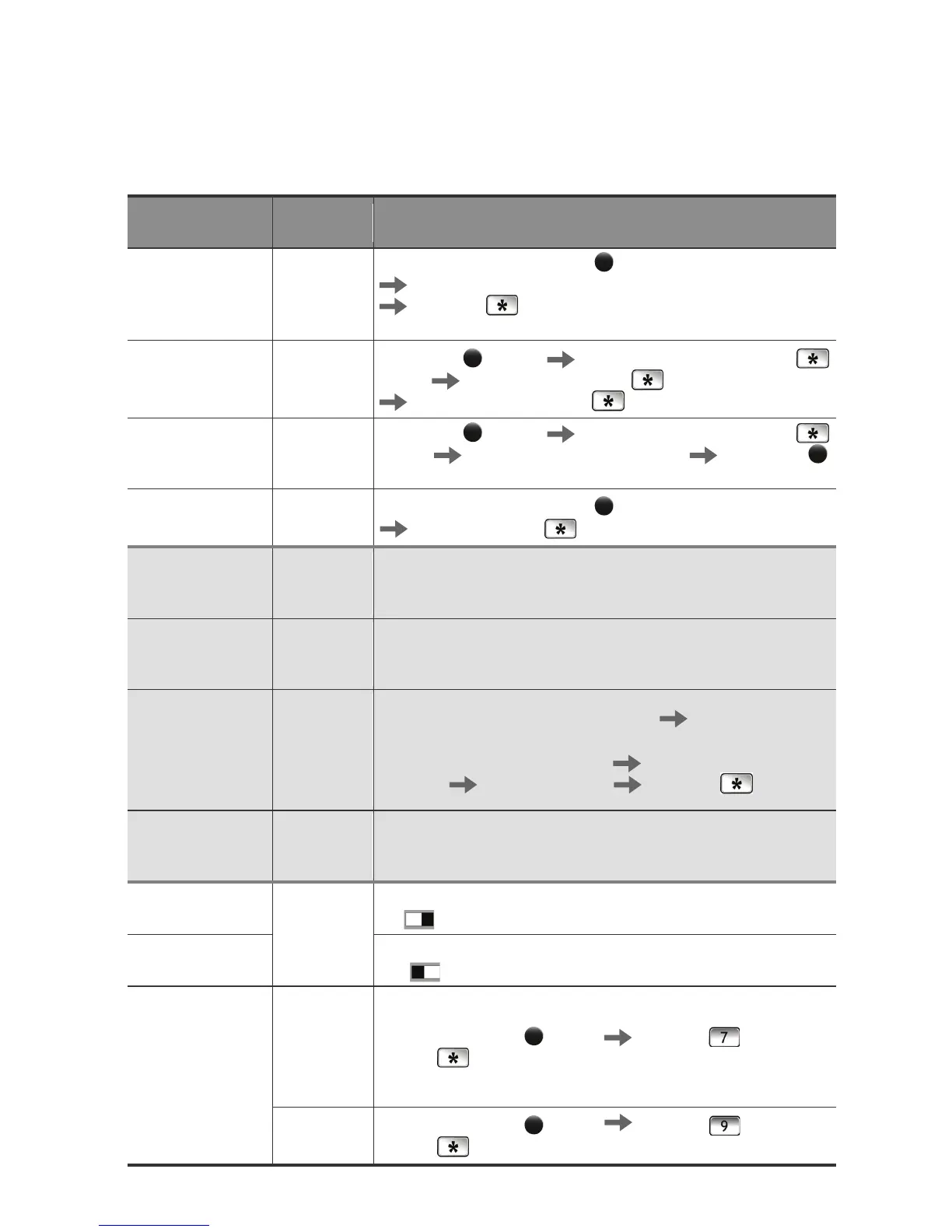
Initialization
(Password,
card, key tag all
deleted.)
-
Press and hold the [Register]
button for 10 seconds
Enter the current password or ‘4560852580’
Press the
button
※ The password is set to ‘1234’ after initialization.
Password
Change
Current
Password
or ‘1234’
[Register]
button
Current password entry +
button
New password entry +
button
New password reentry +
button
Card or Key Tag
Registration
None
[Register]
button Current password entry +
button
Card or key tag recognition
[Register]
button
Card and Key
Ta g D e l e t e
None
Press and hold the [Register]
button for 5 seconds
Password entry +
button
Opening the
Door from the
Inside
-
Press [OPEN] button.
Closing the
Door from the
Inside
-
Automatic Locking: Close the door.
Manual Locking: Press [OPEN] button.
Opening the
Door from the
Outside
Multi-
leveled
Security
Code Entry
Mode
Card or Key Tag: Touch [Number Pad] Expose the card or
key tag to the reader.
Password: Touch [Number Pad]. Enter two arbitrary
numbers Enter a password Press the button
Closing the
Door from the
Outside
-
Automatic Locking: Close the door.
Manual Locking: Touch [Number Pad].
Automatic
Locking Setting
Automatic
Locking
Place the [Automatic/Manual Locking] toggle switch in the
‘A’
position.
Manual Locking
Setting
Place the [Automatic/Manual Locking] toggle switch in the
‘M’
position.
Multi-leveled
Security Code
Entry Mode
Multi-
leveled
Security
Code Entry
Mode
Press the [Register]
button Press the button
and the
button.
Common
Mode
Press the [Register]
button Press the button
and the
button.
※ Initialization, registration, change, and deletion are available while the door is open.



 To Next Page