EasyManua.ls Logo

Samsung SHS-1321 - Double Authorization Mode Setting

Samsung SHS-1321
40 pages
Print Icon
To Next Page IconTo Next Page
To Previous Page IconTo Previous Page
Loading...
19
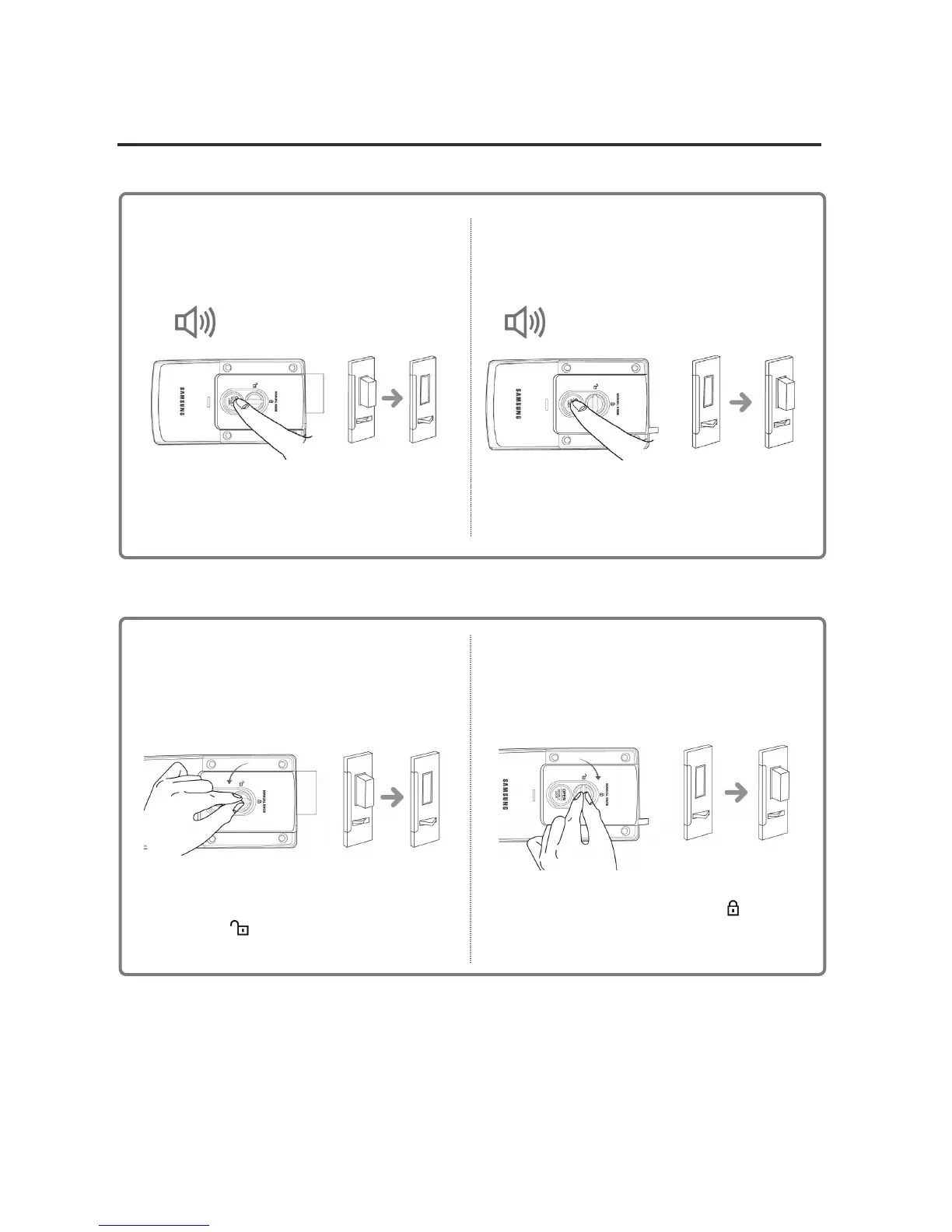
Opening/Locking the Door from the Inside
Opening the Door
Automatically
Locking the Door
A
utomaticall
y
Press the [OPEN] button in the inner body
to open the door when it is locked.
Press the [OPEN] button to lock the door
when it is closed in Manual Locking mode
DING DONG DENG DONG
DING DONG DENG DONG
Turn the manual knob counter-
clockwise(
), while the door is locked.
Turn the manual knob
clockwise(
), while
the door is closed
Opening the Door
Manuall

y
Locking the Door
Manually

Other manuals for Samsung SHS-1321

Related product manuals