13
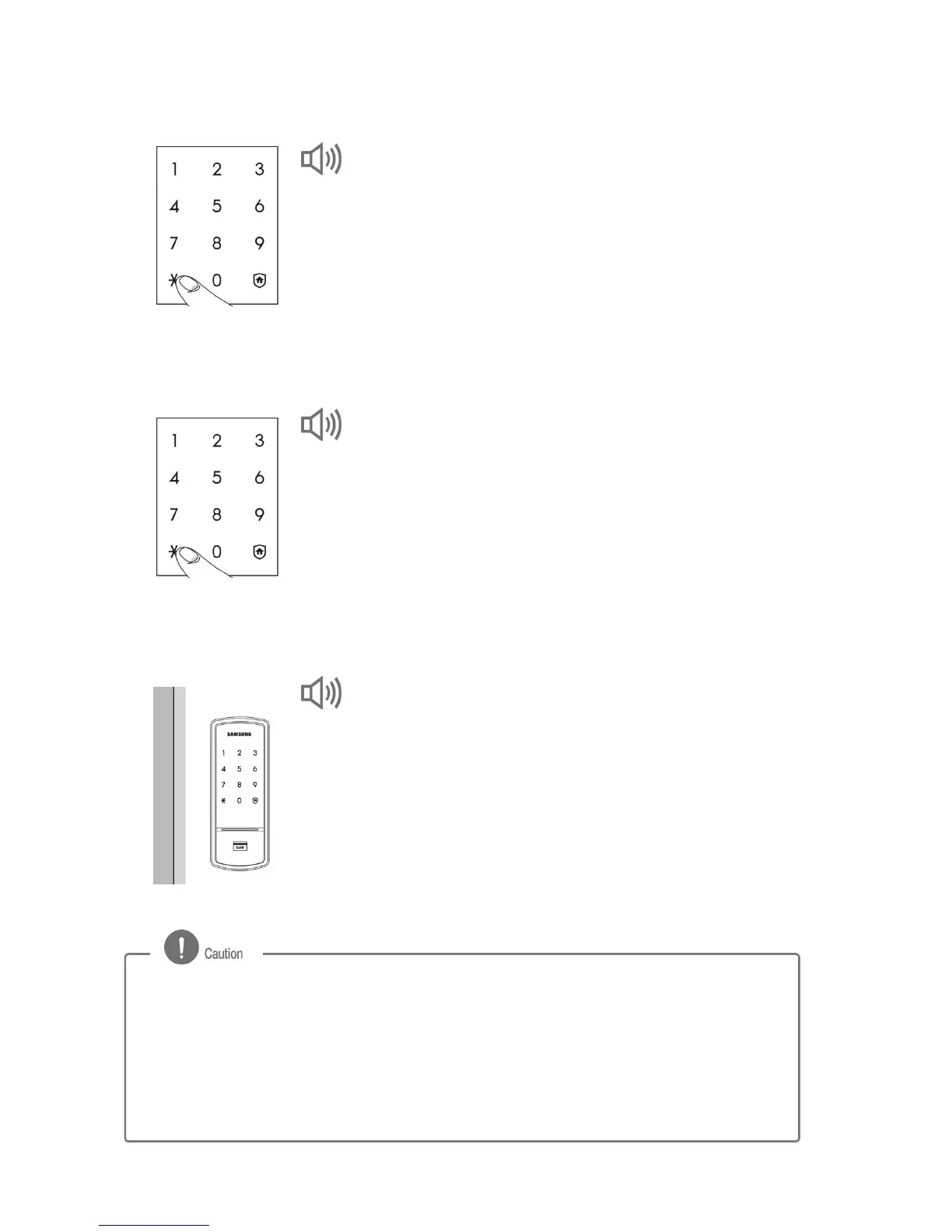
3. Entering a New Password (from the outside)
Enter the new password (4 to 12 digits) and press
the [¹] button.
- To prevent burglary, it is recommended to use a
password of 6 digits or longer. (Only numbers
between 0 and 9 can be used.)
4. Reentering a New Password (from the outside)
Enter the new password again to check if the new
password is accurately configured, and then press
the [¹] button.
5. Checking New Password Operation (from the outside)
To make sure the password has been properly
registered, check the new password and close the
door.
- Please refer to "Opening the Door from Outside
with a Password" on page 17.
DING DONG DENG DONG
DING DONG
DING DONG DENG
- To check the new password, press the door-opening sensor while the door is open.
When the dead bolt is pushed out, check the password, referring to the procedure
described in "Opening the Door from Outside with a Password."
- Manage your password with care so that unauthorized people will not have access to
it. Regularly changing your password can reduce the risk of it being leaked.
- A registered password cannot be deleted. Change the password to a new one or
initialize it to delete all registered data (password, card and key tag) and then
reregister them.



 To Next Page