18 19
INSTALLING SOFTWARE ON PC
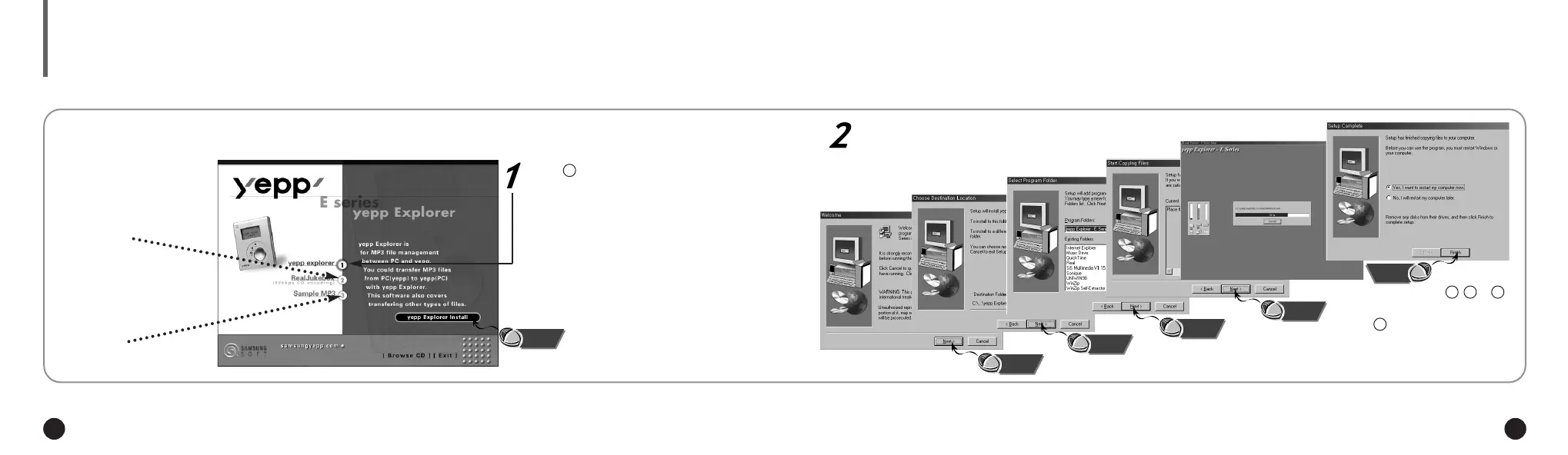
Insert the Installation CD into the CD-ROM drive. The picture below appears when inserting the CD.
Install programs , or
programs and/or download
depending on your require-
ments.
Click .
There are 100 sample
MP3 files that can be
downloaded.
This software lets you listen to
MP3 music on your computer
digitally and encode your CDs
into MP3 Files.
1
Click the next button on each successive window.
Click
Click
Click
Click
Click
Click
2 3 4
5
If your software does not work properly after finishing installation, please refer to
page 27 and recheck your PC parallel configuration (ECP mode).
NN
NN
oo
oo
tt
tt
ee
ee
ENG ENG
Eng 1/20/95 2:13 PM Page 18




 To Next Page