31
SENDING PHONE BOOK ENTRIES TO yepp´
TM
30
STORING PHONE NUMBERS
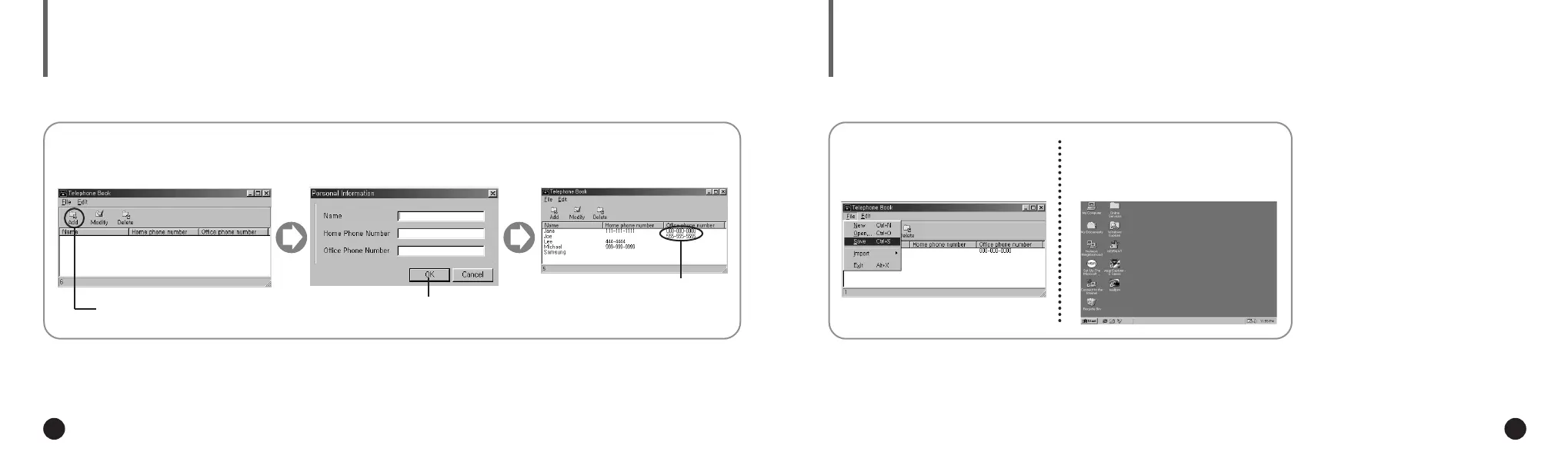
Execute the Telephone Book.
1
Click the icon of
[Add].
2
Enter the name, home phone
number and office phone
number.
3
Click [OK].
4
You can store up to 350 entries to your yepp´
TM
.
Entered phone
numbers are
displayed.
Click [Save Ctrl+S] to save the
phone book entries.
1
Execute the yepp´
TM
Explorer.
2
◆ Now you can send the phone numbers to
your yepp´
TM
. For further information, refer
to page 22.
The phone book entries are saved as [.tel]. Thus, when sending the phone book
entries to the yepp´
TM
you must select the [.tel] file. You can store only one [.tel] file to
the player. If you attempt to store another [.tel] file, it will replace the exiting file.
NN
NN
oo
oo
tt
tt
ee
ee
ENG ENG
Eng 1/20/95 2:13 PM Page 30












 To Next Page