21
FORMATTING FLASH MEMORY
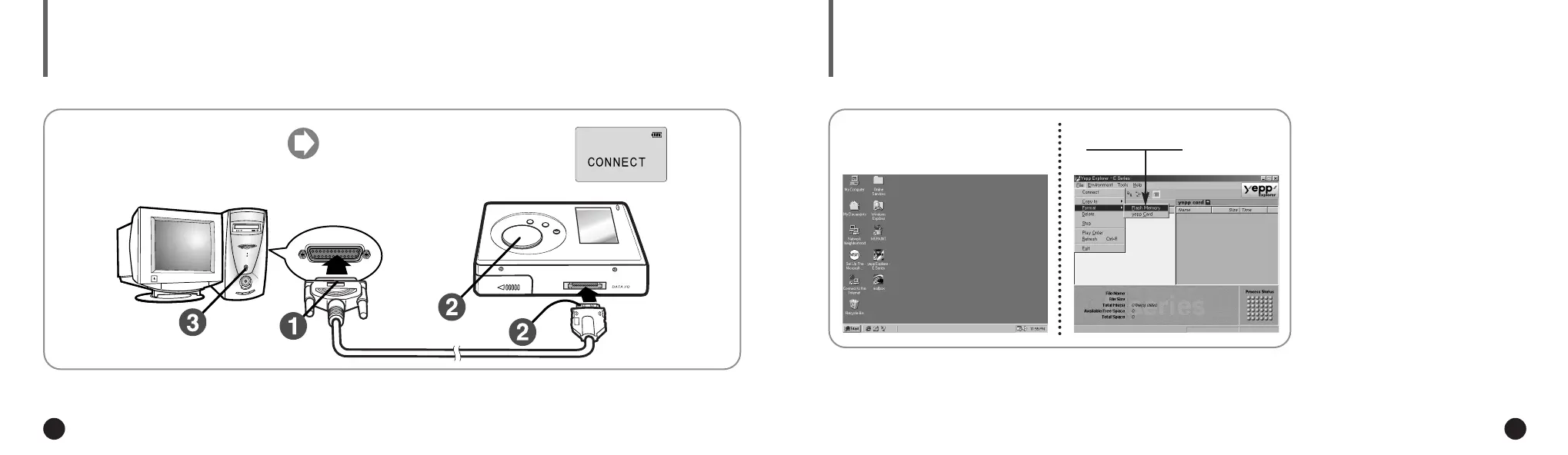
Execute the yepp´
TM
Explorer.
1
Click [File], [Format] and select
[Flash Memory].
2
◆ Double-click the icon of the yepp´
TM
Explorer on the desktop.
◆ Before formatting the flash memory or
the yepp´
TM
Card, connect your yepp´
TM
to
PC and click Connect or Refresh icon on
the yepp´
TM
Explorer.
◆ If the optional yepp´
TM
Card is installed in
the yepp´
TM
, file(s) can also be saved to
the card by clicking Copy to and selecting
yepp´
TM
Card.
◆
You can also format the flash memory
or the yepp´
TM
Card by pressing the right
button on the mouse and selecting
Format.
NN
NN
oo
oo
tt
tt
ee
ee
◆ Formatting Flash memory(or yepp´
TM
Card) will
delete all existing files.
WW
WW
AA
AA
RR
RR
NN
NN
II
II
NN
NN
GG
GG
20
CONNECTING yepp´
TM
TO PC
Connect the parallel cable to the
parallel port of the computer.
Turn the player on and connect
the other end of the cable to the
download connector.
◆ CONNECT will appear on the LCD of
the player.
12
Parallel Port
ENG ENG
Eng 1/20/95 2:13 PM Page 20




 To Next Page