22
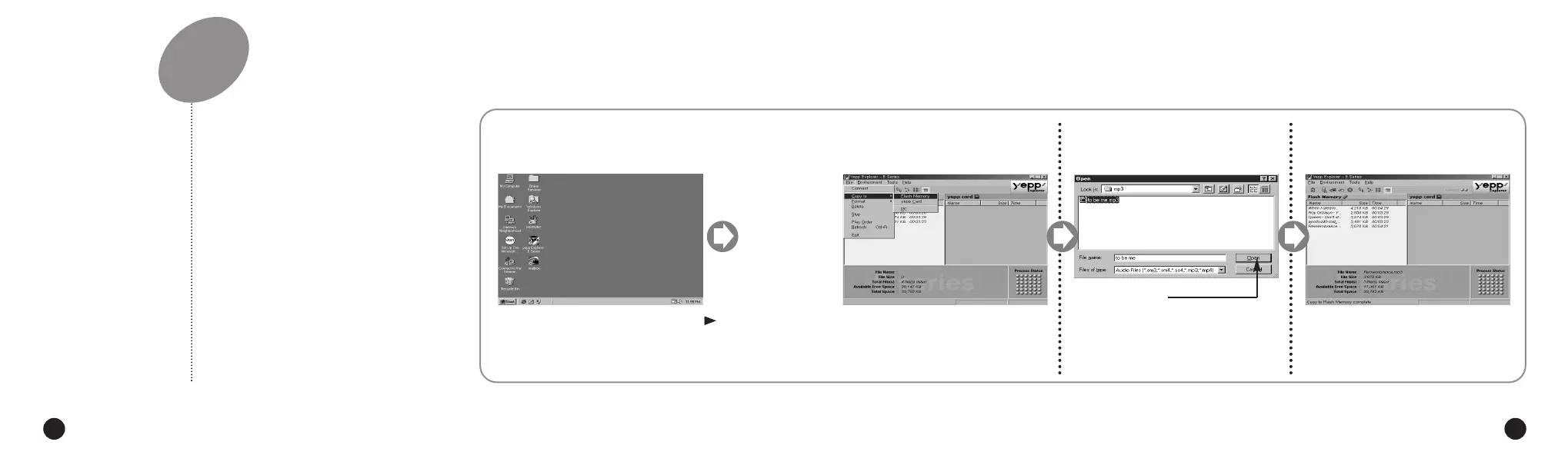
SENDING FILES TO yepp´
TM
Before sending files to your yepp´
TM
,
connect the yepp´
TM
to PC and click
Connect or the Refresh icon on the
yepp´
TM
Explorer.
Execute the yepp´
TM
Explorer.
1
◆ Double-click the icon of the yepp´
TM
Explorer on the desktop.
Turn on the yepp´
TM
by pressing .
2
Click the Connect icon on the
yepp´
TM
Explorer.
3
23
Click [Copy to] and [Flash
Memory] or [yepp´
TM
Card].
4
Select the file you would like to
send to your yepp´
TM
.
5
Click [Open].
6
The selected file has been saved.
Now you can listen to music with yepp´
TM
after removing the parallel cable.
◆ Always check that CONNECT is displayed on the LCD before sending a file.
◆ The yepp´
TM
uses around 1MB of memory for each minute of music.
Voice recording occupies about 0.25MB of memory for each minute.
NN
NN
oo
oo
tt
tt
ee
ee
ENG ENG
Eng 1/20/95 2:13 PM Page 22




 To Next Page