2524
OPTION PREFERENCES
To set the preferences, click the [Environment] and [Option Ctrl+O] on the yepp´
TM
Explorer.
To save the changes, click [OK].
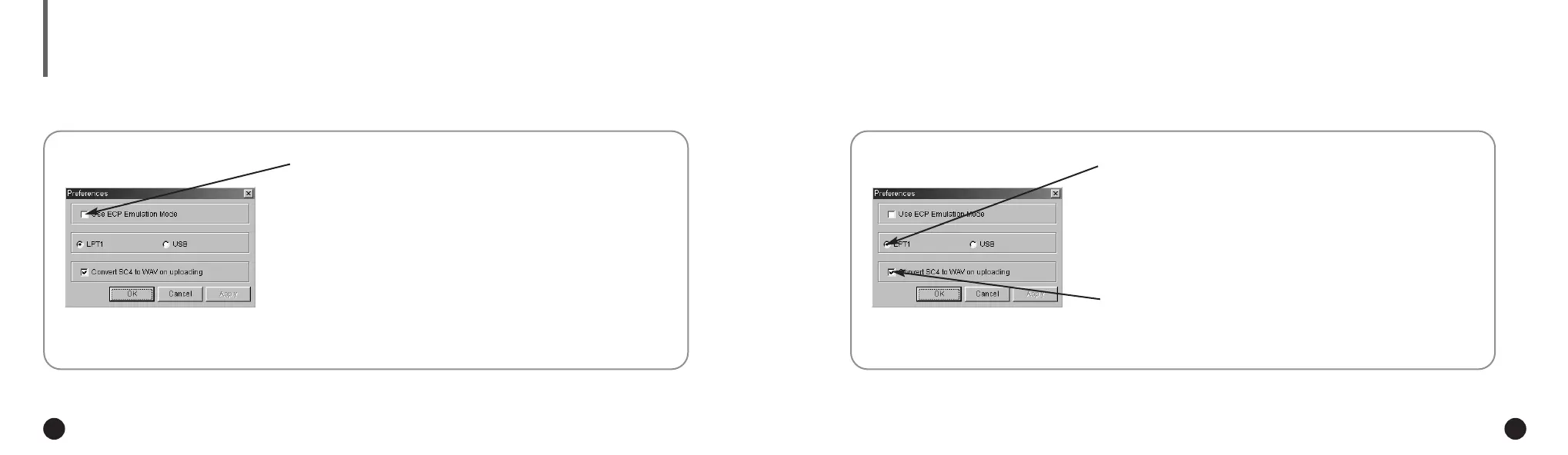
◆ Using ECP Emulation Mode
If your PC supports ECP mode, you do not have to click
on the box.
When your PC does not support ECP mode, click on the ECP
Emulation mode box. (In this case, the download speed can
be lower than that in ECP mode.)
However, some old model computers will not able to
communicate with your yepp´
TM
even though you select
the ECP Emulation mode.
◆ LPT1 & USB
When using the parallel cable, click LPT1 and when using the
USB adapter, click USB. (The USB adapter is an optional
accessory. For further details on the adapter, refer to the
Owner’s Guide provided with the adapter.)
◆ Convert SC4 to WAV on uploading
When you wish to listen to a voice file on your PC,
click on the box.
ENG ENG
Eng 1/20/95 2:13 PM Page 24




 To Next Page