6 7
REPEATING TRACKS/SECTIONLISTENING TO MUSIC
Your yepp´
TM
comes with pre-installed MP3 files for your immediate use. Your yepp´
TM
can automatically repeat all files or an individual file.
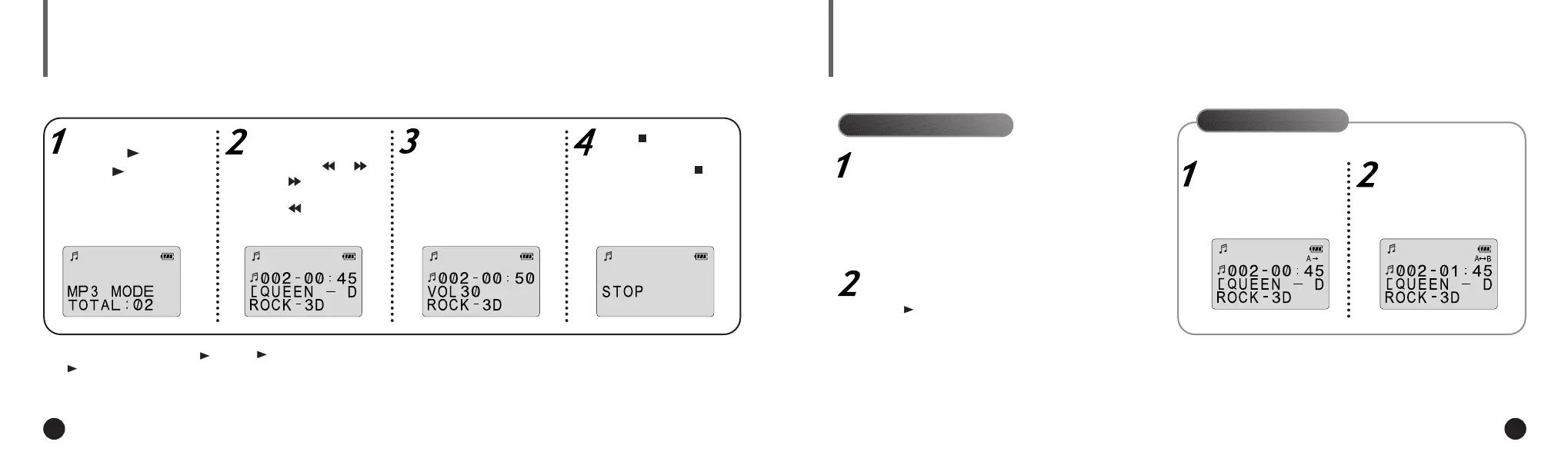
Turn the player on by
pressing .
◆ Press again to play the
first selection.
To stop the playback temporarily, press .
Press again to continue playing.
If there is no music playing, and you
have not pressed any buttons, your
yepp´
TM
will automatically shut down
after approximately 3 minutes.
To cancel section repeating, press the
MODE/A
↔
B button during the playback.
Select the track to
which you wish to listen
by pressing or .
◆ Press to listen to the
next track.
◆ Press to listen to the
previous track.
Adjust the volume by
pressing and holding
the volume +/- to your
desired level.
Press to stop play.
◆ To turn your yepp´
TM
off,
press and hold the for
about 2 seconds.
Continue pressing the REPEAT button until
the desired repeat mode is displayed.
Press to listen to the selected Repeat mode.
To turn off the repeat mode, continue to press
the REPEAT button until there is no repeat
indication on the display.
Pressing the REPEAT button will allow you to
perform the following functions.
◆ Repeat : repeat the current selected file
◆ All : repeat all files stored in the selected mode
◆ Shuffle : randomly plays files in the selected mode
◆ INTRO : plays the first 10 seconds of each file in the
selected mode
Press the MODE/A↔B
button to start excerpt-
ing.
◆ A is displayed on the LCD.
Press the MODE/A↔B
button again to com-
plete selection.
◆ B is also displayed.
You can repeat a section within a song. Begin by playing the desired file.
Repeating Tracks
Section Repeating
▼
Press to play the track you selected.
▼▼
▼
ENG ENG
Eng 1/20/95 2:13 PM Page 6




 To Next Page