10 11
VOICE RECORDINGUSING THE EQUALIZER
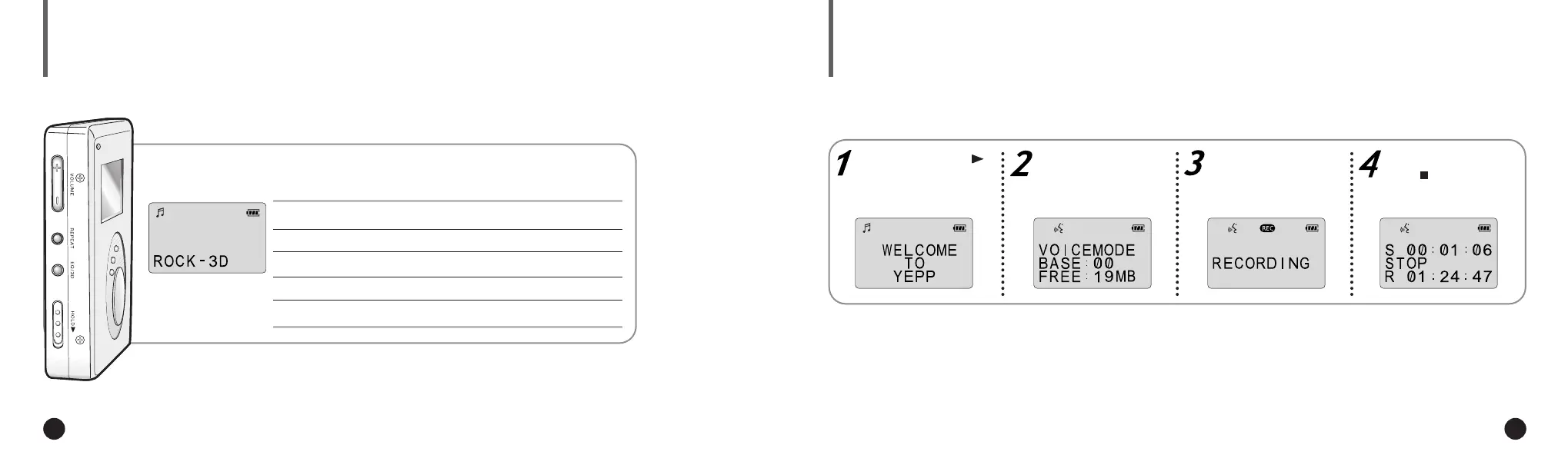
Your player is equipped with a preset equalizer that enables you to choose the most appropriate balance between
treble and bass frequencies, according to the type of music you are listening to.
You can record up to 128 minutes(with YP-E32). Voice is recorded on ADPCM format,
so the quality of sound may be lower than that of the MP3 format.
Press the EQ/3D button one or more times until the required option is selected.
There are seven available equalizer settings.
If necessary, press
to turn the player on.
If ‘full’ is displayed, delete MP3 files or
voice files to secure free space in
memory for voice recording.
Press the MODE/A↔B
button to select the
voice mode.
Press the REC button to
start voice recording.
To stop recording,
press .
To obtain a... Then select...
Normal balance NORMAL
Balance suitable for Jazz music JAZZ or JAZZ-3D
Balance suitable for rock music ROCK or ROCK-3D
Balance suitable for classical music CLASSIC or CLASSIC-3D
▼
3D sounds are Royal Sound Field(RSF
®
) provided by Rhas_tel Co..
(rhas@hitel.net)
NN
NN
oo
oo
tt
tt
ee
ee
If there is no voice signal, your yepp´
TM
will stop
recording automatically until you start recording again.
NN
NN
oo
oo
tt
tt
ee
ee
ENG ENG
Eng 1/20/95 2:13 PM Page 10





 To Next Page