2928
DELETING FILES
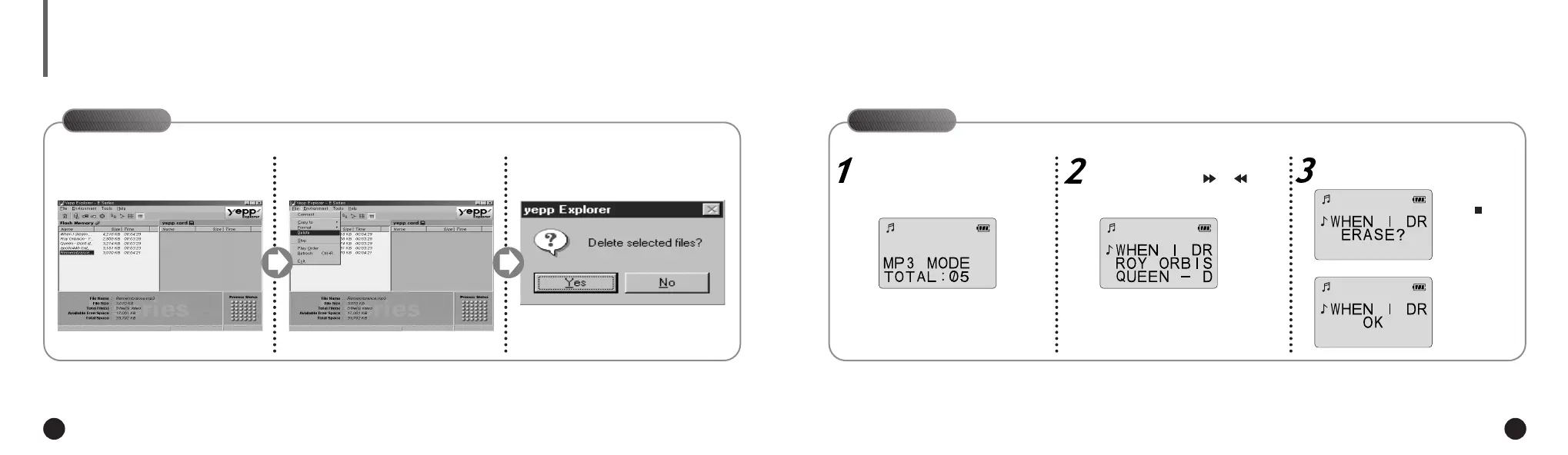
On PC
Click the file you would like to
delete.
1
Click [File] and select [Delete].
2
Click [Yes].
3
Connect your yepp´
TM
to PC and execute the yepp´
TM
Explorer before deleting.
On yepp´
TM
Press the MODE/A↔B button to
select the mode.
Select the file you would like to
delete by pressing or .
Press the ERASE button twice.
Once files have been deleted from your
yepp´
TM
, they cannot be accessed.
NN
NN
oo
oo
tt
tt
ee
ee
You can also delete the file by
pressing the right button on the mouse
and selecting Delete.
NN
NN
oo
oo
tt
tt
ee
ee
To cancel deleting,
press or wait
3~4 seconds with-
out pressing any
button.
▼
ENG ENG
Eng 1/20/95 2:13 PM Page 28




 To Next Page