33
VIEWING PHONE NUMBERS
32
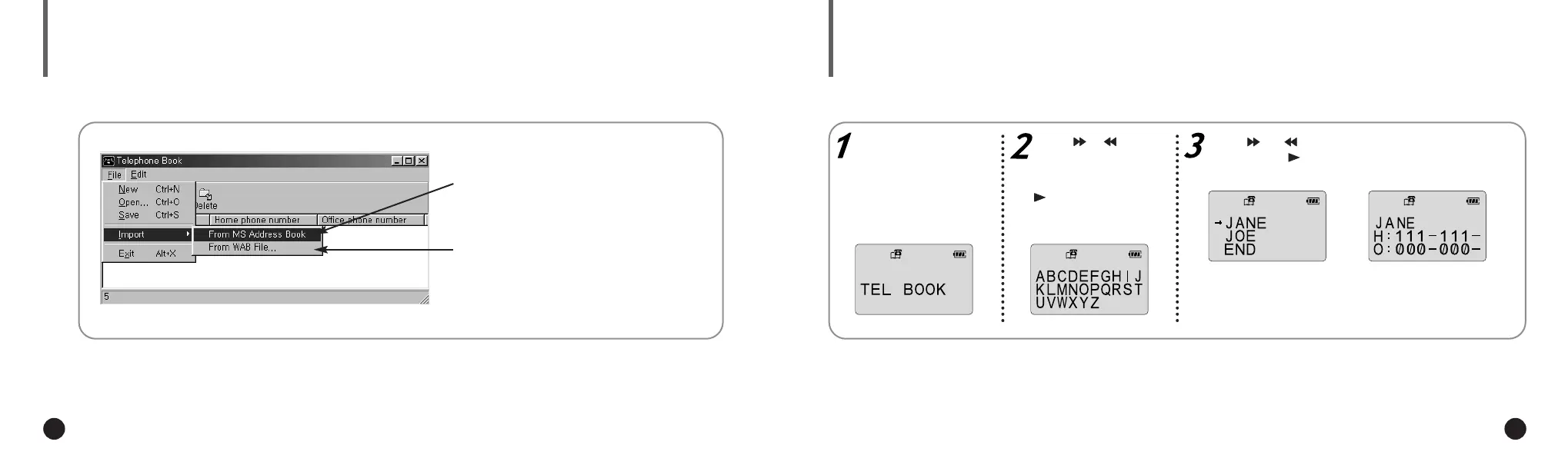
IMPORTING PHONE BOOK ENTRIES
You can import the phone book entries
from the Address Book in Microsoft Internet
Explorer 4.X and 5.X.
You can import the phone book entries [.wab]
from a specific directory.
The phone numbers can be found alphabetically.
Press the MODE/A↔B
button to select the
phone book mode.
Press or to move
the cursor to the first
letter of the name you
are looking for. Press
to display the names
entered under the cho-
sen letter.
Press or to move the cursor to the desired
name. Press to display the chosen names
phone numbers.
The entries are displayed in
alphabetical order.
▼
H : Home phone number.
O : Office phone number.
▼
To exit the phone book mode and return to main
menu, press the MODE/A↔B button again.
▼
ENG ENG
Eng 1/20/95 2:13 PM Page 32







 To Next Page