35
SAFETY PRECAUTIONS
34
yepp´
TM
CARD
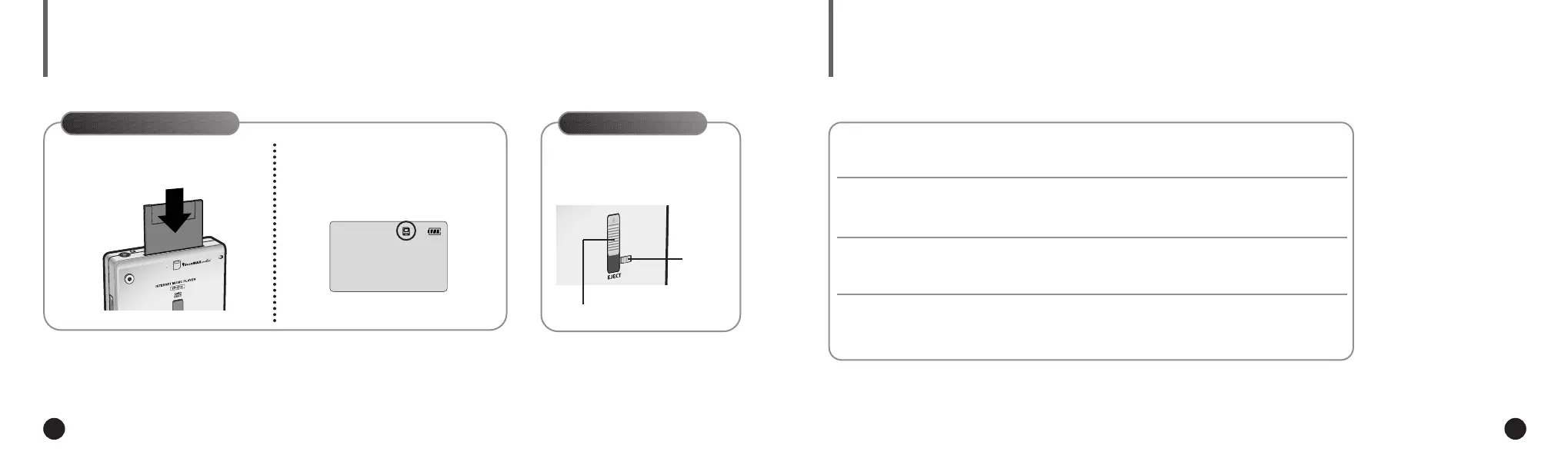
To send files to the yepp´
TM
Card, you must
format the card before using it ; refer to page 21.
You can store more music by using the optional yepp´
TM
Card.
The yepp´
TM
Card icon will
appear when the card is installed
and your yepp´
TM
is turned on.
2
Installing yepp´
TM
Card
Ejecting yepp´
TM
Card
Move the Eject Lock Switch to the
right side and push the yepp´
TM
Card Eject Switch upward.
yepp´
TM
Card Eject Switch
Eject Lock
Switch
Do not drop your player or leave it under heavy objects.
Do not allow any liquids to contact the player.
◆ If this happens, wipe the player with dry cloth and call a Samsung Electronics service center.
Avoid areas of high humidity, strong magnetic fields, or sources of heat when
storing your player.
Do not use thinner, alcohol, or benzene when cleaning the player.
It may damage the player.
▼
Insert the yepp´
TM
Card into the
yepp´
TM
Card Slot.
1
ENG ENG
Eng 1/20/95 2:13 PM Page 34




 To Next Page