12 13
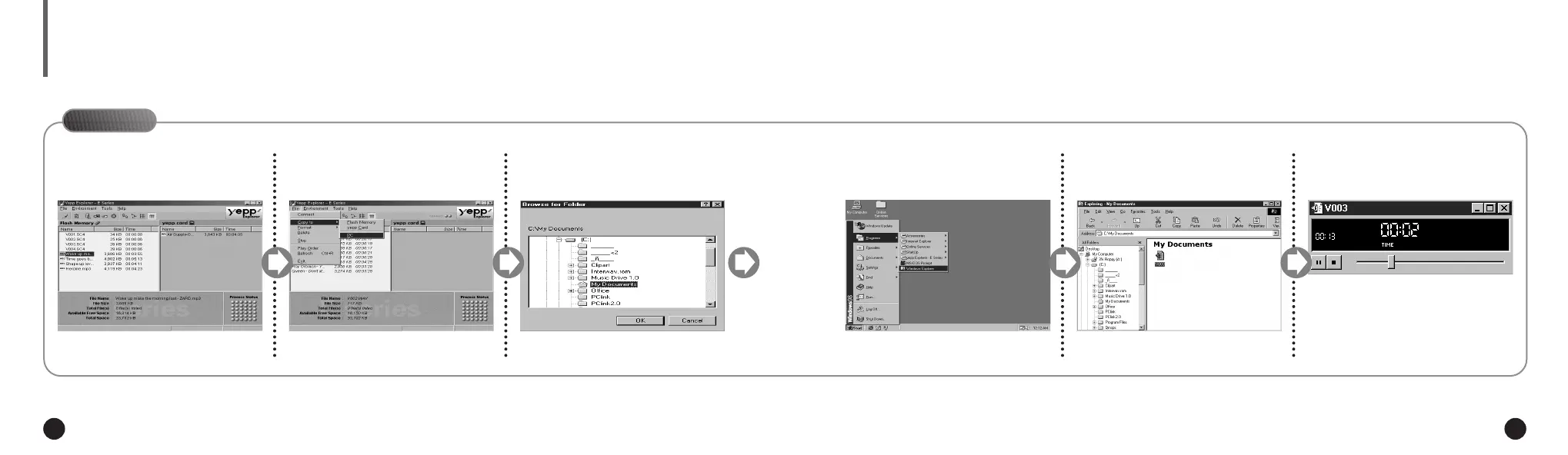
LISTENING TO THE RECORDED VOICE (ON PC)
On PC
Click the file to which you
would like to listen.
1
Click [Copy to] and [PC] in order.
2
Choose the directory.
3
Click [OK].
4
Execute Windows Explorer.
5
Double-click the file you want to
listen to.
6
The selected file is played back.
7
Connect your yepp´
TM
to the PC and execute the yepp´
TM
Explorer as indicated on pages 18~22.
◆ When you wish to send voice files to another computer and listen to them, please refer to page 15.
NN
NN
oo
oo
tt
tt
ee
ee
ENG ENG
Eng 1/20/95 2:13 PM Page 12









 To Next Page