98
ARRANGING THE PLAYBACK ORDER
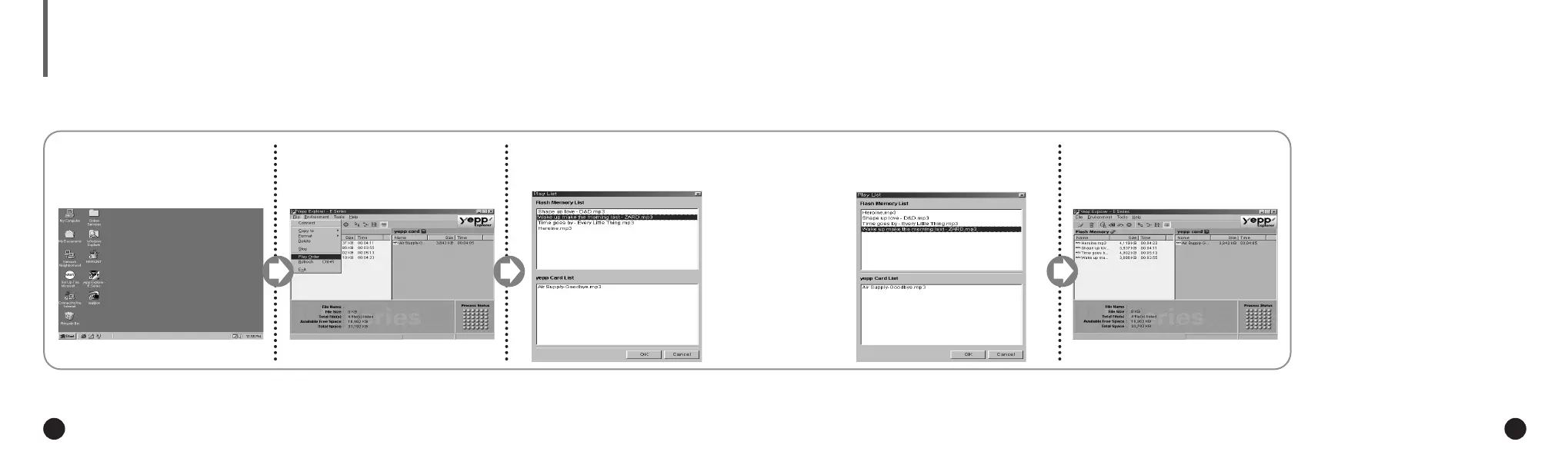
Click [OK] after moving files to
the desired position.
4
The yepp´
TM
Explorer displays the
file arrangement you made.
5
Execute the yepp´
TM
Explorer.
1
Click [File] and [Play Order].
2
◆ Double-click the icon of the yepp´
TM
Explorer on the desktop.
Arrange the files by dragging
and dropping.
3
Connect your yepp´
TM
to the PC and execute the yepp´
TM
Explorer as indicated on pages 18~22.
ENG ENG
Eng 1/20/95 2:13 PM Page 8






 To Next Page