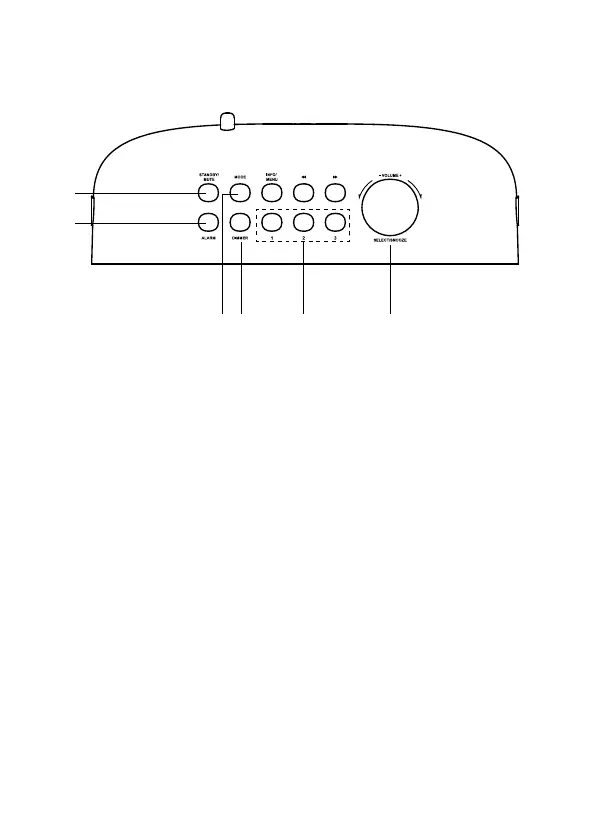
1. STANDBY/MUTE Button
• Press to switch between On and Standby mode.
• In On mode, press and hold to mute/resume playback.
2. ALARM Button
Press to enter Alarm 1/2 Setup menu.
3. MODE Button
Press to switch between FM, DAB, Auxiliary Input and Bluetooth
mode.
4. DIMMER Button
Press repeatedly to select the brightness level.
5. PRESETS 1/2/3 Button
• Press and hold to directly save preset station 1-3.
• Press to directly recall preset station 1-3.
6. –VOLUME+/SELECT/SNOOZE Dial
• Turn to increase/decrease volume.
• Press to conrm a selection in the menu.
• Press to activate the snooze function when the alarm sounds.
• Press to pause/resume playback in Bluetooth mode.
• Press and hold to disconnect the paired device in Bluetooth mode.
• Press and hold to reconnect the last paired device in Bluetooth mode.
Top View
2
3 4 5 6
1
11





 To Next Page