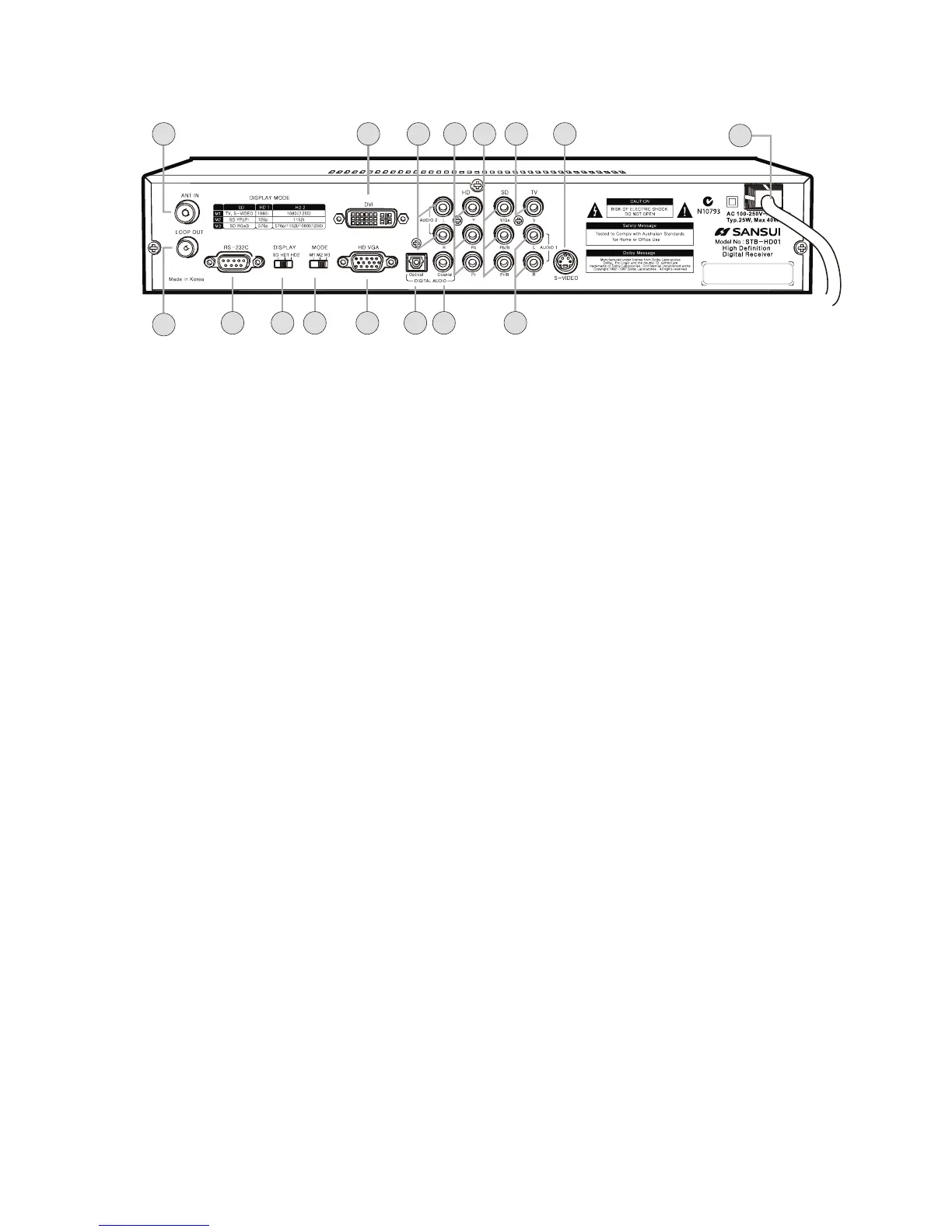
Rear Panel
9. ANT IN terminal
Attach an external Antenna to this terminal
10.
n
11. AUDIO 2 Output terminal(L/R Analog Stereo)
This terminal can be used with your TV analog audio input. Refer to Audio Connection
Pages .
12. HD YPbPr (HD Component Video) Output terminal
Use this terminal with your TV HD Component Video input. (HDTV Only)
13. SD YPbPr or SD RGB (SD Component Video) Output terminal
Use this terminal with your TV equipped with Component Video input (SD or Normal
TV) For designated output type, please refer to DISPLAY MODE table.
14. TV Composite Video Output terminal (CVBS)
Use this terminal with your TV Video input.
15. S-Video Output terminal
Use this terminal with your TV S-Video input.
16. Power Cord
Plug this Cord to the specified AC Power socket.
17. LOOP OUT terminal
Use this terminal to feed RF signal to your TV or VCR for analog reception.
18. RS-232C
Use this terminal for software upgrade purpose only.
19. DISPLAY select switch
Set this switch in conjunction with MODE switch according to your TV display
capability.
20. MODE select switch
Set this switch in conjunction with DISPLAY switch according to your TV display
capability.
21. HD VGA (HD Component RGBHV) Output terminal
Use this terminal with your TV HD VGA Video input. (Only HDTV equipped with VGA
input or Computer Monitor)
22. Optical Digital Audio (S/P DIF) Output terminal
Use this terminal with A/V device equipped with Optical Digital input for 5.1 Dolby
Digital.
23. Coaxial Digital Audio (S/P DIF) Output terminal
Use this terminal with A/V device equipped with Coaxial Digital input for 5.1 Dolby
Digital.
24. AUDIO 1 Output terminal (L/R Analog Stereo)
This terminal can be used with your TV analog audio input. Refer to Audio Connection
pages.
DVI Output terminal
This terminal ca be used with your TV DVI input. Refer to Video Connection Pages.
4
Overview of the equipment
18
17
2419 20 21 22 23
16
13
14 1510 1211
9


 To Next Page