30 ACU-280 SATEL
6. A message will confirm that the device has been added (unless you have entered an
invalid serial number, of which the message will inform you).
6.1. Device type will be displayed. For the AXD-200 multipurpose detector, you can select
the device type.
If the device type you select is different from the type set before the AXD-200
detector was added to the system, the type will change during the periodical
communication. It results in a delay whose duration depends on the frequency of
periodical communication (with the “ECO” option enabled, delay can be up to
3 minutes).
6.2. A new name of the zone to which the device is to be assigned will be displayed.
You can change the name. If the device occupies two or more positions on the
device list, the same name will be given to the other zones. If the device is to be
assigned to outputs, the outputs will be given the same name.
6.3. For some devices you can select if the device is to occupy one or two positions on
the list of devices.
7. Click the “OK” button.
8. The “New device” window will close.
9. The new device will be displayed on the list of devices.
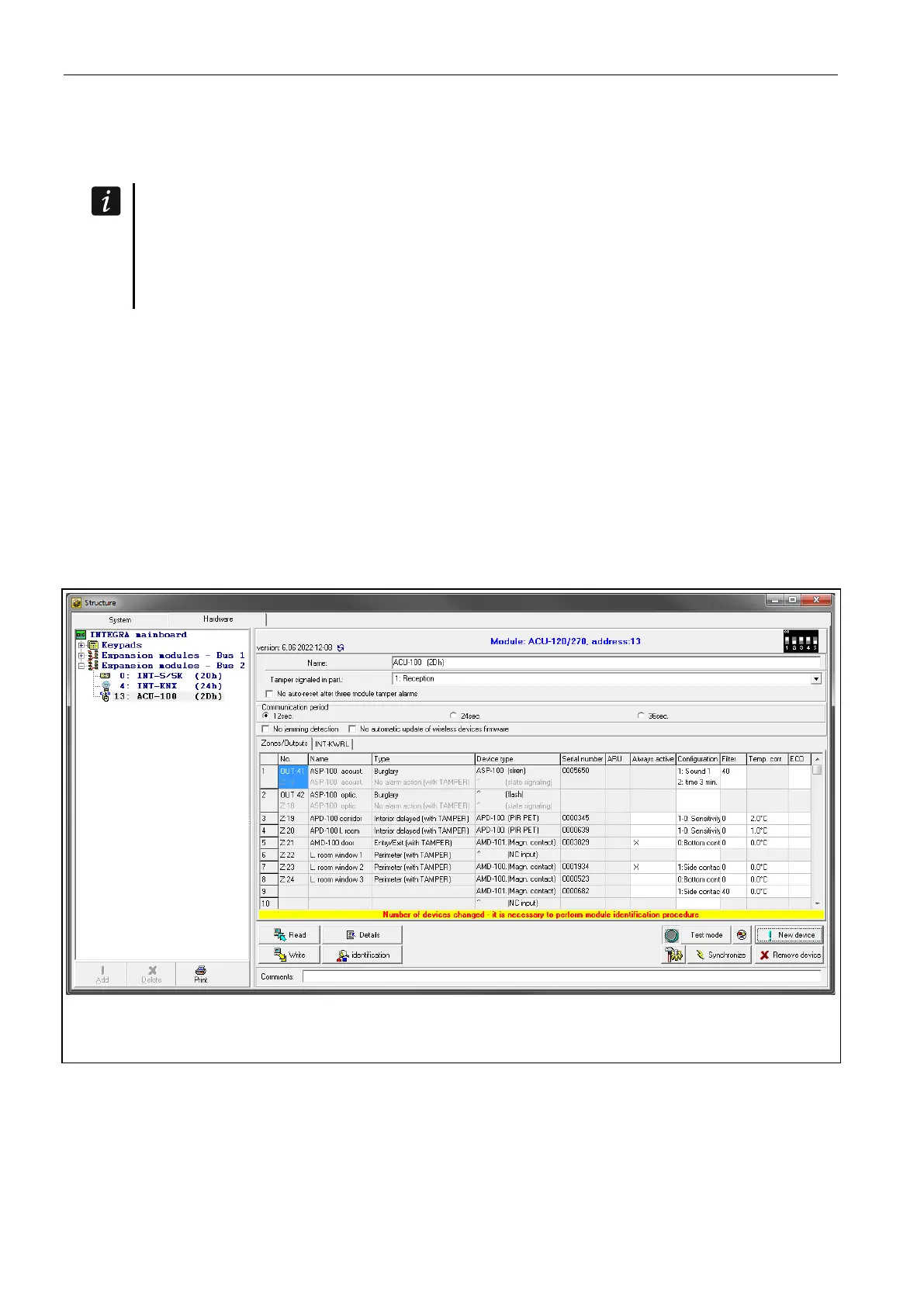
10. Click the “identification” button (see Fig. 23). The new wireless zones / outputs will not be
available in the alarm system until the procedure of expander identification is finished.
Fig. 23. DLOADX program: information displayed after registration of a new device to the
controller connected in the INTEGRA system.
LCD keypad
You can add wireless devices in service mode, using the “New device” function (“Structure”
“Hardware” “Expanders” “Settings” [controller name] “New device”).
When adding a device you can select the alarm system zone to which you want to assign the
device. It can be one of the unoccupied zones from the pool reserved for the controller.
If the device takes up more than one position on the list of devices, additional zones will be
assigned to the device automatically (these will be the zones following the selected one).


 To Next Page