1 Jan, 12:35:47
System OK
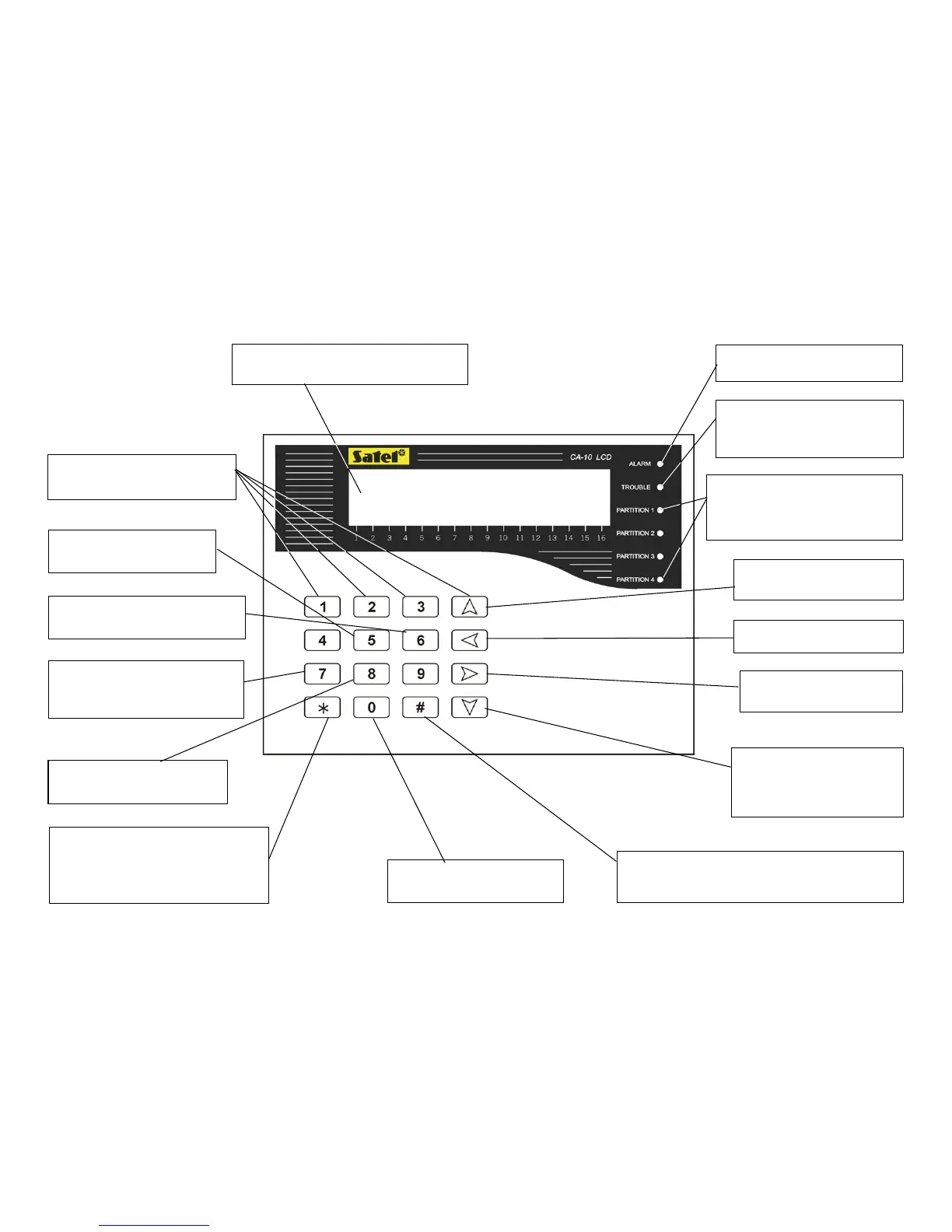
LCD DISPLAY: time and date or partition
name and system status message
cdef - hold down for 3 sec.
to GO TO selected partition
h pressing the key for 3 seconds
activates Trouble Log Review
g - hold down for 3 sec. to
activate alarm log viewing
i - hold down for 3 sec. to
activate current trouble condition
display
j - hold down for 3 sec.
switches the CHIME on/off
[
*
]
- pressing the key for 3 seconds
activates FIRE ALARM
ACCESS CODE+[
*
] - user menu
functions
b - hold down for 3 sec. to
activate AUXILIARY ALARM
[#] - hold down for 3 sec. to activate PANIC ALARM
CODE+[#] – arming/disarming, clear alarm
ALARM - alarm in the current
partition
TROUBLE - signals trouble
detection in the system - to check
press
i key for 3 seconds
PARTITION 1, 2, 3, 4
control on - the zone is armed;
control blinking - counting down
exit delay time
▲ - identifying the partition
signaling alarm
◄ - identifying violated zones
► - identifying zones where
alarm occurred
▼ - displaying partition name,
pressing the key for 3 seconds



 To Next Page