SATEL VERSA 13
3.9.1 Adding a user
1. Enter the user menu and press in turn . Adding the user is effected by
“ rogramming step number is presented on the the step by step” method, hence the p
and LEDs of the first and second partitions (see: page 11, Table 1).
You can press to interrupt the procedure of adding a user. If the procedure is
interrupted in step 5 or a nex hedule and partitions have been t one (the code, user sc
a lready assigned to the user), the user will be added.
2. Step 2. Entering new user code. The user number is indicated by the blinking LED
si new user's code, and then press
. de gnated by number. Enter the
3. Step 3. Selecting user schedule. Five installer defined schedules are available. The
e and the default operating mode of the remote
e keyfobs are added in subsequent steps). Press
the key bearing the digit corresponding to the schedule which is to be assigned to the
ing to the selected schedule number will start blinking. Press
sch dule determines the user's rights
control keyfobs assigned to the user (th
user. The LED correspond
to confirm your selection.
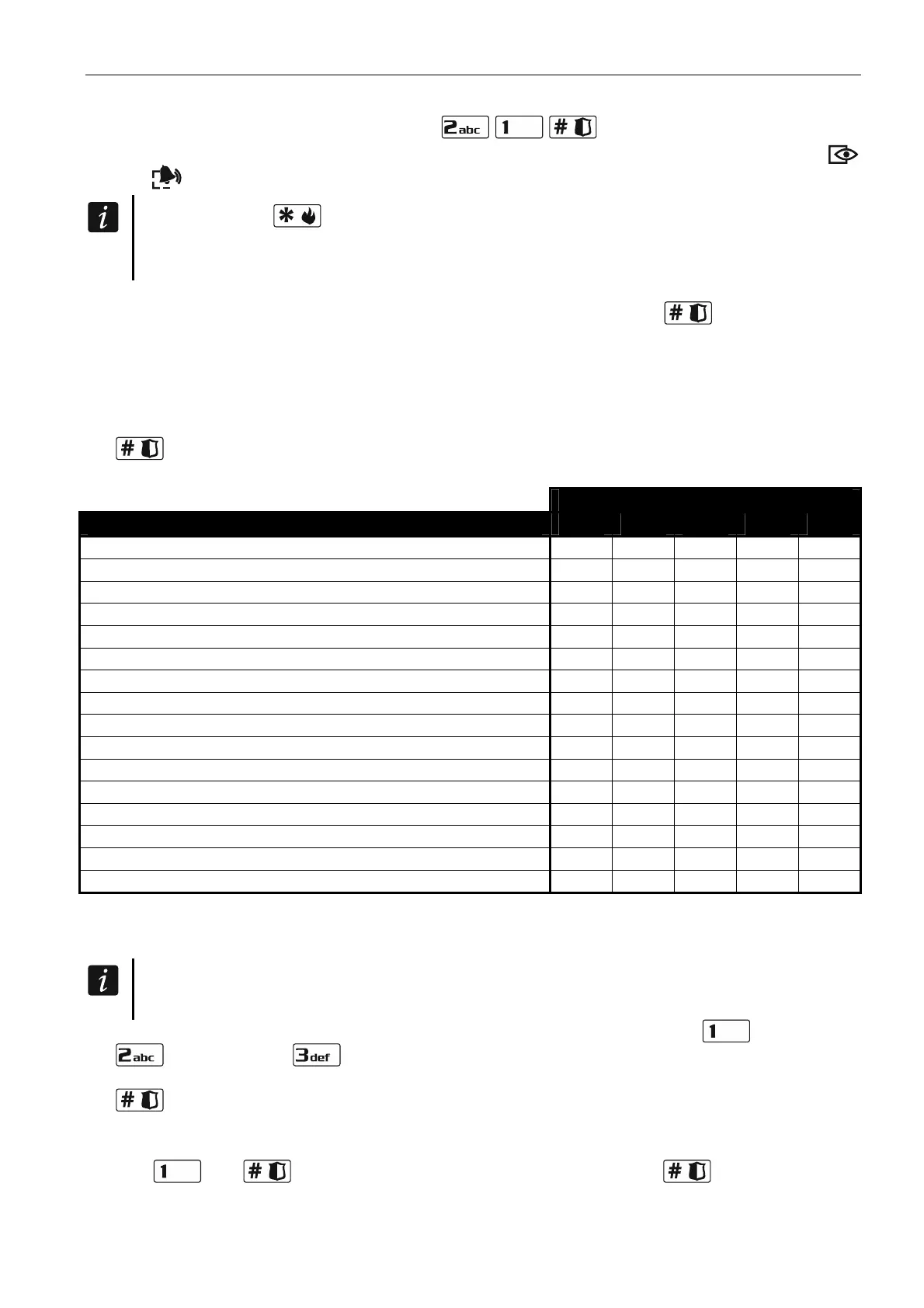
Schedule number
Right 1 2 3 4 5
Arming
Disarming
Alarm clearing
Telephone messaging clearing
Auto-arming defer
Zone inhibition
Zone isolation
Change access code
Users editing
Control
Programming
DOWNLOAD/SERWIS
Inspection
Tests
DURE
SS
INT-VG access
Table 2. Factory default settings of the user schedules. The installer can assign other rights
to them.
Using the DURESS right code will trigger a silent alarm, which is not signaled in any
way, but the alarm code will be sent to the monitoring station.
4. cessible to the user. Press the key Step 4. Selecting partitions ac (partition 1),
(partition 2) or (both partitions) to define the partitions to which the user is to
have access. The LED with number corresponding to your ch . Press oice will start blinking
to confirm your selection.
5. Adding 433 MHz keyfob. If the INT-RX-S, INT-RX ER MC odu is
ed to the control panel, the user may be assi f
5. Step or V SA- U m le
connect gned a 433 MHz key ob. Press in
turn
and (if a keyfob is to be assigned to the user) or only (if no keyfob
. is to be assigned to the user)





 To Next Page