SATLINK FLEET ONE Installation Manual Ref: SL00-01191 Ver: 003
Page 31 of 38
Proprietary Information Not To Be Disclosed Without Written Authorisation From
Satlink S.L., All Rights Reserved
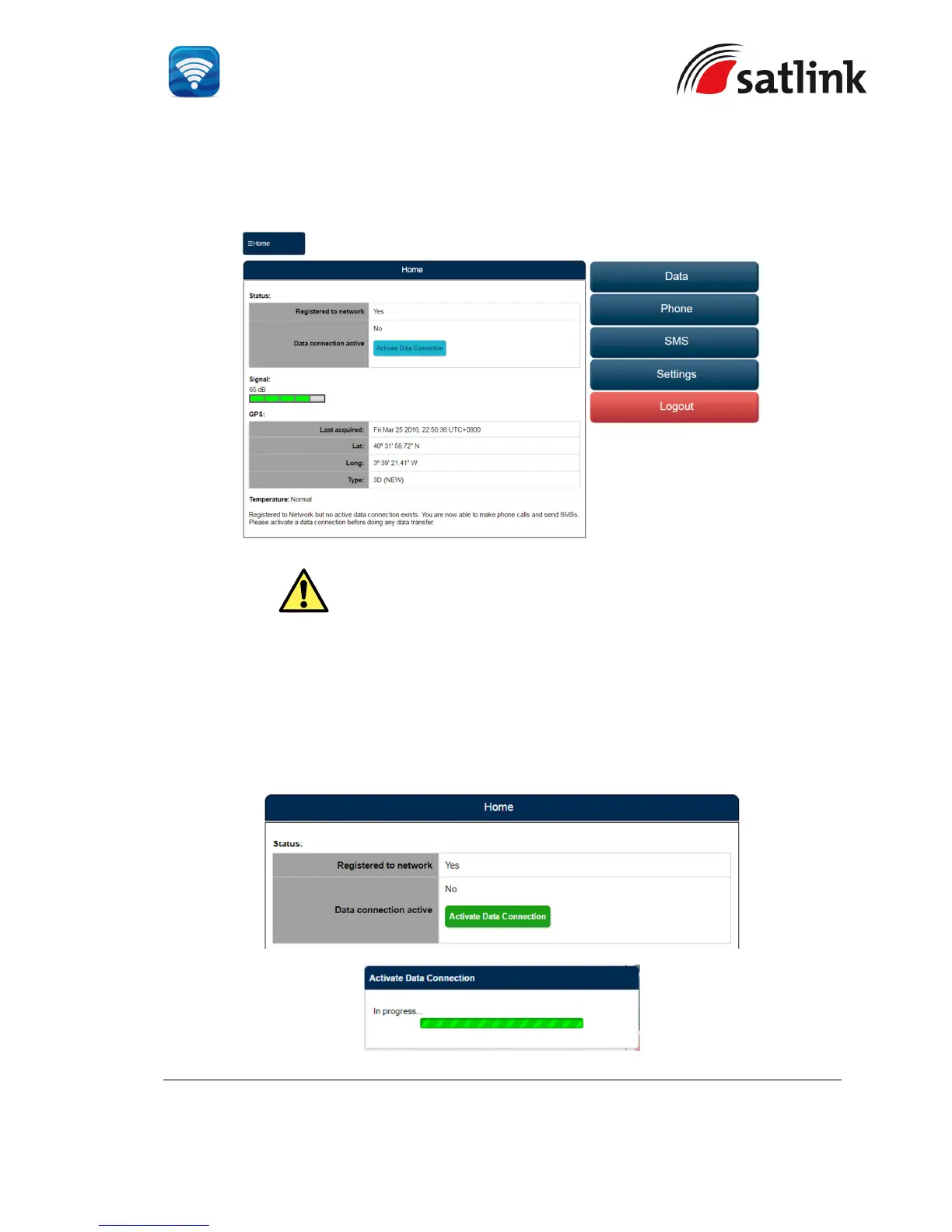
The Web Console will appear. The terminal will proceed automatically to “Checking PIN
status” followed by “Antenna Pointing” and then registering to the network (upon power on).
Upon successful registration, with 3 BDU’s LED indicators (
“TERMINAL”, ”ANTENNA” and
“REGSITERED”
) which are in green, the terminal will be ready for normal operation.
4.3.2 Activating PDP Context
To activate the PDP context for browsing internet, click “Activate Data Connection”. The
BDU’s LED indicator (“DATA ACTIVE”) will turn green.
WARNING: If the signal strength is low (< 50 dB), check any obstruction
against the antenna unit or the condition of antenna cable.


 To Next Page