Section 7: Replacement Procedures
M84Pro Service Manual PN: 9001111A Page 7-7
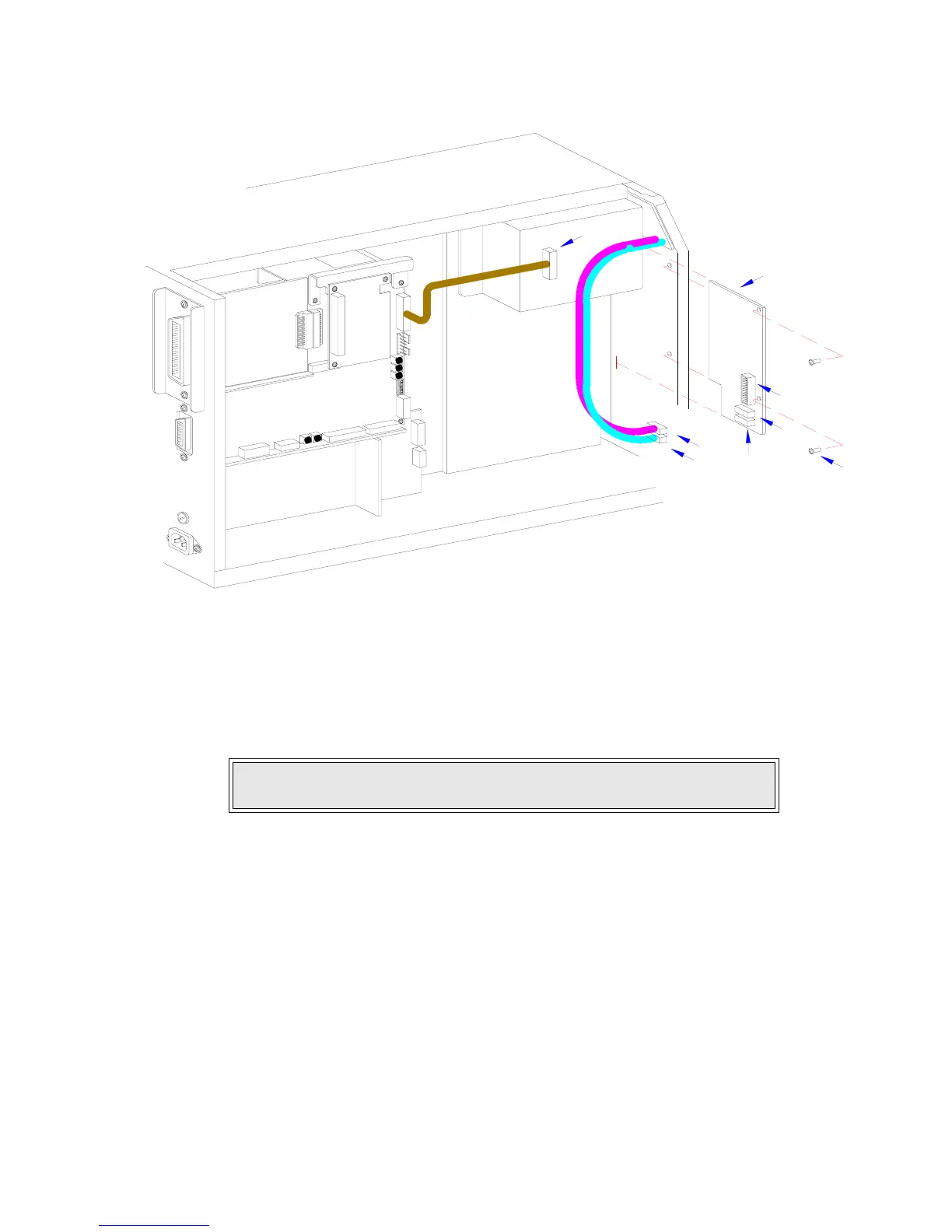
Figure 7-6, Panel Board Replacement
LCD BOARD REPLACEMENT
1 Switch off the printer and disconnect the power supply cord.
2 Open/remove the top, right, and left housing covers.
3 Locate LCD board (1, Figure 7-7) mounted to the interior of the front cover.
4 Disconnect wiring harnesses (A) and (B) from panel board (2).
5 Remove two screws (3) and one plastic washer (4) securing LCD board (1) to the printer.
6 Manipulate LCD board (1) laterally from within the printer.
7 Insert replacement LCD board (1) behind the face cover so that thew LCD is aligned with its
respective slot in the cover.
8 Apply screw (3) into the upper mounting orifice and screw (3) with washer (4) to the lower.
9 Tighten screws (3) securely.
10 Connect LCD wiring harnesses (B) and (A) to panel board (2).
11 Reconnect power supply cord, test cycle, and reattach housing covers.
NOTE: Figure 10-1 of the Daigrams & Schematics section provides guidance
on housing cover removal.
I
N
T
E
R
F
A
C
E
M
A
I
N
C
I
R
C
U
I
T
B
O
A
R
D
D
A
U
G
H
T
E
R
B
O
A
R
D
P
O
W
E
R
B
O
A
R
D
B
O
A
R
D
P
A
N
E
L
B
O
A
R
D
L
C
D
B
E
L
T
C
O
N
F
I
G
U
R
A
T
I
O
N
B
C
2
A
1
A
B
C



 To Next Page