Savant IP Audio Deployment Guide Copyright © 2020 Savant Systems, LLC
009-1571-03 | 200224 22 of 39
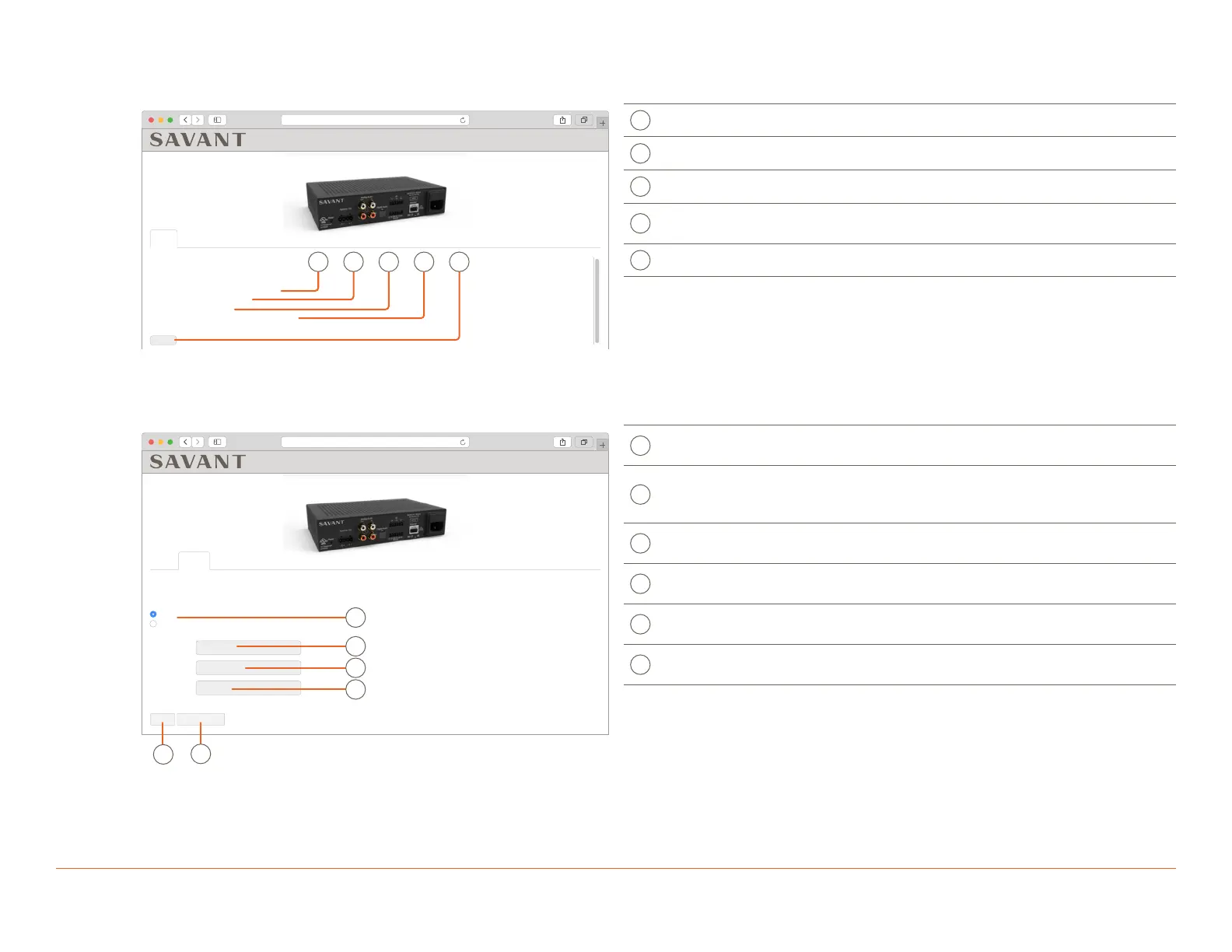
6.2. Status Tab
This tab is available on all IP Audio devices.
10.0.100.50
Status Network Inputs & Outputs
Status
Savant ID
IP Address
Firmware Version
Uptime
001AAE0000000000
10.0.100.50
9.1:62
0 days 2 hours 53 minutes
Restart
IP Audio 1, PAV-SIPA1SM
A B
C D E
A
Savant ID UID of the device.
B
IP Address Currently assigned IP Address.
C
Firmware Version Current Firmware Version number.
D
Uptime
Amount of time the unit has been powered without
a restart.
E
Restart Restarts the software of the unit.
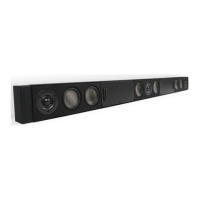
6.3. Network Tab
This tab is available on all IP Audio devices.
10.0.100.50
IP Audio 1, PAV-SIPA1SM
Status Network Inputs & Outputs
Network
DHCP
IP Address
Subnet Mask
Router
10.0.100.1
Apply & Restart
Static
255.255.255.0
10.0.100.50
Revert
A
B
C
D
E
F
A
IP Address
Configuration
DHCP (Dynamic Host Configuration Protocol) or
Static.
IP Address
Displays the current IP Address and allows for entry.
This is automatically assigned when item A is set to
DHCP.
C
Subnet Mask
Subnet mask of the network. This is automatically
assigned when item A is set to DHCP.
D
Router
IP Address of the network router. This is also known
as Gateway or Default Gateway.
E
Revert
Select to erase entered settings and revert back to
saved settings.
F
Apply & Restart
Select to apply entered settings, and restart the
device.
NOTES:
– Setting the IP Address with a Static Address from the WebUI will automatically set the devices DNS to 8.8.8.8 and 8.8.4.4 (Google).
– A second method for setting these devices to a Static IP can be done with EMBScanner, for information on this method see Appendix B for
more information.



 To Next Page