Savant IP Audio Deployment Guide Copyright © 2020 Savant Systems, LLC
009-1571-03 | 200224 34 of 39
9.3. Adjusting Minimum / Maximum Volume
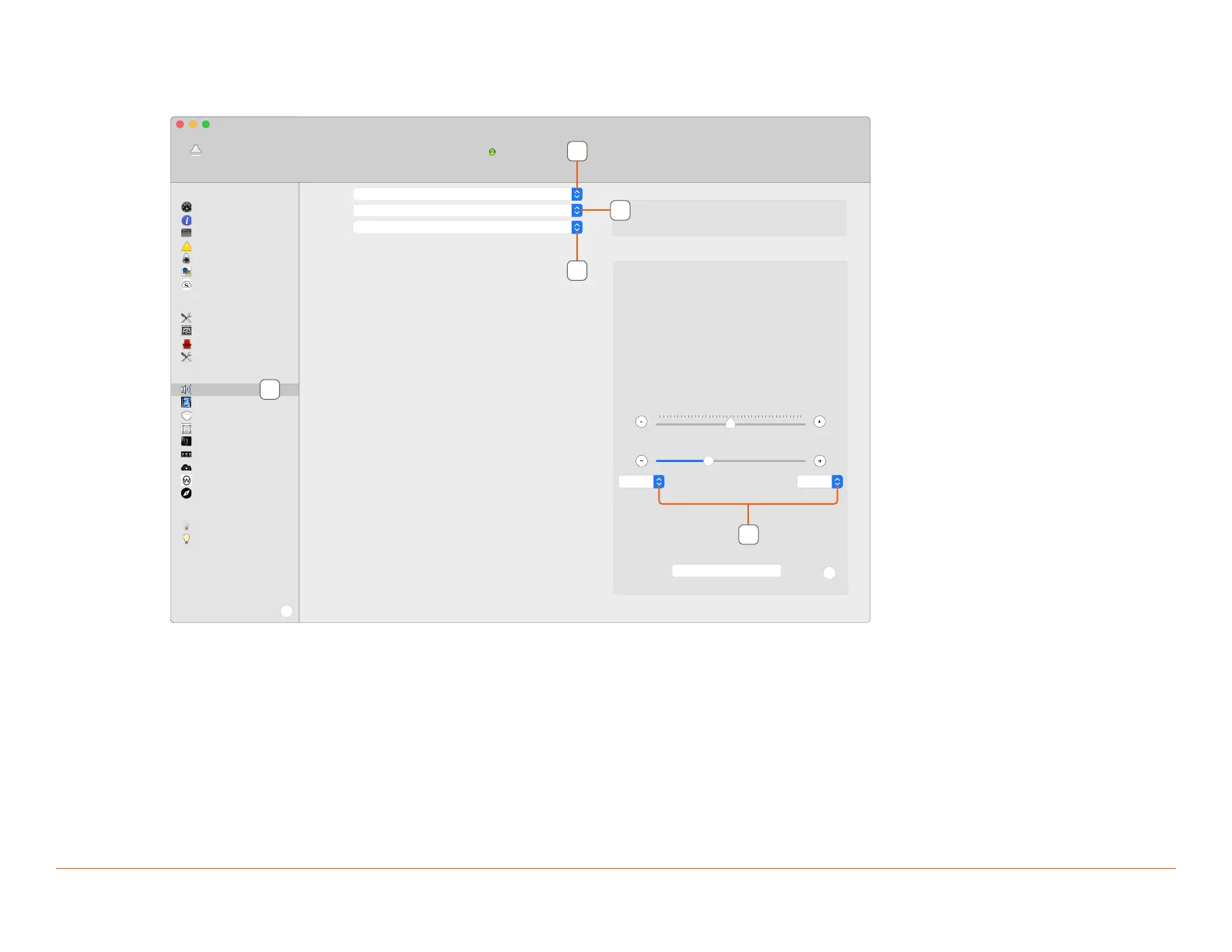
To adjust Minimum or Maximum Volume from System Monitor, follow the steps outlined below.
1. Select the Audio Controls tab from the A/V menu.
SIPA125SM_01
Living Room
Stereo Out 1, Mainboard (Audio Output 1) -> Stereo Speak
Device Name
Zone
Logical IO
No Info
Current Audio Format
Audio Settings
Trim
0
?
Restore Defaults
Volume
17
Min (db) Max (db)
-60
0
GENERAL
System Dashboard
Controller Info
Processes
Diagnostic Reports
System Licenses
Conguration Info
Host Claiming
CONTROL
System State
Service Events
Services
Component Status
A/V
Audio Controls
Video Controls
AV Connections
EDID Settings
Sonos Info
AVB Info
AVoIP Info
WiSA Info
UPnP Discovery
ENVIRONMENT
Entry
Savant Lighting
?
Disconnect
Winespring Inn Host - 10.0.100.25 (Host)
System Status
Online
1
2
3
4
2. Select the target IP Audio device.
3. Select Zone.
4. Select the output device/port.
5. Adjust the Minimum/Maximum Volume as desired.



 To Next Page