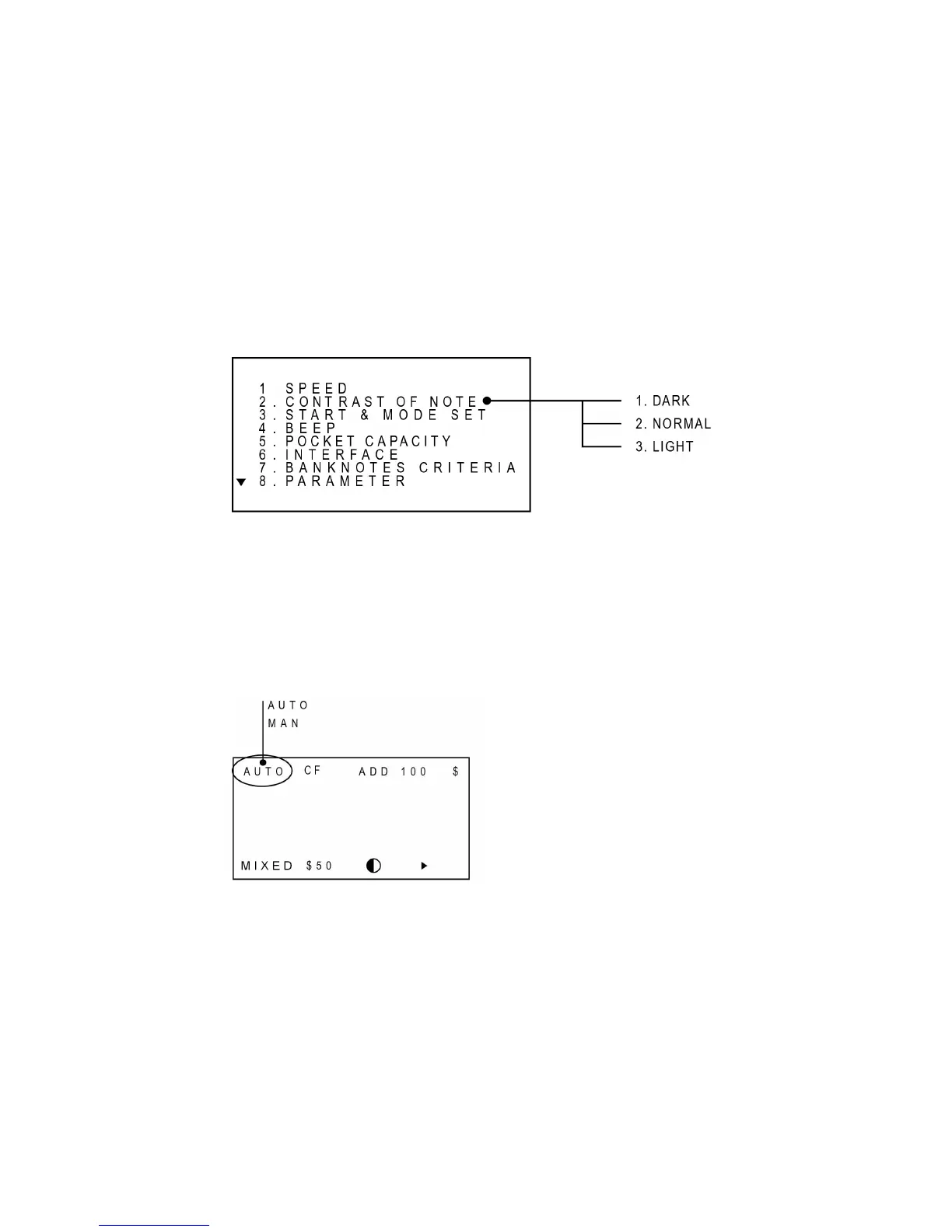
Set Contrast of Banknotes
This menu decides the contrast of bank notes to be counted. The machine refers to this parameter
when it checks for a double feeding error. If the machine cannot detect double feeding error well,
then set “Contrast” to lighter level, on the contrary if the machine detects double even though
actually notes are not double fed, then set “Contrast” to darker level.
To set a level, move to that level using UP/DOWN key. Then press START key to enter or directly
press a numeric key.
Set Auto Start Mode & Mode Lock Function
In Automatic mode, the machine starts to count automatically when detecting a note on the hopper.
Whereas in Manual mode, the machine starts to count after a note is placed in the Hopper and
START/ENTER is pressed.
This mode is displayed on LCD like below:
To change the mode, move to “START & MODE SET” and press ENTER key or directly press the
numeric “3” key. And then select an option in the sub menu. If “AUTO START” is selected, the
Display will show “AUTO”, else “MAN”.
To prevent a mode from changing unintentionally, you can disable the MODE key by setting MODE
LOCK to ON. While this function is ON, the MODE key cannot work. To change a mode, at first
make the Mode Lock function OFF. To set to an ON/OFF, moves to a level using UP/DOWN key
then press START key to enter or directly press a numeric key.



 To Next Page