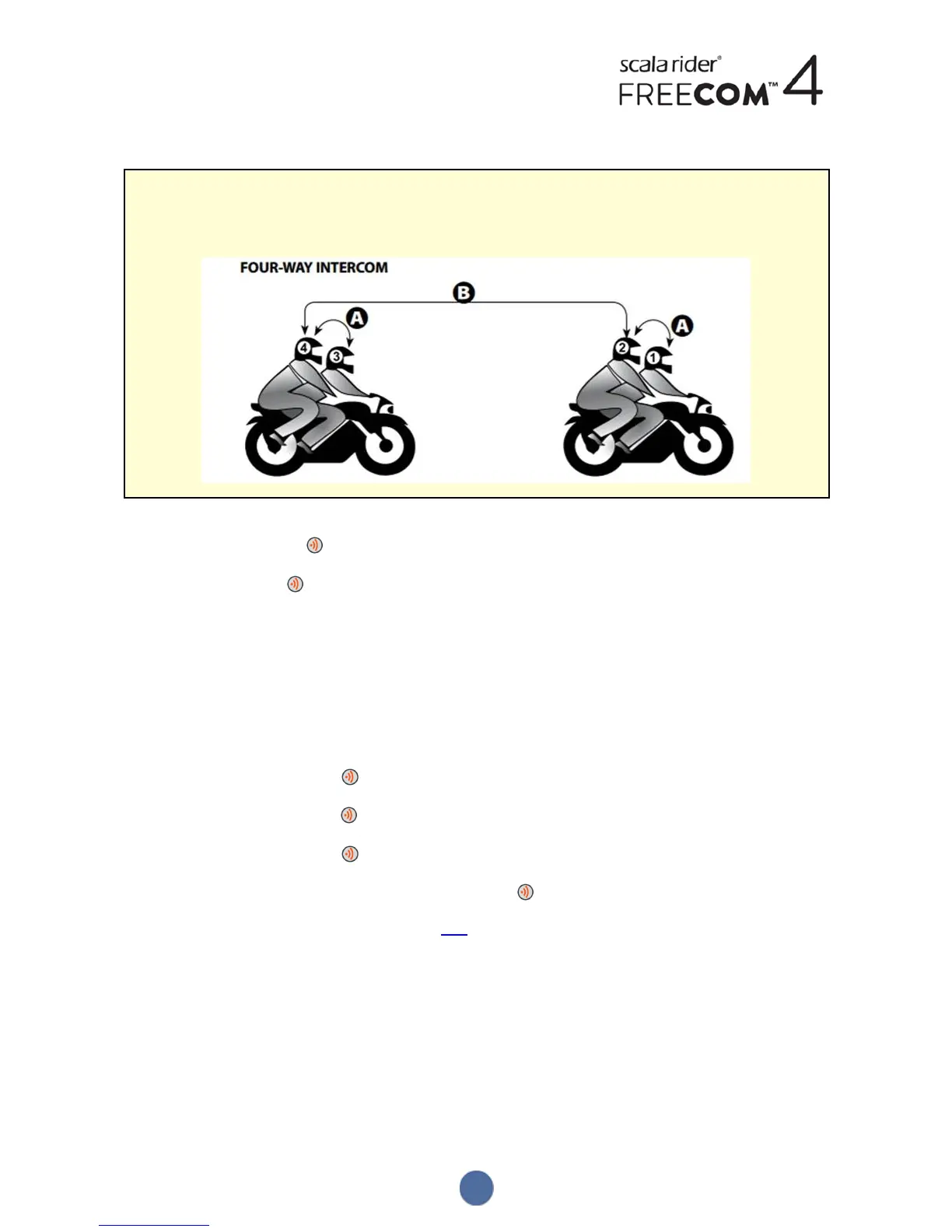
To start a Bluetooth intercom 4-Way call, do one of the following:
Cardo recommends the following pairing configuration for Bluetooth intercom 4-way calls:
● Passenger 2 is paired to rider 1 on Channel A, and to passenger 4 on Channel B.
● Passenger 4 is paired to rider 3 on Channel A, and to passenger 2 on Channel B.
● To use the unit buttons :
a. Passenger 2 presses for 2 seconds. A Bluetooth intercom 3-way call with rider 1 and passenger 4 starts.
b. Passenger 4 taps . Rider 3 is added to the Bluetooth intercom call.
● To use the SmartSet app:
a. On the INTERCOM screen, passenger 2 selects Channels A+B. A Bluetooth intercom 3-way call with rider 1
and passenger 4 starts.
b. On the INTERCOM screen, passenger 4 selects Channel A. Rider 3 is added to the Bluetooth intercom call.
To end a Bluetooth intercom call, do one of the following:
● To use the unit buttons:
● To disconnect rider A, tap .
● To disconnect rider B, tap twice.
● To disconnect rider C, tap three times.
● To end all active Bluetooth intercom connections, press for 2 seconds.
● If you initiated the Bluetooth intercom call using VOX: remain silent for at least 30 seconds. Any open call is
disconnected.
5.2.3 RECEIVING BLUETOOTH INTERCOM CALLS
● If another paired unit calls you via Bluetooth intercom, the call begins instantly.
● To receive Bluetooth intercom calls from unpaired units, see Click-To-Link Calls on page 29.
5.2.4 HOLDING A MOBILE/BLUETOOTH INTERCOM CONFERENCE CALL
You can hold a conference call between a mobile call and Bluetooth intercom (single channel) call.
To add a Bluetooth intercom call to the current mobile call:
● To use the unit buttons:
28


 To Next Page