3. GETTING STARTED
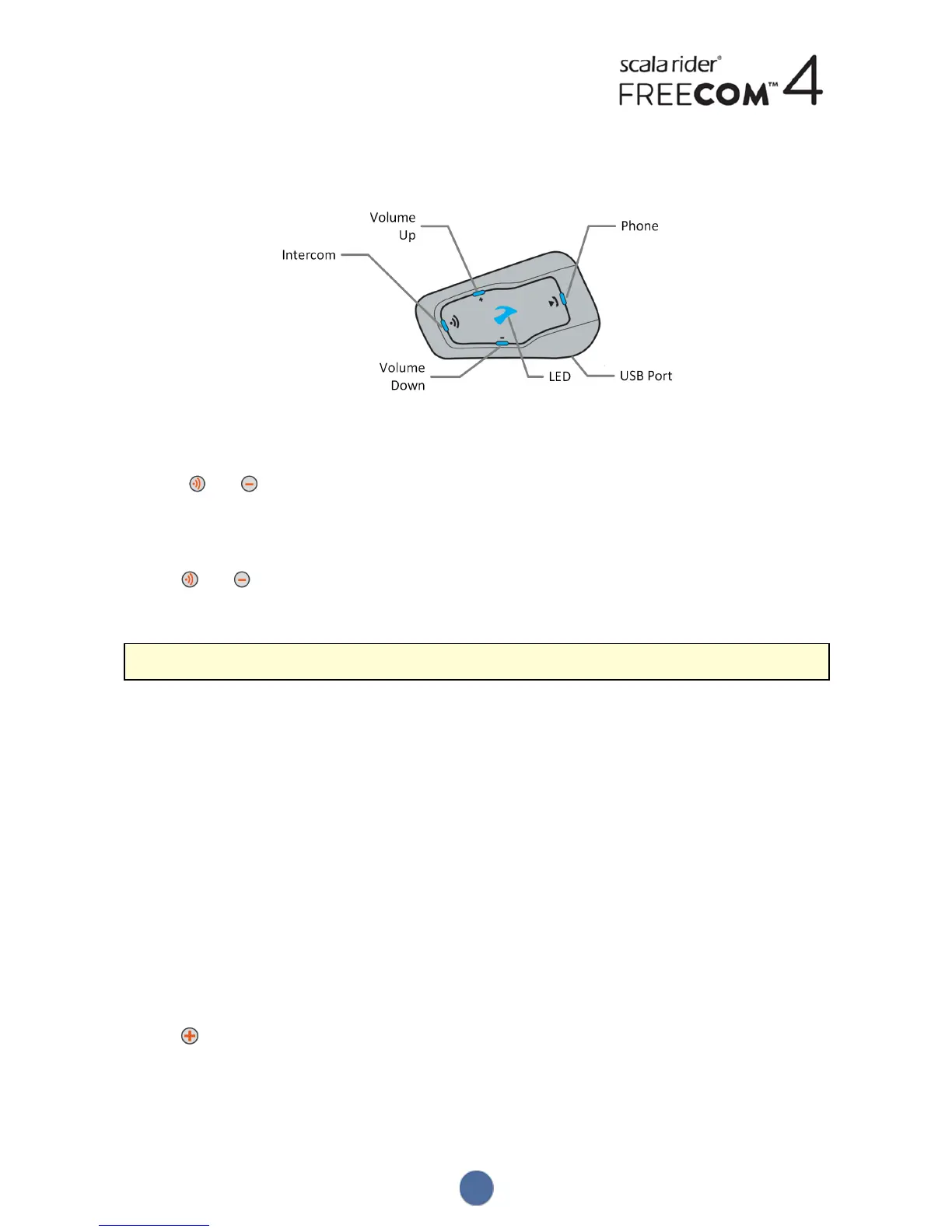
3.1 GETTING TO KNOW YOUR FREECOM4
3.2 SWITCHING YOUR UNIT ON/OFF
To switch your FREECOM4 on:
● Press and for 1 second. The speaker plays an ascending tone and a voice message "Hello FREECOM4".
In all battery states, the LED flashes blue three times repeatedly, confirming that your FREECOM4 is on.
To switch your FREECOM4 off:
● Tap and .
In all battery states, the LED flashes red three times repeatedly, confirming that your FREECOM4 is switching off.
The speaker plays a descending tone and a voice message "Goodbye".
Connecting your unit to a charger switches off the unit.
3.3 DIFFERENT WAYS TO OPERATE YOUR FREECOM4
You can operate the various features by any of the following methods:
● Pressing a button or combination of buttons on the unit.
● Using the SmartSet app on your mobile device (once it is paired with the unit).
● Using the Voice-Assisted Menu in combination with either unit buttons or with the VOX (voice activation). VOX is
for hands free operation of your FREECOM4. You can say a word or phrase loudly when the voice-assisted menu
reaches the function you want to use and your FREECOM4 performs that function. You can also adjust VOX
sensitivity for the microphone, see Configuring Your FREECOM4 Basic Settings through the SmartSet App on
page 15
LEDs, tones and voice announcements guide you while using the functions of your FREECOM4, as described in
FREECOM4 Modes and Events - LEDIndications on page 38.
This manual describes the most suitable method or methods to operate each feature.
3.4 BASIC FUNCTIONS
To turn the volume up for current audio source:
● Tap .
With each tap, a louder tone is played on the speaker until you reach the maximum volume, as indicated by the
maximum volume tone.
6


 To Next Page