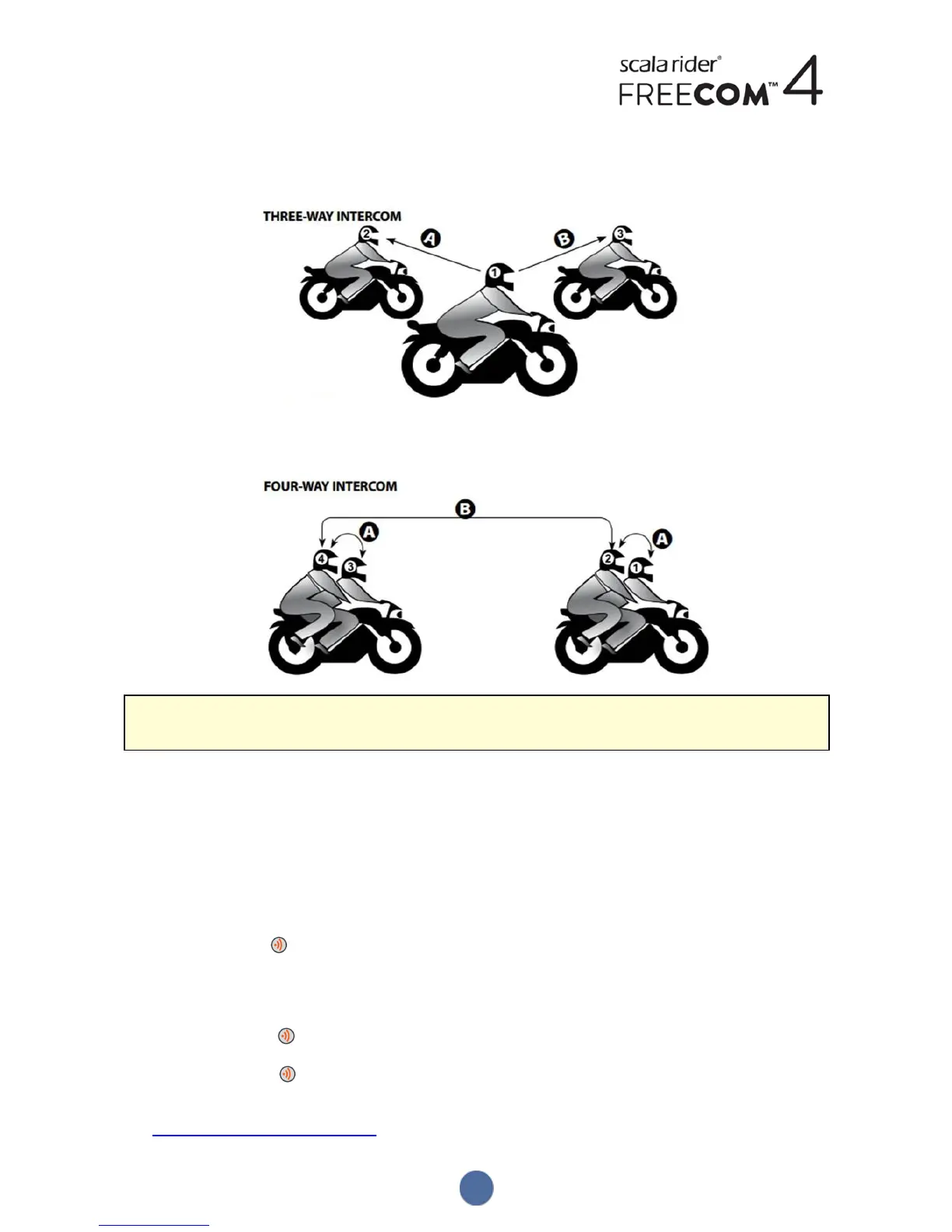
In a 3-way Bluetooth intercom, you are connected to two riders/passengers and each of those riders are connected
only to you. You can call each of the two riders/passengers. If you are already in a Bluetooth intercom call with one
rider/passenger, just add another. All three riders/passengers are now connected in a 3-way Bluetooth intercom call.
In a 4-way intercom conference call, you are connected to your passenger, the second rider is also connected to
his/her passenger, and the passengers are also connected. Each rider calls his/her passenger, and one of the
passengers calls the other passenger. All four riders are now all connected in a 4-way Bluetooth intercom call.
Cardo recommends that during a 3-way or 4-way intercom conference call, riders should be connected to only
one Bluetooth intercom call so they can continue to hear mobile phone and GPS announcements.
Using parallel audio streaming, you can also speak on a 3-way or 4-way Bluetooth intercom call while listening to FM
radio. The Bluetooth intercom volume remains the same while the FM radio plays at a reduced volume in the
background.
For information on making Bluetooth intercom calls, see Making and Receiving Bluetooth Intercom Calls on page 26
3.6.2 PAIRING THE BLUETOOTH INTERCOM TO OTHER CARDO UNITS
To pair your Unit with Cardo units through the unit buttons:
1. Confirm your unit is in Standby mode (LED flashes slowly).
2. On your unit, press for 5 seconds. The LED flashes red.
3. Select the Bluetooth intercom channel you would like to pair:
● Channel A - do not tap anything (default channel).
● Channel B - tap twice. The LED flashes blue.
● Channel C - tap three times. The LED flashes purple.
4. On the other Cardo unit, activate Bluetooth intercom pairing mode (see the other Cardo unit user manual at
cardosystems.com/product-manuals/).
9


 To Next Page