Lubrication system
OPM 250 en-GB 32
© Scania CV AB 2022, Sweden
Checking the oil level
Leave the engine off for at least 7 minutes before
you check the oil level.
If the oil level exceeds the maximum level, the
oil must be changed. Check the cause if the oil
level exceeds the maximum level and contact
your nearest Scania workshop if you suspect a
fault.
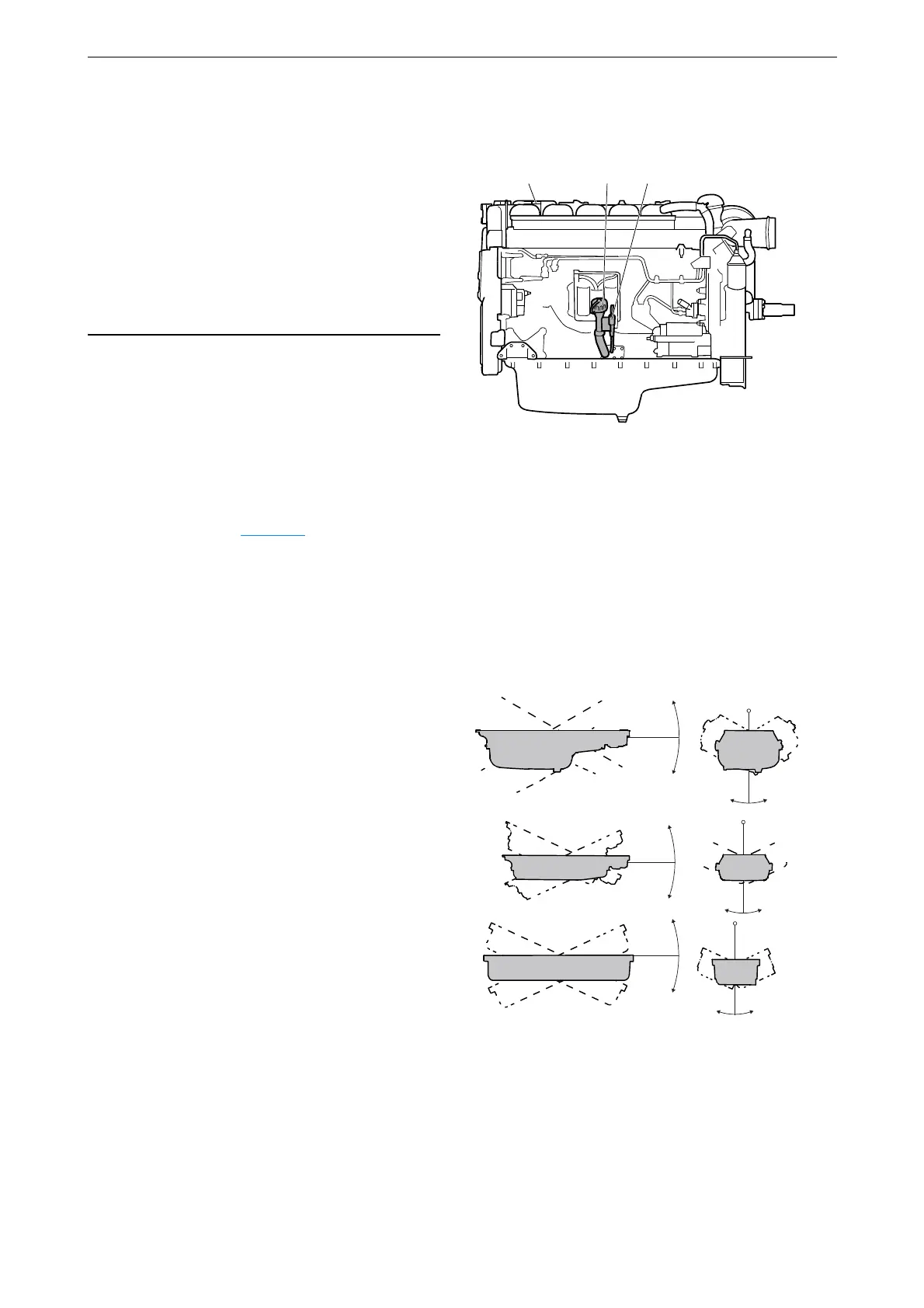
1. Pull out the oil dipstick (1) and check the oil
level. The correct level is between the mini-
mum and maximum marks on the oil dip-
stick.
2. Fill with more oil at point 2 in the illustration
when the oil level is at or below the lower
mark.
Information on the correct oil type is found
under the heading Oil grade
.
Maximum angles of inclina-
tion during operation
Maximum permissible angles of inclination dur-
ing operation vary, depending on the type of oil
sump. See illustration.
212
377 317
1. Oil dipstick.
2. Oil filler.
30°
30°
30° 30°
30°
25°
25°
30°
30°
25°
25°
30°
343 842



 To Next Page