- 15 -
www.SCEPTRE.com
SCEPTRE E27 Display User Manual
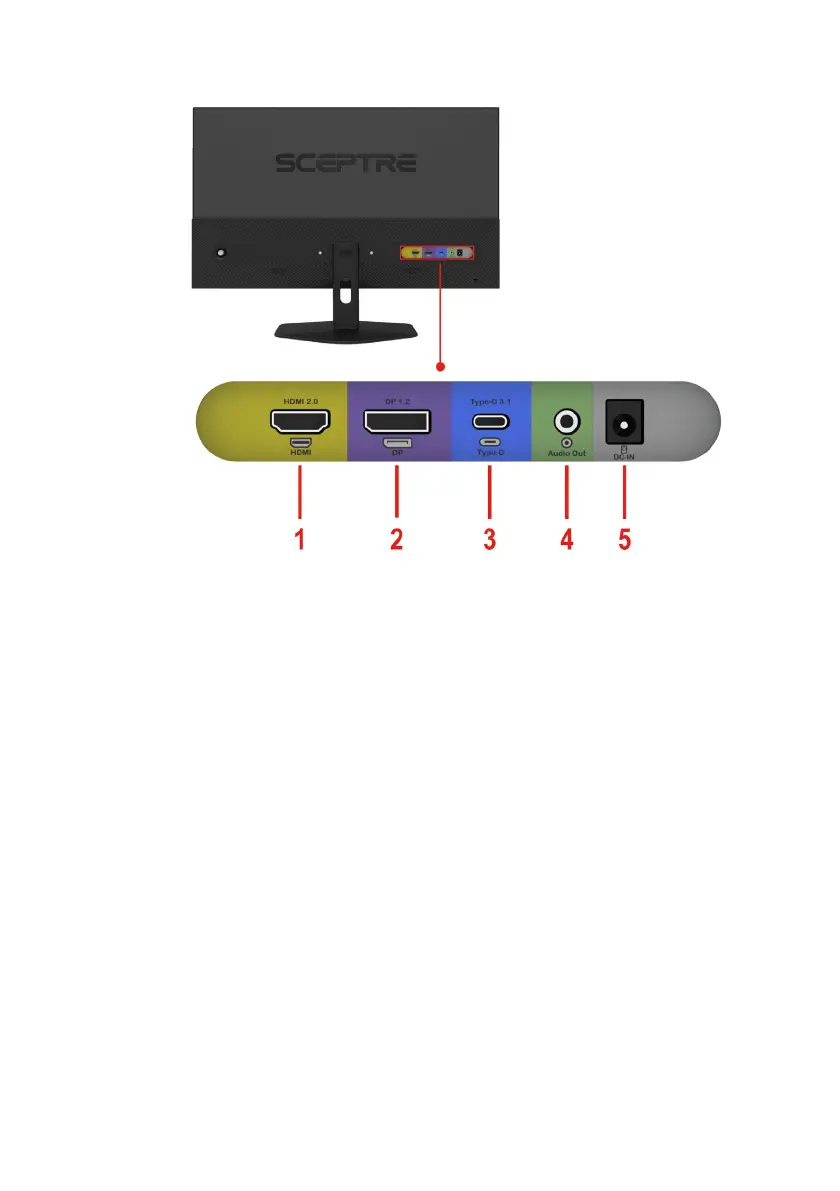
Rear View with Connections
1. HDMI – HDMI stands for High-Definition Multimedia Interface. This
connection is for computers with HDMI video and audio output. HDMI is HDMI
v2.0.
2. DISPLAYPORT – DisplayPort is a digital video connection for connection to
computers with display port video and audio output. DisplayPort is DP v1.2.
3. TYPE-C – USB Type-C DisplayPort utilizes the flexible USB-C port to connect
to all types of versatile devices, carrying video and audio output to your
monitor. USB-C Port is USB v3.1.
4. AUDIO OUT (3.5mm Mini-jack) – This connection is for audio out from the
monitor to multimedia speakers or headphones.
5. POWER – This plug is responsible for providing power to the monitor. Use it
with the included AC adapter.


 To Next Page