- 26 -
www.SCEPTRE.com
SCEPTRE E27 Display User Manual
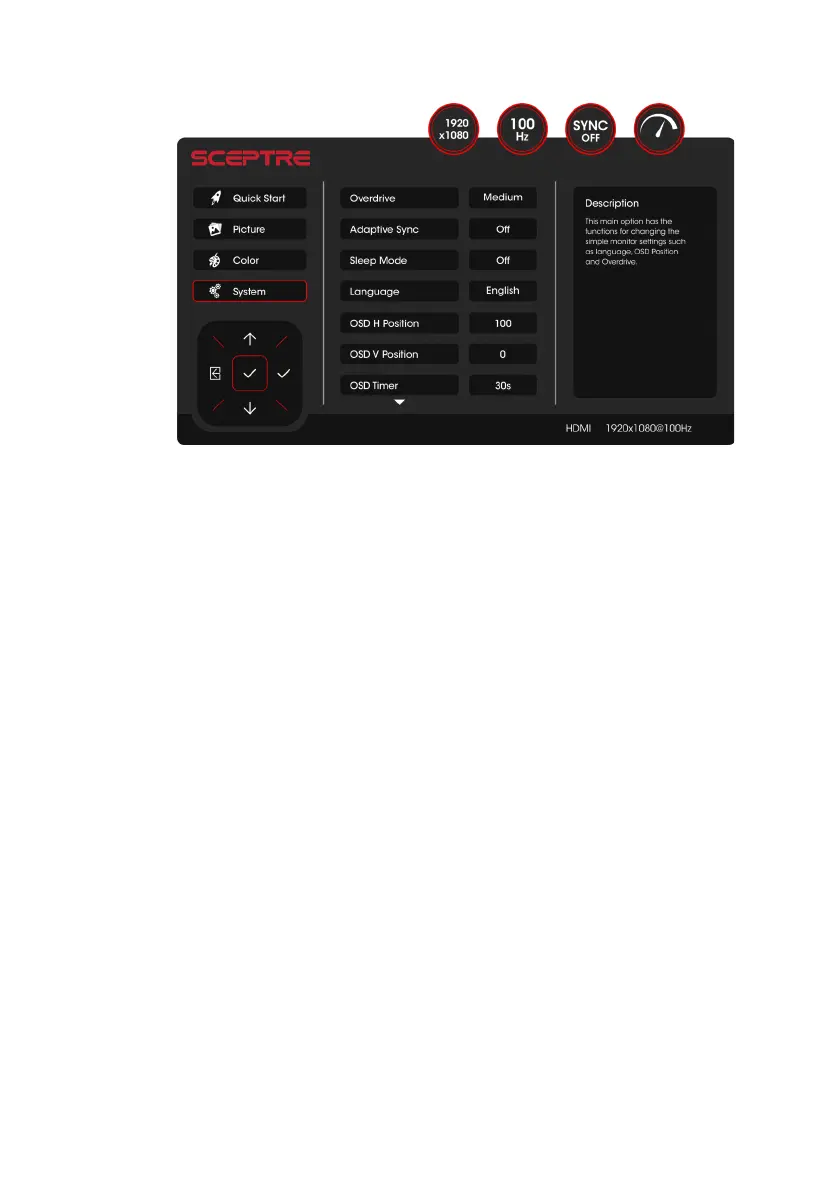
SYSTEM
1. OVERDRIVE – This option adjusts overdrive levels, increasing panel performance.
2. ADAPTIVE SYNC – This option enables syncing with variable frequency with AMD video
cards.
3. SLEEP MODE –
This option turns off the monitor if there has been no signal for a
period of time.
4. LANGUAGE –
This option changes the monitor menu language.
5. OSD H POSITION – This option adjusts the On-Screen Display (OSD) left or right.
6. OSD V POSITION – This option adjusts the On-Screen Display (OSD) up or down.
7. OSD TIMER – This option adjusts the time it takes for the OSD menu to automatically
shut off.


 To Next Page